
Introduction
Find The Right CNC Router For You
By Configuration
Match your routing tasks with ATC, 3 Axis, 4 Axis, 5 Axis, Rotary Axis, or Multi Head options.
By Material
Select CNC routers for wood, foam, plastic, metal, or stone to match your material processing needs.
By Level
Find hobby, home, mini, small, commercial, or industrial CNC routers for your production scale.
By Worktable Size
Choose 6090, 6012, 1212, 1325, 1530, 2030, or 2040 CNC routers for your materials.
Applicable Materials
Applicable Industries
How to Choose CNC Routers

Processing Materials
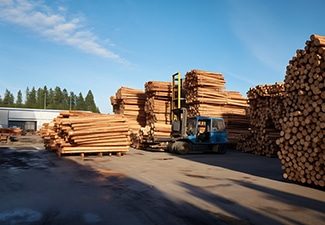
Choose CNC routers based on the materials you process most often, such as wood, MDF, acrylic, plastics, foam, or composites. Different materials have different hardness, density, and cutting resistance. These factors affect machine structure, spindle power, cutting speed, tooling selection, and dust control requirements, so material compatibility should be the first consideration.
Working Area
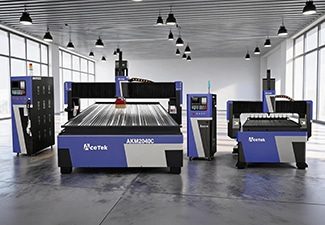
The working area should match your common sheet size, product dimensions, and production workflow. Small CNC routers are suitable for custom parts, samples, signs, and workshops with limited space, while large-format routers are better for furniture panels, doors, cabinets, full-size sheets, and batch production that requires higher efficiency.
Production Volume
For occasional use, prototyping, or small custom jobs, a basic CNC router may be enough. For daily production or industrial manufacturing, choose a machine with stronger components, faster processing speed, automatic functions, better cooling, and higher structural stability to support continuous operation and maintain consistent machining quality.

Software Compatibility
Check whether the CNC router supports your design software, CAM software, and common file formats. Good software compatibility makes drawing import, toolpath generation, parameter setting, and production management easier. It also helps connect design, programming, and machining more smoothly, reducing communication errors and improving overall production efficiency.

Spindle Power
Spindle power affects cutting depth, processing speed, cutting stability, and tool performance. Light engraving or thin material cutting may only require a lower-power spindle, while thick boards, hardwood, dense plastics, and continuous production need a stronger spindle to maintain efficiency, reduce tool stress, and achieve cleaner cutting results.
Machine Structure
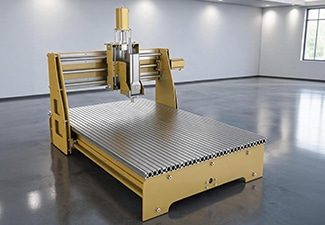
A strong and stable machine structure helps reduce vibration, maintain accuracy, and improve long-term reliability. For heavy cutting, large-format processing, or high-speed production, choose a CNC router with a rigid welded frame, high-quality guide rails, a reliable transmission system, and durable components that can support stable machining over time.
Worktable Type
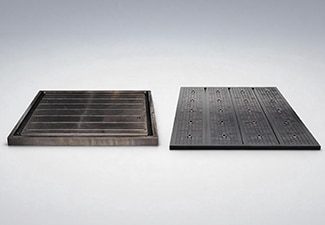
Choose the worktable type according to your material size, clamping method, and production needs. T-slot worktables are flexible for fixing small parts, irregular workpieces, and custom jobs, while vacuum tables are better for holding large sheets quickly and firmly, helping reduce loading time and improve production efficiency.
Tool Configuration
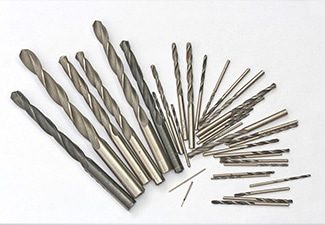
Different applications require different router bits, engraving tools, drill bits, carving tools, and cutting tools. Proper tool configuration improves cutting quality, reduces edge chipping, extends tool life, and allows the machine to complete more types of processing. Matching the right tools to the material helps achieve more accurate and consistent results.
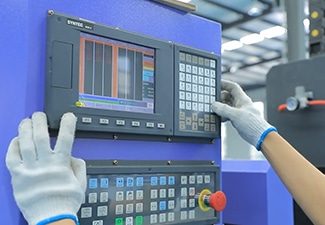
Control System
The control system affects operation convenience, file compatibility, machining accuracy, and production stability. A user-friendly controller allows operators to set parameters, load programs, manage toolpaths, monitor machine status, and reduce operating errors more easily. A reliable control system can also improve workflow efficiency and support smoother daily production.
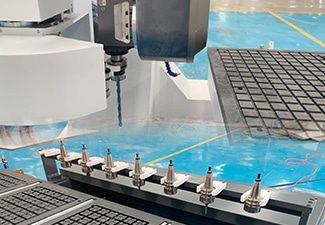
Automatic Tool Changer
An automatic tool changer is useful when one job requires multiple operations, such as cutting, engraving, drilling, grooving, and edge trimming. It reduces manual tool changes, saves labor time, improves machining continuity, and increases efficiency for complex designs, customized products, cabinet production, furniture manufacturing, and batch processing.
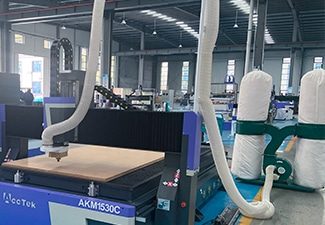
Dust Collection System
CNC routing often produces dust, chips, shavings, and fine particles during cutting or engraving. A good dust collection system helps keep the workshop cleaner, protects guide rails and machine components, improves operator visibility, reduces cleanup time, and creates a safer and more comfortable working environment for long-term production.
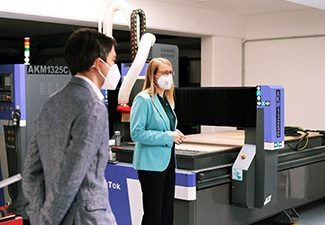
Supplier Support
Reliable supplier support is important for machine installation, operator training, troubleshooting, spare parts supply, software guidance, and long-term maintenance. A professional supplier can help you choose the right configuration, solve technical problems faster, reduce downtime, and make the CNC router easier to operate throughout its service life.
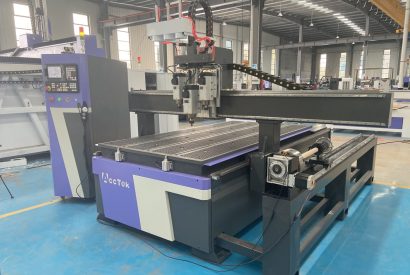
Comparison With Other Machines
| Comparison Item | CNC Routers | CNC Milling Machines | Laser Cutting Machines | 3D Printers |
|---|---|---|---|---|
| Processing Method | Uses a rotating cutting tool to cut, engrave, drill, groove, and carve materials. | Uses rigid cutting tools to remove material with higher force and precision. | Uses a focused laser beam to cut, engrave, or mark materials without direct contact. | Builds objects layer by layer from digital 3D models. |
| Manufacturing Type | Subtractive manufacturing; removes material from a workpiece. | Subtractive manufacturing; removes material from a solid block or part. | Thermal processing; cuts or engraves by melting, burning, or vaporizing material. | Additive manufacturing creates parts by adding material layer by layer. |
| Main Applications | Woodworking, furniture, signage, decoration, crafts, molds, plastics, foam, and panel processing. | Precision parts, molds, dies, mechanical components, and industrial machining. | Sheet cutting, engraving, marking, signs, packaging, textiles, and decorative products. | Prototypes, models, customized parts, design testing, education, and small-batch production. |
| Suitable Materials | Wood, MDF, plywood, acrylic, PVC, plastics, foam, rubber, leather, composites, and some soft metals. | Metals, engineering plastics, hard materials, and precision industrial materials. | Wood, acrylic, paper, fabric, leather, plastic, glass, and metals depending on laser type. | Plastics, resins, nylon, composites, wax, and some metal powders depending on printer type. |
| Cutting Speed | Fast for boards, panels, signs, and furniture parts. | Slower for large sheets but strong for precision machining. | Very fast for thin sheets and fine contour cutting. | Usually slower because parts are built layer by layer. |
| Processing Accuracy | Offers good accuracy for woodworking, advertising, and general fabrication. | Provides higher accuracy for precision mechanical parts. | Provides high accuracy for thin materials and detailed patterns. | Accuracy depends on printer type, layer height, material, and calibration. |
| Surface Finish | Can produce smooth edges and carved surfaces with proper tools and parameters. | Can achieve fine surface finishes through precision tooling and machining strategies. | May leave heat marks, discoloration, or slightly burnt edges on some materials. | Often leaves visible layer lines and may require post-processing. |
| 3D Processing Ability | Suitable for 2D cutting, 2.5D relief carving, and some 3D carving. | Excellent for complex 3D machining and high-precision shapes. | Mainly used for 2D cutting and surface engraving; limited in true 3D shaping. | Excellent for complex 3D shapes, hollow structures, and internal geometries. |
| Production Efficiency | Efficient for batch production of furniture parts, signs, panels, and decorative products. | Efficient for precision parts but usually needs more setup time. | Highly efficient for rapid cutting and engraving of flat materials. | Better for prototypes and small batches than mass production. |
| Tooling Requirements | Requires router bits, drill bits, engraving tools, collets, and fixtures. | Requires milling cutters, tool holders, fixtures, coolant, and measuring tools. | Requires lenses, mirrors, nozzles, assist gas, and fume extraction systems. | Requires filament, resin, powder, nozzles, build plates, and support materials. |
| Setup Complexity | Moderate; needs toolpath programming, material fixing, tool selection, and dust control. | Higher; needs precise clamping, tool setting, machining strategy, and coolant control. | Moderate; needs focus setting, parameter adjustment, ventilation, and safety control. | Moderate; needs slicing, material preparation, bed leveling, and print calibration. |
| Workspace Requirements | Needs enough space for machine operation, sheet loading, dust collection, and finished parts. | Usually requires a rigid foundation and a more controlled machining environment. | Requires ventilation, smoke extraction, fire protection, and laser safety measures. | Usually needs less floor space, depending on printer size and material system. |
| Safety Considerations | Main risks include rotating tools, flying chips, dust, noise, and workpiece movement. | Main risks include sharp tools, chips, coolant, high cutting force, and machine movement. | Main risks include laser radiation, smoke, fumes, fire, and high temperatures. | Main risks include hot nozzles, heated beds, resin exposure, fumes, and moving parts. |
| Cost Position | Often cost-effective for woodworking, signage, and panel-processing businesses. | Usually more expensive due to stronger structure, precision components, and tooling needs. | Cost varies greatly according to laser type, power, work area, and safety system. | Entry-level cost can be low, but industrial systems and materials can be expensive. |
| Main Advantage | Offers a strong balance of versatility, productivity, and cost for cutting and engraving many materials. | Provides high rigidity, precision, and strength for demanding machining work. | Offers fast, clean, non-contact cutting and fine engraving. | Creates complex 3D parts without molds or traditional cutting tools. |
Why To Choose AccTek CNC
High Precision & Efficiency
Our CNC routers are designed to deliver accurate cutting, engraving, drilling, and carving results. With stable motion systems and reliable control, our machines help reduce errors, improve processing speed, and maintain consistent quality during custom and batch production.
Robust And Durable Design
Our CNC routers use strong machine frames, quality guide rails, and reliable transmission components to support long-term operation. The solid structure helps reduce vibration, improve cutting stability, and keep the machine performing well during high-speed and continuous production.
Intelligent Control Systems
Our CNC routers are equipped with user-friendly control systems that make operation easier for both new and experienced users. The machines support smooth toolpath control, stable movement, convenient parameter settings, and compatibility with commonly used design and CAM software.
Flexible Customization
We offer flexible CNC router configurations according to different materials, working sizes, cutting thicknesses, and production needs. Customers can choose suitable spindle power, table type, rotary device, automatic tool changer, drilling unit, dust collection system, and other optional accessories.
Wide Application Range
Our CNC routers can be used in furniture making, advertising signs, woodworking, acrylic processing, foam modeling, crafts, decoration, packaging, and product development. One machine can support many processing tasks, helping customers expand production possibilities and accept more orders.
Complete Technical Support
Our company provides professional support before and after purchase, including machine selection, configuration advice, installation guidance, operation training, and troubleshooting. Our technical team helps customers use the machine correctly, optimize processing parameters, and reduce unnecessary downtime.
Reliable After-Sales Service
We focus on long-term customer use, not only machine delivery. Our company provides spare parts support, maintenance advice, remote assistance, and practical solutions when problems occur, helping customers keep their CNC routers running smoothly and efficiently.
Cost-Effective Production Solution
Choosing Our means investing in a CNC router that balances performance, durability, and value. Our machines help reduce labor costs, improve material use, increase output consistency, and support stable business growth for workshops and production factories.
Customer Reviews
Why To Choose AccTek CNC
Related Resources
How to Deal with Dust and Debris Generated During CNC Routing?
CNC Routing Techniques for Wood: Hardwood vs Softwood
Maximizing ROI with Small CNC Routers: Tips for Small Businesses
Exploring the Different Levels of CNC Routers: From Entry-Level to Industrial
Frequently Asked Questions
What Is The Price Of 1325 CNC Routers?
- Standard 3-Axis CNC Routers: Standard 3-axis 1325 CNC routers usually cost around $5000–8000. These machines are suitable for common cutting, engraving, drilling, grooving, and carving work. They are a good choice for users who need a reliable full-size CNC router for general production without advanced automation.
- 3-Axis ATC CNC Routers: 3-axis ATC CNC routers usually cost around $13500–19000. ATC means automatic tool changer, allowing the machine to change tools automatically during processing. This is useful for projects that require multiple tools, such as cutting, engraving, drilling, and finishing. Although the price is higher, ATC models can improve efficiency and reduce manual operation.
- Standard 4-Axis CNC Routers: Standard 4-axis CNC routers generally cost around $15000–23000. They are designed for more complex machining tasks, especially curved surfaces, 3D carving, furniture parts, decorative components, and products that require flexible cutting angles.
- 4-Axis ATC CNC Routers: 4-axis ATC CNC routers usually cost around $20000–30000. These machines combine multi-angle machining with automatic tool changing, making them suitable for users who need higher productivity and more complex processing ability.
- 5-Axis ATC CNC Routers: 5-axis ATC CNC routers usually cost around $62000–72000. These are advanced machines used for complex 3D surfaces, molds, sculptures, curved parts, and high-end shaped products. Their higher price comes from the precision structure, advanced controller, multi-axis movement, and complex programming capability.
- Rotary Axis and Multi-Head Models: Rotary axis CNC routers usually cost around $6000–8000, while multi-head CNC routers usually cost around $8500–10000. Rotary models are useful for cylindrical workpieces, and multi-head machines are suitable for batch production.
What Factors Influence The Price Of 1325 CNC Routers?
- Machine Frame and Structure: A stronger and heavier frame usually increases the cost. A rigid welded steel frame, stable gantry, and properly processed machine bed help reduce vibration and improve cutting accuracy. Machines designed for long working hours and batch production usually cost more than light-duty models.
- Spindle Power and Brand: The spindle is one of the most important price factors. Basic spindles are suitable for general cutting and engraving, while higher-power spindles provide better performance for deeper cutting, faster processing, and longer operation. Branded spindles, water-cooled spindles, air-cooled spindles, and ATC spindles all affect the final machine price.
- Control System: Different control systems offer different levels of function, accuracy, stability, and ease of operation. A basic controller is more affordable, while an advanced controller with better motion control, tool management, file compatibility, and production functions will increase the cost.
- Drive and Transmission System: Stepper motors are usually more economical, while servo motors cost more but provide better speed, accuracy, response, and stability. High-quality guide rails, rack and pinion systems, ball screws, reducers, and drivers also raise the price but improve long-term performance.
- Table Type: A T-slot table is generally cheaper and suitable for manual clamping. A vacuum table costs more but improves material holding and production efficiency, especially for full-sheet processing. Vacuum pumps, zones, seals, and table design can also affect the price.
- Axis Configuration and Automation: Standard 3-axis machines are more affordable. ATC models, 4-axis CNC routers, rotary axis machines, multi-head machines, and 5-axis CNC routers cost more because they include more complex structures, control functions, and machining capabilities.
- Optional Accessories and Services: Dust collectors, rotary devices, tool sensors, safety covers, software, custom fixtures, packaging, shipping, installation, training, warranty, and technical support can all influence the final price.
What File Formats Do 1325 CNC Routers Support?
- G-Code Files: G-code is the most important format for 1325 CNC routers. It controls machine movement, cutting paths, spindle speed, feed rate, tool height, cutting depth, and other machining actions. Common file extensions include .nc, .tap, .cnc, and .txt. These files are usually generated by CAM software and loaded into the CNC controller.
- DXF Files: DXF is one of the most commonly used formats for 2D cutting and engraving. It is widely used for panels, signs, holes, profiles, cabinet parts, and decorative patterns. DXF files are usually imported into CAM software to create toolpaths before machining.
- DWG Files: DWG files are common in CAD design and engineering drawings. Some CAM programs can open DWG files directly, while others may require conversion to DXF. They are useful for accurate layouts, part drawings, and production designs.
- SVG Files: SVG files are often used for vector graphics, logos, lettering, and decorative designs. They are popular in advertising, craft production, acrylic cutting, and the manufacturing of customized products.
- AI, EPS, and PDF Files: Some CNC router workflows support AI, EPS, and vector PDF files. These formats are common in graphic design and sign-making. However, the files must contain clean vector paths, not only bitmap images.
- STL Files: STL files are used for 3D carving, relief engraving, mold work, sculpture, and curved surface machining. CAM software can generate roughing and finishing toolpaths from STL models.
- Image Files: BMP, JPG, and PNG files can be used for grayscale engraving or converted into vector paths, but they are not usually ready for direct cutting.
What Are The Dangers Of using 1325 CNC Routers?
- Cutting Tool Hazards: The spindle rotates at high speed, and router bits are sharp enough to cause serious injury. If a tool is installed incorrectly, becomes loose, or breaks during cutting, fragments may fly from the cutting area. Operators should always check tool condition, collet tightness, and cutting parameters before starting the machine.
- Flying Chips and Debris: When processing wood, MDF, acrylic, plastics, foam, or composite materials, chips and small particles may be thrown from the cutting area. These can injure the eyes or skin, especially during high-speed cutting. Safety glasses or a face shield should be worn, and the work area should be kept clear.
- Dust Exposure: 1325 CNC routers can generate large amounts of dust, especially when cutting MDF, plywood, hardwood, foam, or plastic sheets. Fine dust can irritate the eyes, nose, throat, and lungs. A dust collector, proper ventilation, and respiratory protection are important for reducing health risks.
- Noise Hazards: High-speed spindles, cutting tools, vacuum pumps, and dust collectors can create loud noise during operation. Long-term exposure may damage hearing, so earplugs or earmuffs should be used when necessary.
- Workpiece Movement: Large sheets must be fixed firmly with a vacuum table, clamps, or fixtures. If the material shifts during cutting, it may damage the tool, ruin the workpiece, or create flying debris.
- Entanglement Risks: Loose clothing, gloves, jewelry, long hair, or hanging accessories can become caught in moving parts. Operators should wear fitted clothing and keep hands away from the spindle, tool, and moving gantry.
- Electrical and Fire Risks: Poor grounding, unstable voltage, damaged wiring, or dust buildup inside electrical cabinets can cause faults or hazards. Some materials may also overheat or burn if cutting settings are incorrect.
What Skills Are Required To Operate 1325 CNC Routers?
- CAD Design Skills: Operators should understand how to create, import, and edit design files in CAD or graphic design software. They need to check dimensions, clean vector lines, arrange parts, and prepare drawings correctly. A poor design file can lead to wrong cuts, missing shapes, or wasted materials.
- CAM Programming Skills: CAM software is used to generate toolpaths and output machine-readable G-code. Operators should know how to set cutting depth, feed rate, spindle speed, tool diameter, machining order, step-down, and tool compensation. Correct toolpath settings are important for smooth cutting, accurate dimensions, and tool protection.
- Machine Control Skills: Operators must know how to start the machine, home the axes, set the work origin, load programs, control the spindle, adjust feed speed, pause machining, and use the emergency stop button. They should also understand the machine controller and basic operating interface.
- Tool Selection Skills: Different materials and processing tasks require different router bits. Operators should know how to choose end mills, V-bits, ball nose bits, compression bits, drilling tools, or engraving tools according to material type, cutting depth, edge quality, and surface finish requirements.
- Material Setup Skills: Because 1325 CNC routers often process large sheets, proper material fixing is very important. Operators should know how to use vacuum tables, clamps, T-slot fixtures, positioning blocks, or custom jigs to prevent material movement during cutting.
- Maintenance Skills: Basic maintenance includes daily cleaning, dust removal, lubrication, spindle inspection, collet cleaning, tool checking, bolt inspection, and dust collector maintenance. These habits help maintain accuracy and extend machine life.
- Quality Control Skills: Operators should use measuring tools such as calipers, rulers, squares, and gauges to check dimensions, edge quality, hole positions, and surface finish.
- Troubleshooting Ability: Operators should be able to identify problems such as tool breakage, rough edges, lost steps, vibration, incorrect origin, poor cutting depth, or file errors.
How Much Training Is Needed To Use CNC Routers?
- Safety Glasses: Eye protection is essential when operating 1325 CNC routers. Chips, dust, broken tool fragments, or small offcuts may fly from the cutting area during machining. Operators should wear impact-resistant safety glasses whenever the machine is running, during tool changes, and while cleaning the worktable.
- Face Shield: A face shield provides extra protection when cutting materials that produce larger chips or when cleaning debris after machining. It is also useful when handling rough sheets, inspecting sharp edges, or replacing router bits. However, a face shield should be used together with safety glasses, not as a complete replacement.
- Hearing Protection: 1325 CNC routers can generate high noise levels from the spindle, cutting process, vacuum pump, and dust collection system. Earplugs or earmuffs help protect operators from long-term hearing damage, especially during extended production runs.
- Dust Mask or Respirator: Cutting MDF, plywood, hardwood, plastics, foam, and similar materials can produce fine airborne dust. A suitable dust mask or respirator should be used when dust exposure is high. Good dust collection and workshop ventilation are also important for reducing respiratory risks.
- Protective Work Clothing: Operators should wear fitted work clothes. Loose sleeves, scarves, jewelry, neckties, or hanging accessories should be avoided because they may become caught in moving parts. Long hair should be tied back securely before working near the machine.
- Safety Shoes: Large sheets, clamps, fixtures, tools, and finished parts can be heavy or sharp. Safety shoes with toe protection and slip-resistant soles help reduce foot injuries and improve stability around the machine.
- Gloves for Handling Only: Gloves can be used when loading sheets, handling sharp edges, changing tools, or cleaning offcuts. However, gloves should not be worn near the rotating spindle or moving cutting tool.
What PPE Is Needed To Operate 1325 CNC Routers?
- Machine Frame and Structure: The frame is usually the longest-lasting part of 1325 CNC routers. A heavy-duty welded steel frame, stable gantry, and properly processed machine bed can remain reliable for many years. If the machine is installed on a flat floor and protected from vibration, impact, moisture, and rust, the structure can maintain good accuracy over long-term use.
- Spindle Life: The spindle is one of the most important working components. Its lifespan depends on running hours, cutting load, cooling method, bearing quality, dust protection, and tool condition. A quality spindle can often work for several years, but bearings, collets, cooling parts, or the spindle itself may need replacement earlier under heavy production.
- Guide Rails and Transmission System: Linear guide rails, rack and pinion systems, ball screws, bearings, reducers, and couplings gradually wear during operation. Regular cleaning, lubrication, and alignment checks help these parts move smoothly and maintain cutting accuracy. Dust buildup and poor lubrication can shorten their service life.
- Electrical and Control Components: Controllers, motors, drivers, sensors, switches, wiring, and inverters also affect the machine’s long-term reliability. Stable power supply, proper grounding, dry electrical cabinets, and clean wiring help reduce faults and extend component life.
- Consumable Parts: Router bits, collets, vacuum table seals, clamps, filters, dust collector bags, and lubrication oil are consumable items. Replacing them on time helps protect the spindle, improve cutting quality, and reduce stress on the machine.
- Maintenance Habits: Daily dust removal, table cleaning, lubrication, spindle inspection, bolt checking, tool inspection, and regular calibration are essential. A machine used in a clean, dry, and well-ventilated workshop will usually last longer.
How To Maintain 1325 CNC Routers?
- Daily Cleaning: After each working day, remove dust, chips, and waste material from the worktable, guide rails, rack and pinion system, ball screws, spindle area, tool magazine, and machine surroundings. Wood dust, MDF powder, acrylic chips, foam particles, and plastic debris can build up quickly and affect movement accuracy. A dust collector should be used during machining and cleaned regularly.
- Lubrication: Guide rails, bearings, ball screws, racks, and other moving parts should be lubricated according to the manufacturer’s schedule. Proper lubrication reduces friction, prevents abnormal noise, and protects motion components from premature wear. Operators should use the recommended oil or grease and avoid mixing unsuitable lubricants.
- Spindle Maintenance: The spindle should be checked for abnormal noise, vibration, overheating, or reduced cutting power. Air-cooled spindles should be kept clean and free of dust. Water-cooled spindles require clean circulating water, normal pump operation, and regular water replacement. Collets and collet nuts should also be cleaned to ensure the tool is clamped securely.
- Tool Inspection: Router bits should be inspected before cutting. Dull, broken, or unsuitable tools can cause rough edges, burning, tool marks, vibration, and spindle overload. Worn tools should be replaced in time, and tool length settings should be checked carefully, especially on ATC models.
- Electrical System Checks: Keep the control cabinet clean, dry, and well-ventilated. Check wiring, grounding, sensors, switches, motors, drivers, inverters, and connectors for looseness, dust, or damage. A stable power supply helps prevent controller alarms and unexpected machine stops.
- Table and Dust Collection Maintenance: Keep the vacuum table, T-slot table, clamps, fixtures, vacuum pump, hoses, filters, and dust bags clean and functional. Good material holding improves both accuracy and safety.