
Introduction
Find The Right CNC Router For You
By Configuration
Match your routing tasks with ATC, 3 Axis, 4 Axis, 5 Axis, Rotary Axis, or Multi Head options.
By Material
Select CNC routers for wood, foam, plastic, metal, or stone to match your material processing needs.
By Level
Find hobby, home, mini, small, commercial, or industrial CNC routers for your production scale.
By Worktable Size
Choose 6090, 6012, 1212, 1325, 1530, 2030, or 2040 CNC routers for your materials.
Applicable Materials
Applicable Industries
How to Choose CNC Routers

Processing Materials
Choose CNC routers based on the materials you process most often, such as wood, MDF, acrylic, plastics, foam, or composites. Different materials have different hardness, density, and cutting resistance. These factors affect machine structure, spindle power, cutting speed, tooling selection, and dust control requirements, so material compatibility should be the first consideration.
Working Area
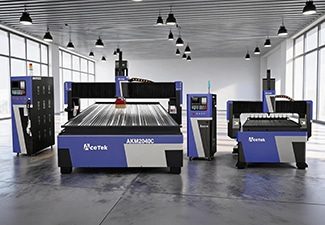
The working area should match your common sheet size, product dimensions, and production workflow. Small CNC routers are suitable for custom parts, samples, signs, and workshops with limited space, while large-format routers are better for furniture panels, doors, cabinets, full-size sheets, and batch production that requires higher efficiency.
Production Volume
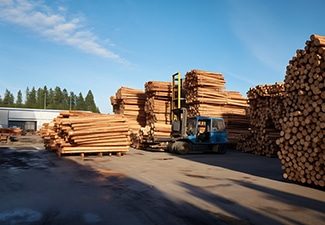
For occasional use, prototyping, or small custom jobs, a basic CNC router may be enough. For daily production or industrial manufacturing, choose a machine with stronger components, faster processing speed, automatic functions, better cooling, and higher structural stability to support continuous operation and maintain consistent machining quality.

Software Compatibility
Check whether the CNC router supports your design software, CAM software, and common file formats. Good software compatibility makes drawing import, toolpath generation, parameter setting, and production management easier. It also helps connect design, programming, and machining more smoothly, reducing communication errors and improving overall production efficiency.
Spindle Power
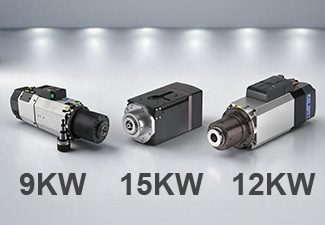
Spindle power affects cutting depth, processing speed, cutting stability, and tool performance. Light engraving or thin material cutting may only require a lower-power spindle, while thick boards, hardwood, dense plastics, and continuous production need a stronger spindle to maintain efficiency, reduce tool stress, and achieve cleaner cutting results.
Machine Structure
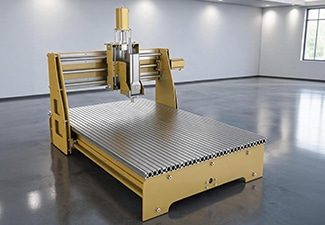
A strong and stable machine structure helps reduce vibration, maintain accuracy, and improve long-term reliability. For heavy cutting, large-format processing, or high-speed production, choose a CNC router with a rigid welded frame, high-quality guide rails, a reliable transmission system, and durable components that can support stable machining over time.
Worktable Type
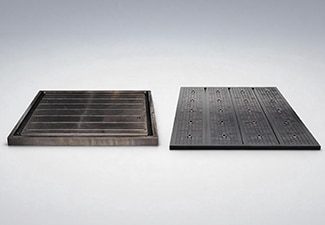
Choose the worktable type according to your material size, clamping method, and production needs. T-slot worktables are flexible for fixing small parts, irregular workpieces, and custom jobs, while vacuum tables are better for holding large sheets quickly and firmly, helping reduce loading time and improve production efficiency.
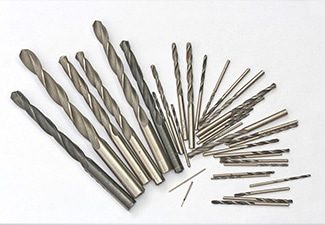
Tool Configuration
Different applications require different router bits, engraving tools, drill bits, carving tools, and cutting tools. Proper tool configuration improves cutting quality, reduces edge chipping, extends tool life, and allows the machine to complete more types of processing. Matching the right tools to the material helps achieve more accurate and consistent results.
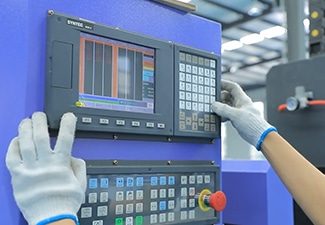
Control System
The control system affects operation convenience, file compatibility, machining accuracy, and production stability. A user-friendly controller allows operators to set parameters, load programs, manage toolpaths, monitor machine status, and reduce operating errors more easily. A reliable control system can also improve workflow efficiency and support smoother daily production.
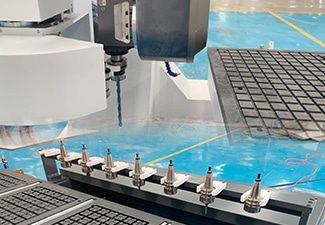
Automatic Tool Changer
An automatic tool changer is useful when one job requires multiple operations, such as cutting, engraving, drilling, grooving, and edge trimming. It reduces manual tool changes, saves labor time, improves machining continuity, and increases efficiency for complex designs, customized products, cabinet production, furniture manufacturing, and batch processing.
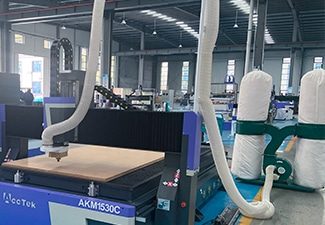
Dust Collection System
CNC routing often produces dust, chips, shavings, and fine particles during cutting or engraving. A good dust collection system helps keep the workshop cleaner, protects guide rails and machine components, improves operator visibility, reduces cleanup time, and creates a safer and more comfortable working environment for long-term production.
Supplier Support
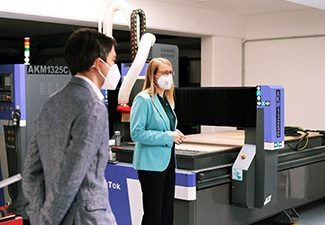
Reliable supplier support is important for machine installation, operator training, troubleshooting, spare parts supply, software guidance, and long-term maintenance. A professional supplier can help you choose the right configuration, solve technical problems faster, reduce downtime, and make the CNC router easier to operate throughout its service life.
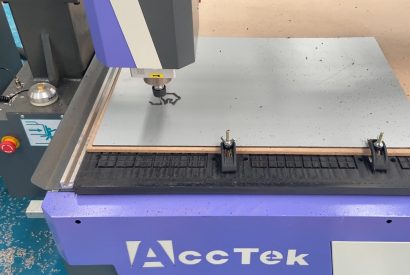
Comparison With Other Machines
| Comparison Item | ATC CNC Routers | CNC Milling Machines | Laser Cutting Machines | 3D Printers |
|---|---|---|---|---|
| Main Working Method | Uses rotating cutting tools and automatic tool changing to cut, carve, drill, and mill sheet or block materials. | Uses rotating cutters for detailed milling, slotting, drilling, and shaping. | Uses a focused laser beam to cut, engrave, or mark suitable materials. | Builds parts layer by layer from digital models. |
| Tool Changing | Equipped with an automatic tool changer for fast switching between different bits. | Tool changing may be manual or automatic, depending on the machine type. | Usually does not require physical cutting tools. | Uses no cutting tools; the nozzle or print head deposits material. |
| Best Use | Ideal for furniture, cabinets, doors, signs, molds, panels, and decorative parts. | Better suited for compact, high-detail parts that require tight machining control. | Best for flat cutting, engraving, marking, and fine pattern work. | Best for prototypes, models, samples, and complex 3D shapes. |
| Material Form | Works well with sheets, boards, panels, and blocks. | Often works with blocks, small workpieces, and precision parts. | Mainly works with flat sheets or thin materials. | Works with filament, resin, powder, or other printable materials. |
| Common Materials | Suitable for wood, MDF, plywood, acrylic, plastic, foam, rubber, and composite boards. | Suitable for plastics, resin boards, wood, and other machinable materials. | Suitable for acrylic, wood, leather, fabric, paper, cardboard, and certain plastics. | Suitable for plastics, resin, nylon, and other printable materials. |
| Production Efficiency | High efficiency for batch cutting, carving, drilling, and multi-process work. | Efficient for precision parts, but usually slower for large-format sheet processing. | Very fast for thin sheet cutting and detailed engraving. | Usually slower because parts are built layer by layer. |
| Processing Area | Often available in large table sizes for full-size panels. | Usually has a smaller working area than large CNC routers. | Available in different sizes, but mainly optimized for flat cutting. | Build volume is usually limited compared with router table size. |
| Surface Finish | Produces clean routed edges and carved surfaces with proper tools and settings. | Can produce very smooth and precise surfaces on smaller parts. | Produces clean edges on many thin materials, with possible heat marks on some materials. | Surface may show layer lines and often needs post-processing. |
| Cutting Depth | Can perform deep cutting, relief carving, pocketing, and 3D routing. | Strong in deep pocketing, contouring, and precise material removal. | Cutting depth depends strongly on material type, thickness, and laser power. | Does not cut depth; it creates the full shape by adding layers. |
| Detail Capability | Good for complex patterns, reliefs, grooves, holes, and shaped edges. | Excellent for fine details and precise part geometry. | Excellent for fine lines, small patterns, and intricate engraving. | Excellent for complex internal structures and free-form shapes. |
| Design Flexibility | Supports 2D cutting, 2.5D carving, and 3D relief work. | Supports accurate 2D, 2.5D, and 3D machining. | Best for 2D cutting and surface engraving. | Strong for complex 3D models that are hard to make by cutting. |
| Automation Level | High automation with tool changing, vacuum table, positioning, and batch programs. | Can be highly automated, but often focused on smaller precision jobs. | Highly automated for cutting paths and engraving files. | Automated printing process, but setup and post-processing may take time. |
| Labor Saving | Reduces manual tool changes and improves continuous production. | Reduces manual shaping work, but setup may require skilled operators. | Reduces manual cutting and engraving work. | Reduces manual model-making but may need cleaning, curing, or support removal. |
| Accuracy | Offers strong accuracy for woodworking, signage, plastic parts, and panel production. | Usually offers very high precision for compact components. | Offers high accuracy for flat patterns and engraving. | Accuracy depends on printer type, material, layer height, and calibration. |
| Edge Quality | Edge quality depends on bit type, spindle speed, feed rate, and material support. | Edge and surface quality can be excellent with correct tooling. | Edge quality can be smooth, but some materials may darken or melt slightly. | Edges are formed by layers and may need sanding or finishing. |
| Waste Generation | Creates chips and dust during cutting and carving. | Creates chips and dust during material removal. | Produces fumes and small cutting residue, requiring good ventilation. | Produces little cutting waste, but failed prints and support material may add waste. |
| Maintenance Needs | Requires spindle, tools, guide rails, vacuum system, dust collection, and tool changer maintenance. | Requires tool, spindle, lubrication, and motion system maintenance. | Requires lens, mirror, laser source, cooling, and exhaust system maintenance. | Requires nozzle, bed, resin tank, motion system, and calibration maintenance. |
| Skill Requirements | Operators need knowledge of CAD/CAM, tools, feeds, speeds, and material fixing. | Requires stronger machining knowledge and careful parameter control. | Requires file setup, laser power adjustment, speed control, and safety awareness. | Requires model slicing, material settings, bed leveling, and print troubleshooting. |
| Cost Performance | Offers strong value for workshops needing multi-tool routing and batch production. | Better for precision-focused applications, but less efficient for large panel work. | Cost-effective for engraving and thin sheet cutting. | Cost-effective for prototypes and small custom parts, but not ideal for large batch routing. |
| Overall Advantage | Best choice for automated cutting, carving, drilling, and multi-process production on boards and panels. | Best for small, precise, and detailed machined parts. | Best for fast, clean flat cutting and engraving. | Best for building complex 3D prototypes and custom models. |
Why To Choose AccTek CNC
High Precision & Efficiency
Our CNC routers are designed to deliver accurate cutting, engraving, drilling, and carving results. With stable motion systems and reliable control, our machines help reduce errors, improve processing speed, and maintain consistent quality during custom and batch production.
Robust And Durable Design
Our CNC routers use strong machine frames, quality guide rails, and reliable transmission components to support long-term operation. The solid structure helps reduce vibration, improve cutting stability, and keep the machine performing well during high-speed and continuous production.
Intelligent Control Systems
Our CNC routers are equipped with user-friendly control systems that make operation easier for both new and experienced users. The machines support smooth toolpath control, stable movement, convenient parameter settings, and compatibility with commonly used design and CAM software.
Flexible Customization
We offer flexible CNC router configurations according to different materials, working sizes, cutting thicknesses, and production needs. Customers can choose suitable spindle power, table type, rotary device, automatic tool changer, drilling unit, dust collection system, and other optional accessories.
Wide Application Range
Our CNC routers can be used in furniture making, advertising signs, woodworking, acrylic processing, foam modeling, crafts, decoration, packaging, and product development. One machine can support many processing tasks, helping customers expand production possibilities and accept more orders.
Complete Technical Support
Our company provides professional support before and after purchase, including machine selection, configuration advice, installation guidance, operation training, and troubleshooting. Our technical team helps customers use the machine correctly, optimize processing parameters, and reduce unnecessary downtime.
Reliable After-Sales Service
We focus on long-term customer use, not only machine delivery. Our company provides spare parts support, maintenance advice, remote assistance, and practical solutions when problems occur, helping customers keep their CNC routers running smoothly and efficiently.
Cost-Effective Production Solution
Choosing Our means investing in a CNC router that balances performance, durability, and value. Our machines help reduce labor costs, improve material use, increase output consistency, and support stable business growth for workshops and production factories.
Customer Reviews
Why To Choose AccTek CNC
Related Resources
How to Deal with Dust and Debris Generated During CNC Routing?
CNC Routing Techniques for Wood: Hardwood vs Softwood
Maximizing ROI with Small CNC Routers: Tips for Small Businesses
Exploring the Different Levels of CNC Routers: From Entry-Level to Industrial
Frequently Asked Questions
What Is The Working Principle Of ATC CNC Routers?
- Digital Design and Toolpath Generation: The process begins with a CAD drawing or design file. The design is then converted into CAM toolpaths, which tell the machine where to move, how deep to cut, what speed to use, and which tool should be used for each operation.
- CNC Control System: After the program is loaded into the controller, the CNC system reads the G-code and sends commands to the machine’s motors, spindle, tool magazine, and other components. This allows the CNC router to follow the programmed path accurately and consistently.
- Spindle Cutting Operation: The spindle holds the cutting tool and rotates at high speed. Different tools can be used for rough cutting, fine carving, drilling, edge trimming, slotting, or surface milling. The spindle moves along the X, Y, and Z axes to process the material according to the toolpath.
- Automatic Tool Changer: The key feature of ATC CNC routers is their automatic tool-changing system. When the program requires a different tool, the spindle moves to the tool magazine, releases the current tool, picks up the next tool, and continues machining. Common tool magazine types include linear tool changers and disc tool changers.
- Servo Motors and Transmission System: Servo motors drive the machine’s movement with high precision. Rack and pinion systems, ball screws, and linear guide rails help ensure smooth motion, accurate positioning, and stable performance during long production runs.
- Workholding System: The material is usually fixed on the table by vacuum adsorption, clamps, or a T-slot system. A stable workholding method helps prevent movement during machining and improves cutting accuracy.
- Continuous Automated Processing: Once the program starts, the ATC CNC router can complete several processes in one workflow. For example, it can cut the outer shape, drill holes, engrave details, and finish edges by automatically switching tools.
What Is The Price Of ATC CNC Routers?
- Entry-Level ATC CNC Routers: Entry-level ATC CNC routers usually cost around $6,500-$8,000. These machines are suitable for small workshops, light production, basic cabinet making, advertising signs, furniture parts, and simple engraving work. They usually have a smaller working area, basic automatic tool-changing functions, and standard control configurations.
- 3-Axis ATC CNC Routers: Standard 3-axis ATC CNC routers usually cost around $11,000-$20,000. This is one of the most commonly used types for woodworking, panel processing, door making, furniture production, and plastic engraving. It can automatically change tools for cutting, drilling, grooving, carving, and edge processing, making it more efficient than manual tool-changing CNC routers.
- 4-Axis ATC CNC Routers: 4-axis ATC CNC routers generally cost around $20,000-$25,000. Compared with a 3-axis model, it can process more complex curved surfaces, cylindrical parts, and multi-angle designs. It is often used for decorative columns, stair parts, chair legs, 3D relief carving, molds, and custom-shaped products.
- 5-Axis ATC CNC Routers: 5-axis ATC CNC routers are more advanced and usually cost around $58,000-$100,000. These machines support complex multi-directional machining and are suitable for high-end mold making, 3D modeling, sculptural work, composite material processing, and precision custom manufacturing. Their higher price comes from advanced motion control, stronger machine structure, better software compatibility, and more complex mechanical design.
- Other Cost Factors: The final price may also be affected by spindle brand, servo motor system, vacuum table, tool magazine capacity, dust collection system, rotary device, safety protection, software, packaging, shipping, and after-sales service. A larger working table or a higher automation level will also increase the total cost.
What Is The Accuracy Of ATC CNC Routers?
- Positioning Accuracy: The positioning accuracy of ATC CNC routers typically ranges from ±0.03 mm to ±0.05 mm, depending on the machine configuration. This means the machine can move the spindle to the programmed position with a very small error range. High-quality guide rails, ball screws, rack and pinion systems, and servo motors help improve positioning accuracy.
- Repeat Positioning Accuracy: Repeat positioning accuracy is often around ±0.02 mm to ±0.03 mm. This is especially important for batch production, where the machine needs to process the same design many times with consistent results. Good repeatability helps ensure that cabinet parts, furniture panels, molds, signs, and decorative components remain uniform.
- Cutting Accuracy: The actual cutting accuracy is usually affected by the tool diameter, spindle speed, feed rate, cutting depth, material hardness, and workholding method. In real production, many ATC CNC routers can maintain practical cutting accuracy within ±0.1 mm to ±0.2 mm, which is suitable for most woodworking, plastic, foam, and composite processing applications.
- Tool Changing Accuracy: Since ATC CNC routers use automatic tool changers, tool length calibration and tool magazine precision also affect final accuracy. A good tool-changing system can ensure that each tool is picked up and used correctly, reducing errors during multi-step processing.
- Machine Rigidity: A heavy-duty frame, stable gantry, and high-quality transmission system help reduce vibration during cutting. Better rigidity allows the machine to maintain smoother movement and more accurate results, especially during long-time operation or high-speed machining.
- Workholding Accuracy: Vacuum tables, clamps, and T-slot fixtures help keep the material stable during processing. If the material moves, bends, or vibrates, the final cutting accuracy will be reduced even if the machine itself is precise.
What File Formats Does ATC CNC Routers Support?
- G-Code Files: G-code is the most important file format for ATC CNC routers. Common extensions include .nc, .tap, .cnc, and .txt. These files contain the actual machining commands, such as movement direction, cutting depth, feed speed, spindle speed, tool number, and tool-changing instructions.
- DXF Files: DXF is one of the most commonly used drawing formats for 2D cutting, engraving, drilling, and grooving. It is widely supported by CAD and CAM software and is often used for furniture panels, cabinet parts, signs, and decorative designs.
- DWG Files: DWG files are often used in AutoCAD and other professional design programs. They usually need to be imported into CAM software before being converted into toolpaths. DWG is useful for detailed engineering drawings and production layouts.
- AI, EPS, and SVG Files: These vector formats are commonly used for advertising signs, logos, letters, decorative patterns, and graphic engraving. Before machining, they are usually imported into CAM software and converted into toolpaths that the ATC CNC router can follow.
- STL Files: STL files are mainly used for 3D relief carving, mold making, sculpture, and curved surface machining. CAM software reads the 3D model and generates roughing and finishing toolpaths for different tools.
- STEP and IGES Files: STEP and IGES formats are often used for more complex 3D models. They are suitable for product design, prototype processing, and parts that require precise surface geometry. These files also need CAM software to generate machining programs.
- Bitmap Image Files: Some software can import JPG, PNG, BMP, or TIFF files for image engraving or relief conversion. However, these files usually need extra processing before they can be used for accurate machining.
What Are The Disadvantages Of ATC CNC Routers?
- Higher Purchase Cost: ATC CNC routers are usually more expensive than standard CNC routers because they include an automatic tool changer, servo system, stronger machine frame, advanced controller, and more complex electrical components. For small workshops with simple cutting needs, the initial investment may be too high.
- More Complex Operation: Because ATC CNC routers can use multiple tools in one program, operators need to understand toolpath design, tool numbers, tool length settings, tool compensation, feed speed, spindle speed, and machining sequence. Incorrect settings may cause tool collision, cutting errors, or material waste.
- Higher Maintenance Requirements: The automatic tool-changing system needs regular inspection and cleaning. Tool holders, tool magazine positions, sensors, air pressure, spindle cones, and tool clamps must remain accurate and clean. If the tool-changing system is not maintained properly, tool pickup or tool release problems may occur.
- Larger Space Requirement: Many ATC CNC routers have heavy-duty frames, vacuum tables, tool magazines, dust collectors, air pumps, and electrical cabinets. They require more workshop space than small manual tool-changing CNC routers. Users also need enough space for loading, unloading, and material storage.
- Dependence on Air Supply: Many ATC CNC routers require compressed air for tool changing, spindle cleaning, pneumatic positioning, and other functions. If the air pressure is unstable or the air is not clean and dry, the tool changer may not work smoothly.
- Higher Repair Cost: Since ATC CNC routers include more mechanical and electrical parts, repair costs can be higher. Components such as servo drives, tool magazine systems, spindles, sensors, and controllers may be more expensive to replace than parts on basic machines.
- Not Necessary for Simple Jobs: If a user only needs basic cutting or simple engraving with one tool, ATC CNC routers may be unnecessary. Standard CNC routers may be more cost-effective for low-volume or single-process work.
What Workshop Conditions Are Required To Install ATC CNC Routers?
- Enough Floor Space: The workshop must have enough space for the machine body, electrical cabinet, vacuum pump, dust collector, air compressor, tool magazine movement, and material loading and unloading. Operators should also leave a safe walking space around the machine for maintenance, inspection, and daily operation.
- Flat and Strong Ground: ATC CNC routers should be installed on a flat, solid, and vibration-resistant floor. Uneven ground may affect machine leveling, cutting accuracy, and long-term stability. For heavy-duty machines, a concrete floor is usually preferred because it can support the machine weight and reduce vibration during high-speed machining.
- Stable Power Supply: The workshop needs a stable electrical supply that matches the machine’s voltage and power requirements. ATC CNC routers often require power for the spindle, servo motors, vacuum pump, control system, dust collector, and air compressor. Proper grounding is also important to protect electrical components and reduce interference.
- Compressed Air System: Many ATC CNC routers need compressed air for automatic tool changing, spindle cleaning, pneumatic positioning, and other functions. The air supply should be clean, dry, and stable. A filter, pressure regulator, and air dryer are recommended to prevent moisture or dust from damaging pneumatic components.
- Dust Collection and Ventilation: CNC routing produces a large amount of chips and dust, especially when processing wood, MDF, plastic, foam, or composite materials. A suitable dust collector and good workshop ventilation help keep the machine clean, protect operators, and improve cutting quality.
- Temperature and Humidity Control: The workshop should avoid extreme temperatures, high humidity, and condensation. A stable environment helps protect the control system, servo drives, electrical cabinet, spindle, guide rails, and tools from damage or corrosion.
- Material Storage Area: Materials should be stored in a clean, dry, and organized area. Warped or damp boards can affect cutting accuracy and workholding stability. Enough space should also be reserved for finished parts.
- Safety Conditions: The workshop should include emergency access, fire protection, proper lighting, protective equipment, and clear operating areas. Operators should be trained before using the machine.
What Skills Are Required To Operate ATC CNC Routers?
- CAD Drawing Skills: Operators should understand basic CAD design and drawing files. They need to read or create 2D and 3D designs, check dimensions, confirm cutting lines, and make sure the drawing is suitable for machining. Common design work includes cabinet parts, furniture panels, signs, relief carvings, molds, and decorative patterns.
- CAM Programming Skills: CAM software is used to generate toolpaths for the ATC CNC router. Operators should know how to select machining strategies, set cutting depth, choose feed speed, arrange machining order, and assign different tools for different processes. Correct toolpath programming helps prevent tool breakage, poor cutting quality, or machine collision.
- Tool Selection Skills: ATC CNC routers use different tools for cutting, engraving, drilling, grooving, rough machining, and finishing. Operators should understand tool types, tool diameters, cutting edge designs, tool length, and suitable applications. Choosing the wrong tool may reduce accuracy, damage the material, or shorten tool life.
- Machine Setup Skills: Before machining, operators must know how to fix the material, set the workpiece origin, calibrate tool length, check tool magazine positions, and confirm spindle direction. Proper setup is very important for accurate cutting and smooth automatic tool changing.
- Parameter Adjustment Skills: Different materials require different spindle speeds, feed rates, cutting depths, and toolpath strategies. Operators should be able to adjust parameters according to material hardness, thickness, tool size, and required surface finish.
- Controller Operation Skills: Operators need to understand the CNC control system, including file loading, program preview, manual movement, zero setting, tool changing commands, emergency stop, and error handling. Familiarity with the controller helps improve efficiency and reduce mistakes.
- Maintenance Skills: Daily maintenance includes cleaning dust and chips, checking guide rails, lubricating moving parts, inspecting tools, checking air pressure, and keeping the tool holders clean. Regular maintenance helps keep the machine accurate and reliable.
- Safety Awareness: Operators must follow safety procedures, wear protective equipment, avoid touching moving parts, and monitor the machine during operation.
How To Maintain ATC CNC Routers?
- Daily Cleaning: After each working day, operators should clean dust, chips, and material debris from the machine table, guide rails, ball screws, rack and pinion system, tool magazine, and spindle area. Wood dust, plastic chips, and composite particles can affect movement accuracy and shorten the life of mechanical parts if they are not removed in time.
- Guide Rail and Transmission Maintenance: Linear guide rails, ball screws, racks, gears, and sliders should be checked and lubricated regularly. Proper lubrication reduces friction, prevents wear, and keeps the machine moving smoothly. Operators should also check whether there is unusual noise, vibration, or movement resistance during operation.
- Spindle Maintenance: The spindle should be kept clean and free from dust. Operators should check spindle cooling, spindle sound, tool clamping condition, and spindle temperature during machining. If the spindle uses water cooling, the cooling water should be clean and replaced regularly. If it uses air cooling, the cooling fan and air path should be kept clear.
- Tool Changer Maintenance: The automatic tool-changing system needs careful inspection. Tool holders, tool magazine positions, sensors, cylinders, and spindle cones should be clean and correctly aligned. The air pressure must be stable, clean, and dry. Poor air quality or low pressure may cause tool pickup or tool release failure.
- Tool Inspection: Cutting tools should be checked for wear, breakage, dull edges, or incorrect installation. Worn tools can reduce cutting quality, increase spindle load, damage materials, and affect machining accuracy. Tool length calibration should also be checked when tools are changed.
- Electrical System Check: The electrical cabinet should be kept clean, dry, and well-ventilated. Operators should check cables, connectors, limit switches, emergency stop buttons, and grounding regularly. Dust and moisture should be avoided to protect electrical components.
- Vacuum and Dust Collection Maintenance: Vacuum pumps, filters, pipes, and dust collectors should be cleaned and inspected to maintain strong workholding and a clean workshop.