

- 10-14 Min Read
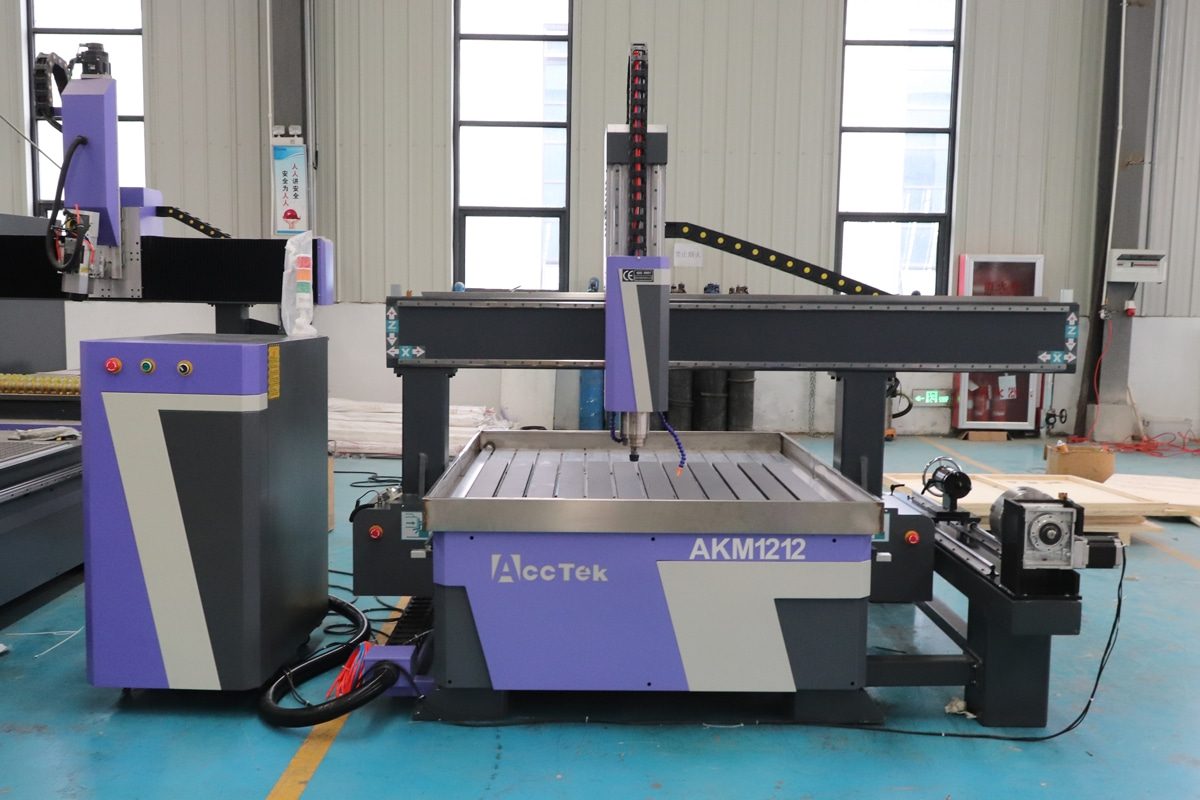
A CNC router is designed to operate with precision, stability, and smooth motion. While a certain level of noise is normal during operation, sudden or unusual sounds are often signs of an underlying problem. Left unchecked, these disturbances can lead to reduced machining accuracy, premature wear on components, tool breakage, or even costly downtime.
This article explores the most common reasons your CNC router might be making unusual sounds or exhibiting vibrations, how to diagnose the issues, and practical steps to fix and prevent them. Whether you’re a seasoned operator or new to CNC machining, knowing what to listen for can help you protect your equipment and ensure consistent production quality.
Understanding Normal vs. Abnormal CNC Sounds
CNC routers naturally generate some level of noise during operation, especially when cutting dense materials at high speeds. However, distinguishing between normal operating sounds and abnormal noises is beneficial for the early detection of mechanical issues.
Normal Sounds
Normal operational noise in a CNC router is typically steady, stable, and predictable. While the exact sound profile can vary depending on the machine model, tooling, material, and cutting parameters, here are the key characteristics of normal noise:
- Consistent Motor Whirring: Motors produce a smooth humming or whirring sound as they drive the axes. This sound should be even, without sudden fluctuations, grinding, or irregular pulses.
- Spindle Sound: The spindle emits a continuous and relatively smooth, high-pitched tone while spinning. The pitch will vary depending on RPM but should remain stable under constant load.
- Cutting Noise: When the tool engages with the material, a consistent cutting or buzzing sound occurs. This noise should match the feed rate and spindle speed.
- Toolpath Transitions: You might hear slight changes in pitch or rhythm when the tool accelerates, decelerates, or changes direction, but these should still sound controlled and smooth, not abrupt or jarring.
Abnormal Sounds
Unusual or abnormal sounds from your CNC router are often the first sign that something is wrong. Recognizing these abnormal noises early can help prevent damage, reduce downtime, and maintain machining quality. Here are the most common types of abnormal sounds and their potential causes:
- Grinding or Screeching: Often points to worn bearings, misaligned components, or tool-to-material mismatch.
- Rattling or Clanking: May suggest loose fasteners, vibration from unstable workholding, or backlash in drive systems.
- Buzzing or Vibrating Hum: Excessive tool wear, incorrect tool for the material, or harmonic resonance.
- Popping or Knocking: Typically linked to inconsistent tool engagement or damage in mechanical components.
- High-Pitched Whining or Hissing: Spindle imbalance, electrical interference, or unstable spindle RPM.
- Intermittent Clicking: Faulty relays, worn-out bearings, or electrical arcing in motor drivers.
- Chattering: Tool deflection due to aggressive cutting parameters or tool overhang.
Vibration Characteristics
While minor vibration is expected during aggressive cutting, excessive or irregular vibration is abnormal. It often leads to poor surface finish, reduced accuracy, and accelerated wear on mechanical parts. Vibrations may be felt in the spindle, gantry, worktable, or even the floor if the machine isn’t properly anchored.
Recognizing what is normal for your specific machine and setup is the first step toward diagnosing problems. A sudden change in sound or vibration during operation should always be treated as a warning sign, prompting further inspection and maintenance.
Common Causes of Unusual Noises or Vibrations
Unusual noises or vibrations in a CNC router are often signs that something is out of tune within the system. These issues can develop gradually due to wear or appear suddenly due to improper setup or operating conditions. Below are the most common causes:
Loose Mechanical Components
- Symptoms: Over time, constant machine motion and vibration can loosen bolts, brackets, and fasteners. When structural connections weaken, components may shift or rattle during operation, leading to clanking or knocking sounds.
- Impact: These compromise the machine’s structural stability, which in turn reduces cutting precision and surface quality. Additionally, the constant movement of unsecured components accelerates wear on bearings, guides, and fasteners.
Spindle Problems
- Worn Bearings or Unbalanced Spindle: Worn bearings often produce high-pitched whining or rumbling noises during operation and allow radial play in the spindle shaft, resulting in vibration. Similarly, an unbalanced spindle creates uneven rotational forces, which introduce constant vibration throughout the machine, even at idle speeds.
- Collet Issues or Tool Runout: If the collet is damaged, dirty, or improperly tightened, the tool may sit off-center, leading to tool runout. Runout causes the tool to wobble during rotation, generating chattering or buzzing sounds and creating uneven cutting loads.
- Improper Spindle Speed or Load: Running the spindle too fast can result in resonance or overheating, while speeds that are too slow can lead to tool chatter. Similarly, feeding the tool too aggressively or making deep passes can overload the spindle, producing grinding noises and increasing the likelihood of mechanical failure.
Feed Rate and Cutting Parameters
- Incorrect Feed Rate or Spindle Speed Combination: A low spindle speed combined with a high feed rate can cause the tool to gouge the material rather than cut cleanly, producing rough cutting sounds and strong vibrations. An excessively high spindle speed with a slow feed may result in excessive friction, causing squealing or resonance.
- Excessive Depth of Cut: Setting the depth of cut too deep can overwhelm the spindle, slow down the cutting action, and cause the machine to emit grinding noises. The added strain also increases tool deflection and vibration, which negatively impact accuracy.
- Tool Chatter Due to Aggressive Settings: It manifests as a loud buzzing or screeching sound and produces a rippled surface finish on the workpiece. This self-excited vibration destabilizes the entire cutting process, leading to excessive tool wear and spindle stress.
Tool Problems
- Dull, Chipped, or Unbalanced Tools: Dull or chipped tools will generate harsh scraping or grinding noises and can produce excessive heat when cutting materials. If the tool is unbalanced, it can cause high-frequency vibrations that are transmitted through the spindle and gantry, leading to a poor surface finish.
- Wrong Tool for Material: Using the wrong type of tool for a specific material can lead to unstable cutting conditions. For example, a wood-cutting bit used on aluminum may create excessive chatter or squeaking sounds due to improper chip removal and feed pressure.
- Poor Tool Installation: If the tool is not properly installed, it can introduce runout and instability. This often results in buzzing, wobbling noises, and vibrations during rotation.
Workpiece and Fixturing Issues
- Loose Workholding or Vibration-Prone Fixtures: When the workpiece is not firmly clamped or the fixture lacks rigidity, it can shift or vibrate during cutting. This often produces rattling, clunking, or tapping noises, especially during rapid tool engagement or heavy material removal.
- Resonance from Flexible Stock: Some materials can naturally flex or vibrate when subjected to cutting forces. This internal resonance amplifies vibration and causes a humming or buzzing sound during cutting. Even if the material is clamped at the edges, the unsupported centre can vibrate, resulting in chatter marks and inconsistent cuts.
Drive System Problems
- Worn Ball Screws or Lead Screws: This can cause grinding, clicking, or knocking sounds, particularly during direction changes or rapid positioning. Worn screws also increase vibration along the motion path, reducing accuracy and contributing to poor surface finishes.
- Stepper/Servo Motor Issues: When these motors lose synchronization, the machine may emit buzzing, humming, or pulsing noises. Inconsistent torque output from a faulty motor can cause vibrations during acceleration or deceleration, leading to lost steps, skipped tool paths, or uneven cuts.
- Loose Belts or Couplings: Loose belts may slip under load, producing flapping or squeaking sounds and causing sudden movement irregularities. Similarly, worn or misaligned couplings may result in rotational imbalance or backlash, generating vibration and knocking noises that affect cut consistency and machine reliability.
Vibration from External Sources
- Unstable Flooring: If the CNC router is placed on an uneven floor, this may result in low-frequency hums, shaking, or resonance that interferes with the machine’s natural damping. In severe cases, the entire frame may oscillate, degrading accuracy and producing rattling or reverberating sounds during operation.
- Poor Machine Leveling: A machine that isn’t flat or properly supported may rock slightly under motion, generating clunking, squeaking, or shifting noises. This instability not only affects surface finish and cut consistency but also accelerates wear on guide rails, motors, and screws due to uneven load distribution.
- Nearby Heavy Machinery Interference: CNC routers operating near large industrial equipment can experience transmitted vibration through the floor or air. These external forces can create faint but persistent shaking or resonant hums even when the machine is idle.
Identifying which of these areas is causing the abnormal sound or vibration is key to effective troubleshooting. The next sections will help you pinpoint specific issues and guide you toward corrective actions.
Diagnostic Checklist and Step-by-Step Inspection
When a CNC router begins to produce unusual noises or vibrations, immediate investigation is essential to prevent further damage and ensure operational accuracy. A systematic approach can help isolate the source of the problem quickly and effectively. Below is a structured checklist and inspection process to guide you:
Visual and Physical Inspection
- Check for loose components: Inspect the gantry, spindle mount, linear guides, and frame for loose bolts, brackets, or fasteners.
- Inspect the spindle and tooling: Look for signs of wear, unbalanced tools, or improperly seated collets.
- Examine belts, couplings, and lead screws: Check for visible wear, slackness, or misalignment in the drive system.
- Observe the workholding setup: Ensure that clamps or vacuum systems are securing the material firmly and that the fixture is rigid.
Listen to the Sounds
- Identify the sound type: Is it a high-pitched whine, a rattle, grinding, knocking, or buzzing?
- Note when it occurs: During rapid movement, spindle start-up, tool engagement, or idle time?
- Determine the location: Try to localize whether the sound is coming from the spindle, axes, worktable, or machine base.
Vibration Testing
- Use your hand as a quick check: Lightly touch different machine areas during operation to feel for vibration sources.
- Use tools for accuracy: Employ a dial indicator, vibration sensor, or smartphone vibration app to detect intensity and direction.
- Inspect surface finish on test cuts: Wavy lines or chatter marks can help identify vibration patterns.
Tool and Spindle Runout Check
- Perform a spindle runout test: Use a dial indicator to measure spindle shaft concentricity.
- Check tool installation: Verify that the tool is properly seated in a clean collet and is balanced.
Drive System and Motor Test
- Move each axis manually or via jog mode: Listen for uneven motion, mechanical resistance, or grinding.
- Inspect stepper/servo motors: Feel for overheating, inconsistent torque, or abnormal sounds during motion.
- Observe belts and pulleys while running: Look for fluttering, slippage, or wobble.
Workpiece and Fixturing Review
- Secure test material and repeat the operation: Listen and observe if noise or vibration persists.
- Try an alternative fixturing method: Use clamps, vacuum beds, or dampening pads to see if the issue improves.
Environmental Evaluation
- Check machine leveling: Use a spirit level to ensure the machine is evenly supported on all feet.
- Assess floor stability: Stand near the machine during operation and note if the ground shakes.
- Listen for external vibrations: Shut off the CNC router and check if nearby equipment is producing vibrations that could affect the machine.
By following this diagnostic checklist and inspection routine step by step, you can systematically eliminate potential causes and pinpoint the source of abnormal noise or vibration. This proactive approach not only minimizes downtime but also helps maintain high precision and extends the lifespan of your CNC router.
How to Fix Unusual Noises or Vibrations
Once the source of unusual noises or vibrations in your CNC router has been identified, corrective action should be taken immediately to avoid further damage and restore cutting precision. Below are key strategies to fix these issues effectively:
Tighten Loose Mechanical Components
- Inspect and re-torque all bolts, screws, and brackets on the frame, gantry, spindle mount, and linear guides.
- Use a torque wrench where applicable, and consider applying thread-locking compound to prevent them from loosening again under vibration.
- Confirm that the machine frame is square and all structural parts are firmly secured.
Service or Replace Spindle Bearings
- If you detect bearing noise or spindle vibration, consult your machine manual for bearing replacement procedures or contact the manufacturer.
- Ensure proper lubrication (if applicable) and check for balance after reassembly.
Fix Tool and Collet Issues
- Replace worn or damaged collets, and clean the collet and tool shank before installation.
- Use balanced tools appropriate for your spindle speed and material type.
- Ensure proper tightening torque when installing tools to minimize runout.
Optimize Feed Rate and Cutting Parameters
- Match spindle speed and feed rate to the tool size and material. Use manufacturer-recommended values.
- Reduce the depth of cut if excessive load or chatter is observed.
- Avoid aggressive ramp-in strategies or tight corners that increase tool pressure suddenly.
Realign or Replace Worn Drive Components
- Replace worn or damaged ball screws, lead screws, belts, or pulleys. Ensure proper tensioning and alignment when installing new belts.
- If motors feel hot, emit noise, or fail to move smoothly, they may need servicing or replacement. Ensure driver settings and wiring are also correctly configured and secure.
- Check and tighten couplings between motors and shafts to eliminate backlash or slippage.
- Calibrate and realign axes if positional errors or rough motion are detected.
Improve Workholding Stability
- Use more rigid fixturing methods or support long, thin, or flexible stock with sacrificial backing boards.
- Adding rubber pads or vibration-damping materials beneath fixtures or materials can further reduce resonance and noise.
- Verify that clamps or vacuum systems apply uniform, firm pressure.
Address Environmental and External Vibration
- Ensure the machine is properly leveled on a flat, stable surface.
- Add isolation pads or mounts under the machine feet to absorb floor-transmitted vibration.
- Relocate the CNC router away from heavy machinery or use vibration barriers if external interference is unavoidable.
Applying these targeted fixes, you can eliminate most causes of abnormal noise and vibration, ensuring smoother operation, longer tool life, and better machining results. For persistent or complex issues, don’t hesitate to contact your machine’s technical support team or a qualified technician.
Preventive Maintenance Tips
Preventing unusual noises and vibrations in a CNC router begins with consistent, proactive maintenance. By implementing a regular inspection and upkeep routine, you can catch potential issues early, extend the life of machine components, and maintain high-quality machining performance. Here are essential preventive maintenance tips:
- Regularly Inspect and Tighten Fasteners: Vibration from daily operations can gradually loosen bolts, screws, and brackets. Periodically inspect all structural and motion-related fasteners and retighten them to manufacturer-specified torque values.
- Lubricate Moving Components: Linear bearings, ball screws, and guide rails require proper lubrication to reduce friction and wear. Follow your machine’s maintenance schedule to apply the correct lubricant type and amount, preventing dry running that can lead to squeaking or grinding sounds.
- Monitor Spindle and Tool Condition: Inspect the spindle for signs of bearing wear, heat buildup, or abnormal noise. Check collets and tool holders for cleanliness and concentricity. Replace dull, chipped, or unbalanced tools before they cause vibration or damage.
- Check Belts, Couplings, and Drive System Alignment: Look for wear, tension loss, or cracking in belts and couplings. Ensure proper alignment and tension, and replace aging components before they affect motion stability or produce noise during axis travel.
- Inspect Workholding and Fixtures: Ensure clamps, vises, or vacuum systems maintain a firm grip on the workpiece. Periodically evaluate fixtures for rigidity, wear, or movement that may introduce instability during cutting.
- Keep the Machine Clean: Accumulated dust, chips, and debris can get into mechanical components and affect their function. Clean the machine bed, guideways, and spindle area regularly to prevent interference with motion and avoid contamination of sensitive parts.
- Log Performance and Maintenance: Keep a detailed maintenance log that includes dates of service, issues found, parts replaced, and parameters adjusted. This helps track recurring problems and identify trends before they lead to failures.
Following these preventive maintenance practices, you can significantly reduce the likelihood of abnormal noises and vibrations while ensuring smooth, efficient, and safe CNC router operation.
Summarize
Unusual noises or vibrations in a CNC router are more than just a nuisance—they’re often early warning signs of deeper mechanical, operational, or environmental issues. By understanding the potential causes, following a structured diagnostic process, and applying targeted fixes, you can quickly restore stable performance and protect your machine investment. Regular preventive maintenance and environmental awareness are also key to keeping your CNC router running smoothly and quietly for years to come.
If you’re looking for a reliable and high-performance CNC router, AccTek CNC is a trusted manufacturer based in China. We offer a comprehensive range of CNC routers, including 3-axis, 4-axis, 5-axis, and ATC models, designed to meet the needs of various industries—from woodworking and metalworking to plastics, stone, and composites. Whether you’re a small workshop or a large-scale production facility, AccTek provides tailored solutions backed by technical expertise and excellent customer support.