

- 13-18 Min Read
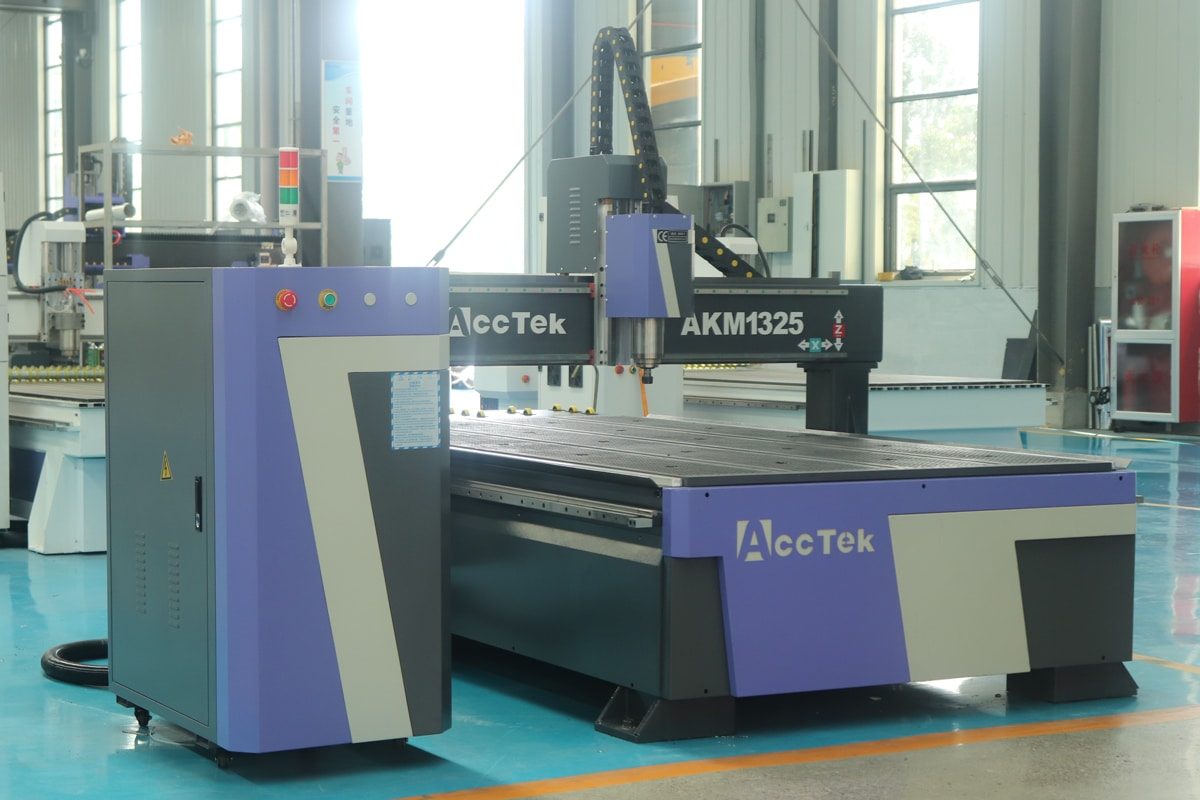
A 3-axis CNC router is one of the most widely used machines in modern manufacturing, woodworking, and prototyping. With its ability to move along the X, Y, and Z axes, it can cut, engrave, and shape a wide variety of materials with precision and efficiency. From creating intricate signs to producing furniture components, its versatility makes it an invaluable tool for both professionals and hobbyists. However, while the machine itself offers impressive capabilities, the quality of results depends heavily on how well it is set up, maintained, and operated.
Getting the most out of a 3-axis CNC router requires a deep understanding of its functions, smart selection of tools and accessories, and careful optimization of cutting parameters. Regular maintenance, efficient workflow management, and adherence to safety practices also play key roles in maximizing performance and extending machine life. In this article, we’ll explore practical strategies and techniques to help you unlock the full potential of your 3-axis CNC router, ensuring greater accuracy, higher productivity, and long-term reliability.
Understanding Your 3-Axis CNC Router
Before you can get the most out of your 3-axis CNC router, it’s important to understand exactly how it works and what it can—and cannot—do. Because of its straightforward design, the 3-axis router remains one of the most common and accessible CNC machines for workshops of all sizes.
Definition and Basic Functionality
A 3-axis CNC router is a computer-controlled machine that moves a cutting tool along three perpendicular axes to shape, cut, or engrave materials with precision. Each axis serves a specific directional function:
- X-Axis: The X-axis controls the horizontal movement of the cutting tool from side to side across the workpiece. This axis allows for precise positioning along the width of the material.
- Y-Axis: The Y-axis moves the cutting tool forward and backward relative to the machine’s frame. This axis works in combination with the X-axis to define the two-dimensional plane of the workpiece, enabling complex 2D shapes and paths.
- Z-Axis: The Z-axis governs vertical movement, raising or lowering the tool toward the workpiece. This axis determines cutting depth, allowing the router to perform shallow surface engraving, deeper cuts, or even multi-level contouring.
Common Materials for 3-Axis CNC Routers
A 3-axis CNC router is highly versatile and can handle a wide range of materials, making it suitable for woodworking, sign-making, prototyping, and light metal fabrication. Some of the most commonly processed materials include:
- Wood: Hardwood, softwood, plywood, MDF, and particleboard are among the most frequently machined materials. Wood is ideal for furniture, cabinetry, decorative carvings, and signs.
- Plastics: Acrylic, PVC, polycarbonate, and HDPE are commonly cut or engraved using 3-axis routers. Plastics are popular for signage, displays, and prototype components.
- Soft Metals: Aluminum, brass, and copper can be machined with a 3-axis CNC router, especially for small parts, molds, or prototypes. These materials require appropriate cutting tools, lower feed rates, and proper cooling.
- Composites: Materials such as MDF-based laminates, carbon fiber sheets, and fiberglass panels can be processed with specialized tooling. Care must be taken to avoid delamination or tool wear.
- Foam and Other Soft Materials: Expanded polystyrene (EPS), polyurethane foam, and similar soft substrates are often used for packaging, molds, and signage prototypes.
Capabilities and Limitations
A 3-axis CNC router excels at machining flat or moderately contoured surfaces. Its precise movement along the X, Y, and Z axes makes it ideal for cutting profiles, pocketing, drilling, engraving, and shallow 3D shapes. Projects such as furniture components, signage, and simple prototypes benefit greatly from its speed, accuracy, and consistency. Its simplicity, affordability, and ease of operation also make it a popular choice for small workshops and hobbyists.
However, compared to 4-axis or 5-axis CNC routers, a 3-axis machine has certain limitations. It is not well-suited for complex 3D contours, undercuts, or parts that require multi-directional tool access. Achieving intricate 3D shapes or highly detailed curved surfaces often requires additional axes, specialized tooling, or extensive post-processing.
By understanding how a 3-axis CNC router operates, recognizing its strengths, and acknowledging its limitations, operators can make informed decisions about project selection, tooling, and workflow. Mastery of these fundamentals lays the foundation for maximizing precision, efficiency, and overall performance, ensuring that the machine delivers consistent, high-quality results across a wide range of applications.
Choosing the Right Tools and Accessories
Maximizing the performance of a 3-axis CNC router isn’t just about understanding the machine—it also depends on selecting the right tools and accessories. From cutting bits to workholding systems and dust collection, each choice directly impacts precision, efficiency, and safety. The right setup not only improves machining results but also extends tool life and reduces wear on the router.
Cutting Tools
The type of tool you choose depends on the material being processed, the type of cut, and the level of detail required. Common cutting tools for 3-axis CNC routers include:
- End Mills: Versatile tools used for cutting, slotting, and pocketing. They are suitable for wood, plastics, and soft metals. End mills come in different shapes to suit a variety of operations.
- Ball Nose Bits: Designed for creating smooth, contoured surfaces, ball nose bits are ideal for 2.5D or shallow 3D carvings. They provide excellent surface finish and are commonly used in artistic woodwork or mold making.
- V-Bits: These are primarily used for engraving, decorative detailing, and lettering. The angle of the V-bit determines the width and depth of cuts, making them versatile for intricate designs.
- Drill Bits: Standard drill bits or specialized CNC drill bits are used for creating precise holes in wood, plastics, and metals. Using the correct drill type ensures accuracy and prevents material splitting or tool breakage.
Workholding Methods
The right workholding method prevents material movement during cutting, reduces vibration, and ensures consistent results. Common methods include:
- Clamps and Hold-Downs: Simple and versatile, clamps are ideal for flat materials and smaller projects. They allow quick setup and adjustment but may require careful placement to avoid interfering with tool paths.
- Vacuum Tables: These tables use suction to hold sheet materials like plywood, acrylic, or MDF firmly in place. Vacuum hold-downs provide uniform pressure across the workpiece and are especially useful for thin or delicate materials that could flex or move under mechanical clamping.
- Jigs and Fixtures: Custom jigs or fixtures are used for repeatable cuts, angled or irregular pieces, and batch production. They ensure consistent positioning and alignment for precision parts or multi-step machining processes.
- Double-Sided Tape or Adhesives: For lightweight or thin materials, strong double-sided tape or specialized adhesives can hold the workpiece without mechanical clamping. This method is best for shallow cuts and smaller projects.
Dust Collection and Safety Accessories
CNC routers generate large amounts of dust and debris, especially when machining wood, plastics, or composites. Effective dust collection and proper safety accessories are beneficial for maintaining both machine performance and operator health.
- Dust Collection Systems: A dedicated dust collection system connected to the CNC router’s spindle area helps remove chips and fine particles during cutting. For best results, a high-quality dust shoe or brush attachment should be used to capture debris at the source.
- Air Filtration: In addition to dust collection, air filters or extraction units are valuable for handling fine airborne particles, especially in enclosed workshops. Good ventilation minimizes respiratory risks and ensures a safer working environment.
- Safety Accessories: Operators should always use personal protective equipment (PPE), including safety glasses to shield against flying debris, hearing protection to reduce noise exposure, and dust masks or respirators to protect from inhaling fine particles.
By carefully selecting cutting tools, securing materials with reliable workholding methods, and investing in proper dust collection and safety accessories, operators can significantly enhance the performance of their 3-axis CNC router. These choices create the foundation for cleaner cuts, smoother workflows, and safer operation, ensuring the machine consistently delivers high-quality results across different projects.
Machine Setup and Calibration
Accurate setup and calibration are the foundation of successful CNC machining. Even with the best tools, a poorly configured machine can lead to wasted materials, tool breakage, and inconsistent results. Taking the time to properly prepare your 3-axis CNC router ensures that every movement aligns with your design, resulting in clean cuts, reliable accuracy, and smoother operation.
Initial Setup Tips
Before starting any project, ensuring your 3-axis CNC router is properly set up is the first step toward achieving accurate and reliable results. A careful initial setup helps prevent errors, reduces material waste, and protects both the machine and cutting tools.
- Level the Machine Bed: Verify that the work surface is completely flat and free of debris.
- Check Spindle Mounting: Make sure the spindle is securely fastened and aligned.
- Inspect Wiring and Connections: Confirm that all electrical connections, cables, and limit switches are properly secured.
- Lubrication and Movement: Check that guide rails, lead screws, or ball screws are lubricated and free of dust buildup.
- Home the Machine: Run the homing cycle to ensure the CNC router recognizes its default position before setting workpiece coordinates.
Calibration Essentials
Once your CNC router is properly set up, the next step is to accurately calibrate it. Calibration aligns the machine’s movements with the programmed toolpaths, preventing errors that could waste materials or damage tools.
- Squaring the Machine: Accurate cuts depend on a machine that is square and aligned. Ensure the X, Y, and Z axes move perpendicular to one another, and adjust as necessary.
- Tool Length Calibration: Use a touch plate, probe, or manual method to correctly set tool length. Accurate Z-axis calibration ensures the cutting depth matches your design specifications.
- Zeroing the Workpiece: Establish a precise origin point for the X, Y, and Z axes based on the material’s position. Proper zeroing ensures toolpaths align with the workpiece, avoiding offset errors.
- Backlash Compensation: Check for and compensate for any play in the lead screws or belts. Backlash can cause inaccuracies in cutting dimensions and must be corrected through machine adjustments or software settings.
- Periodic Verification: Calibration isn’t a one-time process. Regularly check axis alignment, tool offsets, and spindle runout to maintain accuracy as the machine experiences vibration and wear over time.
A well-set-up and calibrated machine delivers precision, efficiency, and repeatability across all projects. By carefully following initial setup steps and regularly checking calibration, operators can reduce errors, extend tool and machine life, and achieve higher-quality results. Calibration is not just a preliminary step—it is an ongoing practice that ensures your 3-axis CNC router continues to perform at its best.
Optimizing Cutting Parameters
Getting the most out of your 3-axis CNC router requires more than just proper setup—it also depends on fine-tuning your cutting parameters. Feed rate, spindle speed, depth of cut, toolpath strategy, and material-specific settings all influence how well your 3-axis CNC router performs. Adjusting these parameters appropriately ensures precise cuts, reduces tool wear, and improves overall productivity across a variety of materials and projects.
Feed Rate and Spindle Speed
Two of the most critical parameters in CNC machining are feed rate and spindle speed, and finding the right balance between them directly affects cut quality, tool life, and overall efficiency.
- Feed Rate: This determines how quickly the cutting tool moves across the material. If the feed rate is too slow, the tool may rub instead of cut, leading to burning, melting, or excessive wear. If it’s too fast, the tool can chatter, break, or leave rough edges.
- Spindle Speed: Measured in revolutions per minute (RPM), spindle speed dictates how fast the tool rotates. Higher speeds are suitable for softer materials like wood or plastics, while lower speeds are often required for metals to prevent overheating and tool damage.
Depth of Cut
The depth of cut refers to how deep the tool plunges into the material during each pass, and it plays a major role in balancing efficiency, surface quality, and tool life.
- Shallow Cuts: Taking lighter passes reduces tool stress, improves accuracy, and produces smoother finishes. This approach is particularly useful for detailed engraving, fine carving, or when working with brittle materials that may chip or crack under heavy loads.
- Deeper Cuts: Increasing the depth per pass can significantly shorten machining time by removing more material quickly. However, it requires a rigid setup, sharp tooling, and sufficient spindle power to avoid tool breakage or machine strain.
Toolpath Strategies
The toolpath determines how the cutting tool moves through the material and directly affects cycle time, surface quality, and tool wear.
- Roughing vs. Finishing Passes: Roughing Passes remove the bulk of the material quickly, using deeper cuts and wider step-overs. The goal is speed and efficiency rather than surface quality. Finishing Passes use shallower cuts and smaller step-overs to refine the surface, producing smooth, precise edges and contours.
- Climb Milling vs. Conventional Milling: Climb Milling moves the cutter in the same direction as the feed, reducing tool wear and producing a smoother finish on many materials. Conventional Milling moves the cutter against the feed, which can be safer for older machines or certain materials prone to chipping.
- Path Optimization: Minimize unnecessary movements, avoid sharp direction changes, and plan entry/exit points to reduce stress on the tool and material.
Material-Specific Settings
Different materials require tailored cutting parameters to achieve optimal results with a 3-axis CNC router. Understanding material-specific requirements is key to consistently producing high-quality results.
- Wood: Softer woods can handle higher feed rates and deeper cuts, while hardwoods may require slower feeds to prevent tear-out or burning. Plywood and MDF benefit from sharp tools and moderate speeds to avoid chipping.
- Plastics: Acrylic, PVC, and other plastics require slower spindle speeds and controlled feed rates to prevent melting, warping, or rough edges. Step-downs should be shallow to maintain clean cuts.
- Soft Metals: Aluminum, brass, and copper need slower feeds and proper lubrication or air cooling to avoid overheating and tool wear. Harder metals may require multiple shallow passes and sharp, high-quality cutting tools.
- Composites: Materials like carbon fiber or fiberglass require specialized tooling and controlled feeds to prevent delamination or excessive tool wear.
- Foam and Soft Materials: Expanded polystyrene (EPS) and polyurethane foam can tolerate faster feed rates, but toolpaths should minimize vibrations to avoid tearing or rough surfaces.
Optimizing cutting parameters is key to unlocking the full potential of your 3-axis CNC router. By carefully balancing feed rate and spindle speed, selecting the right depth of cut, planning effective toolpaths, and tailoring settings to the material, operators can achieve superior surface finishes, extend tool life, and maximize efficiency. Fine-tuning these variables ensures consistent, high-quality results and helps the machine perform at its best on every project.
Best Practices During Operation
Operating a 3-axis CNC router effectively requires more than simply loading a design and pressing start. Following best practices during operation ensures precision, safety, and long-term reliability. By paying attention to workpiece security, tooling, machine parameters, and environmental factors, operators can prevent mistakes, reduce tool wear, and maintain consistent results across every project.
Monitoring the Cutting Process
When using a CNC router, closely monitoring the cutting process helps detect unexpected problems early and resolve them promptly to ensure machine accuracy, prevent damage, and ensure safety.
- Check Material Movement: Ensure that the workpiece remains securely held in place.
- Observe Surface Finish: Monitor the quality of cuts as the machine operates. Rough edges, tear-out, or uneven surfaces may indicate the need to adjust feed rates, spindle speeds, or toolpaths.
- Listen for Abnormal Sounds: Unusual noises, such as grinding, chatter, or motor strain, can indicate potential problems with tooling, spindle alignment, or machine mechanics.
- Be Ready to Pause or Stop: Always be prepared to immediately pause or stop the machine if an issue arises. Quick intervention prevents costly mistakes and potential safety hazards.
Tool Select and Maintenance
Regular attention to tool maintenance ensures consistent cutting quality, reduces machine stress, and minimizes downtime due to tool failure.
- Use the Correct Tooling: Select cutting tools that match the material and intended operation.
- Regular Inspection: Frequently check tools for signs of wear, chipping, or dull edges.
- Sharpening or Replacing: Depending on the material and frequency of use, cutting tools may need sharpening or replacement.
- Cleaning: Remove debris, resin, or buildup from tools after each use.
- Proper Storage: Store tools in a dry, organized space to prevent damage or corrosion. Avoid mixing different types of tools loosely in a drawer or container.
Avoiding Common Mistakes
Even experienced operators can make mistakes that reduce precision. Being aware of common pitfalls and taking steps to prevent them is beneficial for safe and efficient operation.
- Skipping Setup and Calibration: Rushing the initial setup or neglecting calibration can result in inaccurate cuts, misaligned toolpaths, and wasted materials. Always take the time to properly prepare the machine.
- Using the Wrong Tool or Material Settings: Mismatched cutting tools, feed rates, spindle speeds, or depths of cut can lead to poor surface finishes, tool breakage, or workpiece damage. Follow the recommended parameters for each material.
- Ignoring Tool Wear: Continuing to use dull or damaged tools reduces cutting quality, increases machine strain, and can cause workpiece errors. Regularly inspect and replace tools as needed.
- Poor Workholding: Failing to secure the workpiece properly can result in shifting, vibrations, or complete project failure. Always use appropriate clamps, jigs, or vacuum hold-downs.
- Neglecting Cleaning and Lubrication: Accumulated dust, chips, or a lack of lubrication can impair machine movement, reduce accuracy, and shorten component lifespan. Maintain a clean and well-lubricated machine.
- Overloading the Machine: Pushing the machine beyond its recommended feed rates, depths, or material capabilities can strain motors, spindles, and rails, leading to premature wear or failure.
Careful monitoring of the cutting process, proper tool selection, and attention to machine behavior help minimize errors, protect tools and materials, and extend the life of the CNC router. Developing disciplined operational habits ensures that every project is completed with high quality and minimal downtime.
Improving Workflow Efficiency
Maximizing the productivity of a 3-axis CNC router requires more than just proper setup and maintenance—it also depends on creating an efficient workflow. From organizing the workspace and standardizing procedures to optimizing toolpaths and managing materials, each step plays a role in reducing downtime, minimizing errors, and improving overall output. By focusing on workflow efficiency, operators can achieve faster, more consistent, and higher-quality results across all projects.
- Organize the Workspace: A well-organized workspace is the foundation of efficient CNC operation. Keeping tools, accessories, and materials neatly arranged and within easy reach reduces setup time, prevents accidental damage, and ensures a smooth workflow. Maintaining a clean work area free of chips, dust, and debris also improves safety and allows for more precise machining.
- Pre-Plan and Standardize Processes: Standardizing setup and operational procedures helps maintain consistency and minimize errors. By creating checklists for tasks such as machine calibration, tool changes, and workpiece placement, operators can streamline repetitive processes. Pre-configured CAM settings and toolpath templates for frequently machined materials further reduce setup time and improve reliability.
- Optimize Toolpaths and Software Workflow: Efficient toolpaths directly impact machining speed and quality. Simulating toolpaths in your CAD/CAM software allows operators to detect collisions, reduce unnecessary movements, and optimize cutting strategies. Using roughing and finishing passes strategically ensures that material removal is fast while surface finishes remain smooth.
- Batch Processing and Job Grouping: Grouping similar parts or projects together minimizes repeated setup steps and tool changes. By machining multiple pieces with similar feed rates, spindle speeds, and depths of cut in one session, operators can reduce downtime and increase throughput, making production runs faster and more predictable.
- Efficient Workholding and Material Management: Proper workholding and material preparation save both time and resources. Using vacuum tables, jigs, or fixtures ensures secure and consistent positioning of workpieces, while pre-cut or pre-marked materials prevent unnecessary delays. Maintaining an organized inventory of commonly used materials ensures that projects can begin immediately without waiting for supplies.
- Training and Documentation: Well-trained operators and clear documentation of optimized workflows enhance efficiency across the board. By ensuring everyone understands best practices, software settings, and machine capabilities, teams can maintain consistency, reduce errors, and quickly adapt to new projects.
Improving workflow efficiency is beneficial for getting the most out of your 3-axis CNC router. Thoughtful organization, strategic planning, effective toolpath management, and careful monitoring all contribute to smoother operations, reduced waste, and higher productivity. By implementing these efficiency-focused strategies, operators can optimize every stage of the machining process, ensuring consistent precision and maximizing the machine’s potential.
Summarize
Getting the most out of a 3-axis CNC router requires a combination of knowledge, careful preparation, and consistent practice. Understanding your machine, selecting the right tools and accessories, and maintaining proper setup and calibration lay the foundation for precision and efficiency. Consistent attention to operational best practices and preventive maintenance ensures precision, efficiency, and longer tool and machine life. With these strategies in place, every project can be completed more accurately, safely, and efficiently, allowing you to achieve high-quality results and maximize the value of your CNC router. Continue reading “What Should a CNC Router Operator Learn?” and you can grow into a confident CNC machining professional.
For anyone looking to maximize the performance of a CNC router, AccTek CNC offers a comprehensive range of high-quality machines, including 3-axis, 4-axis, 5-axis, and rotary CNC routers. Designed for precision, durability, and efficiency, AccTek machines are suitable for a wide variety of materials and applications, from engraving and cutting to complex 3D shaping. Beyond the machines themselves, we provide professional training and technical support, ensuring operators can achieve consistent, high-quality results and make the most of their investment. Whether you are a beginner or an experienced professional, AccTek CNC delivers reliable performance and the expertise needed to elevate your production capabilities.