

- 13-18 Min Read
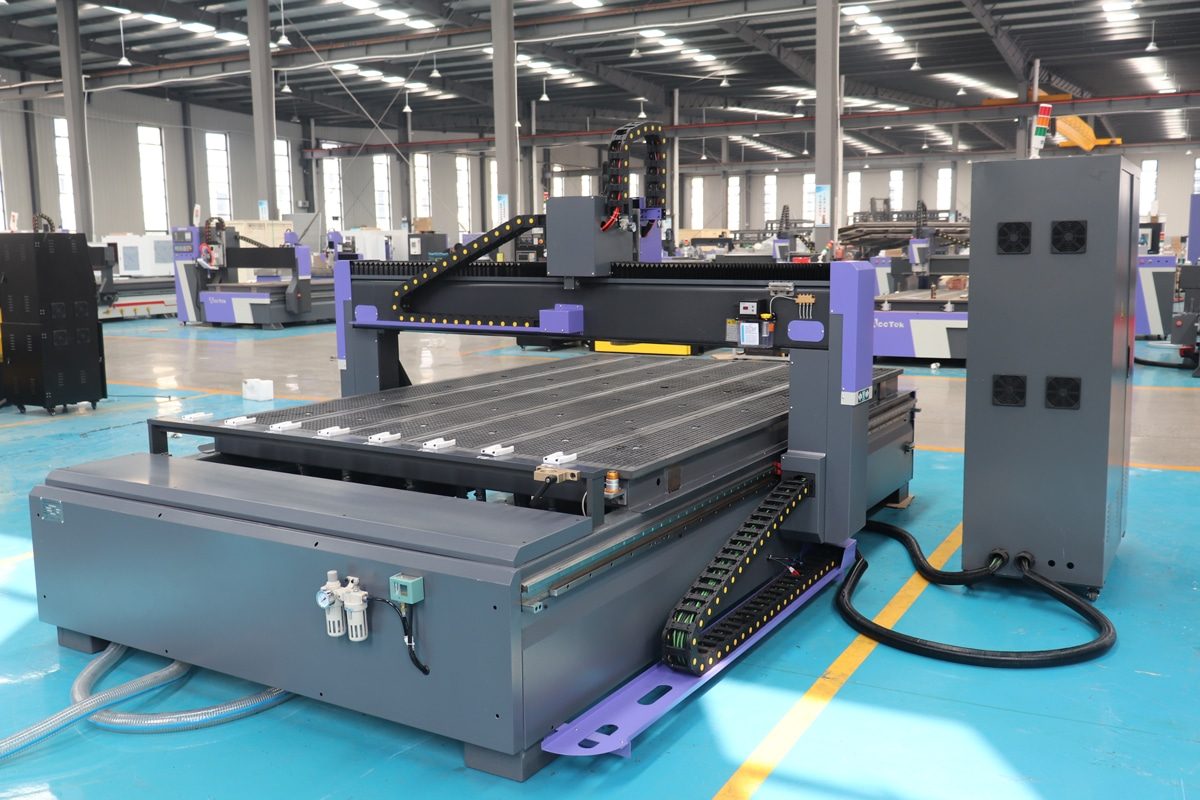
ATC CNC routers are advanced machines that streamline the machining process by automatically swapping tools during a job, eliminating the need for manual tool changes. This capability enhances efficiency and allows for continuous, high-volume production with minimal downtime. However, to maximize their potential, it’s essential to operate these machines with both safety and efficiency in mind. Proper handling ensures not only the longevity of the machine but also the quality of the finished products.
In this article, we will walk you through the essential steps to safely and efficiently operate an ATC CNC router. We will cover everything from understanding the basics of the machine and preparing your workspace to running the machine, performing tool changes, and troubleshooting common issues. By following these step-by-step instructions, you will be equipped to operate your CNC router with confidence, minimize risks, and extend the life of your equipment.
Understanding the Basics of an ATC CNC Router
An ATC (Automatic Tool Change) CNC router is a high-performance machine designed for precise, automated cutting, milling, and engraving across various materials. The key feature that distinguishes an ATC CNC router from standard routers is its ability to automatically change tools during a machining process, without operator intervention. This allows for continuous production without manual stops to swap tools, significantly improving efficiency and reducing human error. Here are the essential components of an ATC CNC router:
- Spindle: The spindle is the rotating part of the CNC router that holds and drives the cutting tool. It is responsible for cutting or engraving the material as the router moves along different axes.
- Tool Magazine: The tool magazine is a storage unit that holds multiple tools, often in a carousel or linear configuration. The CNC router can automatically retrieve and load the required tool during a job based on the programmed toolpath.
- Tool Changer Mechanism: The tool changer is the heart of the ATC system, allowing the CNC router to automatically switch between tools. This system typically includes a robotic arm or a linear shuttle that retrieves tools from the magazine and places them into the spindle.
- Control System: The control system of the CNC router is responsible for interpreting the CAD/CAM data and guiding the machine’s movements. It coordinates the tool changes and adjusts machine settings like speed, feed rates, and tool offsets.
- Axis System: Like all CNC routers, an ATC CNC router moves along multiple axes (typically 3 to 5) to perform precise cuts and shapes. The ATC system works seamlessly within this multi-axis framework, optimizing the entire process for complex and high-speed operations.
An ATC CNC router is a powerful tool that combines advanced automation with precise machining capabilities. Automatically changing tools during the process, it significantly reduces downtime and allows for continuous, high-quality production. Understanding the key components will help operators make the most of the machine’s capabilities. This foundational knowledge sets the stage for a more efficient CNC routing experience.
Preparing for Operation
Preparing for operation is a crucial step in ensuring that your ATC CNC router runs smoothly, efficiently, and safely. Proper preparation can help prevent costly mistakes, reduce downtime, and extend the lifespan of your machine. This phase involves organizing your workspace, setting up the machine and tools, and ensuring that everything is calibrated correctly before you start the cutting process. Taking the time to carefully follow these preparatory steps will ensure that your operations are as safe and efficient as possible.
Safety First
Safety is the cornerstone of CNC router operation. Prioritizing safety at every stage of the operation ensures that the operator remains protected while minimizing the chance of accidents or machine damage.
- Personal Protective Equipment (PPE): Always wear appropriate PPE, including safety glasses, hearing protection, gloves, and steel-toed boots. CNC routers can produce sharp tools, debris, and loud noise, so ensuring your safety is the first priority.
- Understanding Machine Safety Features: Familiarize yourself with the emergency stop buttons, safety interlocks, and any other built-in safety mechanisms. Knowing how to quickly stop the machine in an emergency can prevent accidents and equipment damage.
Workspace Setup
A well-organized and safe workspace is beneficial to the smooth operation of an ATC CNC router. Below are key steps for setting up your workspace before beginning any CNC router operation.
- Ensure the Work Area is Clean and Organized: A clutter-free workspace minimizes the risk of accidents and improves your workflow. Make sure the floor is free of tools or debris, and that all required materials are easily accessible.
- Position Materials Properly: Ensure that the material you plan to cut is securely placed on the machine’s work surface. Use proper clamping or vacuum systems to prevent shifting during operation. The material must be level and aligned with the machine’s coordinate system to ensure accurate cutting.
Tool Setup
Proper tool setup is one of the most critical steps in operating an ATC CNC router safely and efficiently. Below are key steps to ensure a smooth and effective tool setup:
- Load Tools into the Tool Magazine: Select the tools required for the job and load them into the tool magazine. Verify that the correct tool sizes and types are being used based on the material and the design specifications. Ensure that tools are free from defects and are properly secured in the tool holders.
- Verify Tool Identification: Double-check the tool numbers and positions in the tool magazine to ensure that the machine can correctly identify and select the tools during the operation.
Machine Calibration
Calibration involves adjusting various settings and verifying key reference points. This step minimizes errors and ensures that the CNC machine cuts exactly where you want it to, preventing costly mistakes and improving overall efficiency.
- Set Tool Offsets: Tool offsets refer to the exact position of each tool relative to the machine’s reference point. The tool offsets into the control system to ensure precise cuts are accurately input.
- Check and Adjust Machine Zero Points: Ensure that the machine’s zero points (usually the origin or home position) are properly set. This step ensures that the machine knows where to start the cutting process in relation to the material and work surface.
Thorough preparation before operating an ATC CNC router is key to achieving consistent, high-quality results while maintaining safety standards. By ensuring that your workspace is clean and organized, your tools are properly set up, and the machine is calibrated correctly, you create a foundation for smooth and efficient operation. Taking these crucial steps minimizes the risk of errors and machine malfunctions, ultimately enhancing productivity and extending the life of your equipment. With the right preparation, you’re ready to tackle any CNC job with confidence and precision.
Operating the ATC CNC Router
Once the ATC CNC router has been properly prepared, calibrated, and set up, it’s time to begin the operation. Operating a machine requires a combination of skill, attention to detail, and understanding of both the machine and the material being processed. The ability to successfully execute a job involves more than just running a program—it requires monitoring tool changes, ensuring machine accuracy, and maintaining safety throughout the process. Below are the key steps to follow during the operation phase of an ATC CNC router.
Starting the Machine
This initial step sets the foundation for the entire operation, ensuring that all systems are ready for the cutting process and that safety protocols are in place.
- Powering Up the Machine: Ensure that the power supply is connected and that all safety interlocks are engaged before turning on the machine. Press the power button and wait for the system to initialize.
- Homing the Machine: After the machine is powered on, perform a homing cycle. This ensures that all axes (X, Y, Z) move to their predefined home positions, setting a reference point for the entire operation.
Loading the Program
Any errors during this stage can lead to inaccurate cuts or even damage to the material or machine. Below are the key steps for properly loading the CNC program into the machine.
- Transfer the CNC Program: Using the control system, load the CNC program that has been created for the specific job. This program contains the cutting instructions, tool paths, speeds, and feeds required for the job.
- Verify Program Accuracy: Double-check that the program has been properly loaded and reviewed. Ensure that all tool changes, cutting strategies, and coordinates are correct before proceeding.
Tool Change Process
Monitor and manage the tool change process to prevent issues that could disrupt production or cause damage to the machine or workpiece. Below are the critical steps involved in ensuring a smooth and effective tool change process.
- Monitor Automatic Tool Changes: The operator should monitor the tool change process, especially during the first few tool changes, to ensure the correct tool is selected and loaded into the spindle.
- Verify Tool Length Offsets: As the machine changes tools, verify that the correct tool length offsets are being applied. Any discrepancy in tool offsets could lead to inaccuracies in the cutting process, causing defects in the final product.
Running the Machine
Running the ATC CNC router involves monitoring the entire machining process, ensuring that the machine performs according to the program’s specifications, and making adjustments when necessary.
- Start the Cutting Process: Once the program is loaded and the machine is ready, initiate the cutting process. Ensure the feed rates, spindle speed, and cutting parameters are correctly set according to the material and tool being used.
- Monitor the Machine: While the machine is running, keep a close eye on its performance. Look out for irregularities, such as unusual sounds, vibrations, or visual discrepancies, which could indicate issues with the tool, machine, or material.
Tool Monitoring and Maintenance
Since the tools used in CNC machining are subject to wear and tear, staying proactive in managing tool health can prevent unnecessary downtime, improve machining quality, and extend tool life.
- Monitor Tool Wear: Depending on the complexity of the job and the material being cut, tools may wear down over time. Listen for any changes in sound or cutting performance, and inspect the cutting edge of the tool if necessary.
- Change Tools if Necessary: If the tool becomes dull or damaged during operation, manually replace it and input the new tool’s offsets into the machine’s control system. Be sure to update the tool magazine if the ATC system requires a manual tool swap.
Monitoring the Environment
Environmental factors such as dust and temperature can significantly impact machining accuracy, tool life, and operator safety. Below are the key aspects to monitor and maintain in the CNC router’s working environment.
- Dust and Chip Management: CNC routers generate a significant amount of dust and chips during operation. Ensure that the dust collection system is running and effective. Clean chips from the work area regularly to maintain a safe and efficient environment.
- Cooling and Lubrication: Some materials, like metals, require a cooling or lubrication system to prevent overheating and tool wear. Ensure that the cooling system is functioning properly during the operation, especially for high-speed or high-precision jobs.
Operating an ATC CNC router is a process that requires vigilance and attention at every stage. By following the recommended procedures, you can ensure that your machine operates efficiently, produces high-quality results, and minimizes the risk of costly errors or downtime. Consistent monitoring and environmental checks throughout the operation will contribute to a smoother process and longer machine life.
Ensuring Safe Operation During Machining
Safety is a top priority when operating any CNC machine, and an ATC CNC router is no exception. Ensuring safe operation during machining involves setting up the right safety measures, staying aware of possible hazards, and taking proactive steps to minimize the risk of accidents. Below are the key practices for ensuring safe operation during machining.
Machine Monitoring and Observation
Continuous vigilance throughout the CNC machining process ensures that any potential issues are identified and addressed early, preventing damage to the machine, workpiece, and tools, while also maintaining high-quality results.
- Monitor the Machine Continuously: Watch for signs of tool wear or breakage. Check for any sudden changes in machine movement or speed that may indicate a malfunction or misalignment.
- Listen for Irregular Sounds: Unusual sounds such as grinding, squealing, or excessive clattering may indicate a tool problem or an issue with the machine’s mechanical components. If you hear anything abnormal, stop the machine and inspect it.
Maintain Proper Ventilation and Dust Collection
Efficient dust collection systems help prevent the accumulation of harmful particles, reduce fire risks, and ensure that the machine operates smoothly without unnecessary downtime due to clogging or contamination.
- Ensure Effective Dust Control: CNC routers generate a significant amount of dust, especially when cutting wood, plastics, or other particulate-producing materials. Ensure that the dust collection system is running efficiently to prevent dust accumulation on the machine and in the work area.
- Use Ventilation Systems: For materials that produce fumes or gases, make sure that the ventilation system is adequate and operating properly. Some materials, such as certain plastics or metals, can release harmful vapors during cutting that must be safely vented outside.
Properly Manage Tool Changes
Automatic Tool Change (ATC) systems automate the process of swapping tools, but it still requires careful attention to ensure that each tool change is executed correctly to avoid tool damage, misalignment, or machining errors.
- Monitor Tool Changes Closely: Verify that the tool is properly locked into the spindle before beginning the cutting process. During tool changes, ensure that the machine’s tool magazine or carousel is clear of obstructions and moving smoothly.
- Avoid Tool Overloading: Ensure that the tools are used within their specified limits, such as the proper feed rate, cutting depth, and material type. Overloading a tool can cause it to break, which may lead to damage to the workpiece, machine, or even injury.
Ensuring safe operation during machining is a continuous process that requires vigilance, proper setup, and proactive monitoring throughout the operation. By following these safety guidelines, operators can significantly reduce the risk of injury, prevent damage to the machine, and ensure high-quality, accurate machining results. A safe operating environment, combined with careful monitoring and adherence to established procedures, allows for optimal machine performance while protecting both the operator and the equipment.
Post-Operation Procedures
After completing a machining task, it’s essential to properly shut down the machine, remove tools and materials, clean the workspace, and perform necessary safety checks. These steps not only help avoid potential damage to the CNC router but also ensure that the work area remains free from hazards and that everything is in optimal condition for the next job.
Finishing the Job
Once the machining operation is complete, carefully remove the workpiece from the machine bed. Ensure that the workpiece is cool enough to handle and that it has been properly finished.
- Inspect the Workpiece: Inspect the finished product for quality and accuracy. Check for any defects such as burrs, rough edges, or any signs of tool wear or malfunction. If the workpiece does not meet the expected standards, note the issues and determine whether machine adjustments or tool replacements are necessary.
- Label the Workpiece: If necessary, label the workpiece with identifiers (job number, material type, etc.) to ensure proper tracking and organization for storage or shipping.
Shutting Down the Machine
After completing the operation and removing the workpiece, power down the CNC router following the manufacturer’s instructions. This usually involves turning off the machine via the control panel and allowing it to go through a safe shutdown procedure.
- Return the Machine to Home Position: Before fully shutting down, ensure that the machine’s axes return to their home position or a safe park position. This minimizes stress on the machine components and ensures that the next operation can be set up more easily.
- Turn Off the Power: After the machine has been shut down, switch off the power to the machine to ensure that there is no accidental activation during maintenance, cleaning, or tool changes.
Post-Operation Safety Checks
After shutting down the machine, perform a comprehensive safety check. This ensures that the CNC router is ready for its next job and that the workspace remains safe for operators.
- Check for Tool and Material Hazards: Ensure that there are no tools left in the machine spindle or tool changer that could pose a safety risk. Make sure that any sharp edges or debris left in the work area are properly handled.
- Ensure Tool Storage Safety: If tools were removed from the machine, ensure they are properly stored in designated areas. Use tool racks or drawers to keep tools organized, and make sure they are safely stored to avoid accidental damage or misuse.
- Verify Cooling and Dust Collection Systems: If the machine uses a coolant or dust collection system, check that these systems were turned off correctly. Ensure that the coolant tank is cleaned, and filters or hoses are inspected for wear and tear.
Ensuring no tools or materials are left on the CNC router and storing them appropriately are key steps in maintaining a safe and efficient working environment. Proper storage practices protect tools from damage, prevent clutter in the workspace, and reduce the risk of accidents in future operations. By conducting thorough post-operation safety checks, operators can avoid machine malfunctions, ensure the quality of the next job, and maintain a safe, organized workspace. Consistently following these post-operation procedures contributes to smoother workflows, better machine performance, and a safer work environment overall.
Best Practices for Efficient Operation of CNC Routers
Efficient operation of CNC routers not only improves production speed and reduces costs but also enhances the overall quality and lifespan of the machine. By following industry best practices, operators can achieve more consistent results, reduce downtime, and ensure safe and reliable performance. Below are some key practices that help optimize the operation of CNC routers for maximum efficiency.
Regular Machine Maintenance
Regularly inspect the CNC router for signs of wear and tear. Check key components such as the spindle, rails, bearings, and tool changer for damage or misalignment. Keeping these parts in top condition ensures smooth operations and reduces the risk of unexpected breakdowns.
- Lubricate Moving Parts: Regular lubrication of moving components such as rails, lead screws, and the spindle helps minimize friction, prevent wear, and maintain optimal performance.
- Clean the Machine: Dust, debris, and chips can accumulate in various parts of the machine and affect its performance. Regularly clean the machine, especially around moving parts, the tool changer, and the dust collection system.
- Check the Coolant System: Ensure that the coolant system is functioning correctly. Verify that coolant levels are adequate, and there are no blockages or leaks in the system.
Optimize Machine Setup
Organize the workspace to ensure quick and easy access to tools, materials, and machine components. Pre-plan the setup and ensure that all required tools, fixtures, and materials are readily available before starting the operation.
- Use Quick-Change Fixtures: Implement quick-change fixtures or modular clamping systems that reduce the time spent changing workpieces. These systems allow for easy setup adjustments, ensuring that the machine can run more efficiently.
- Ensure Proper Alignment: Double-check that the workpiece is properly aligned and securely clamped. Misaligned workpieces can result in inaccurate cuts and can cause unnecessary wear on the machine.
- Use Automatic Tool Length Measurement: Many CNC routers have automatic tool length measurement systems that can reduce the time spent measuring tools manually. Ensure this feature is used to save time and increase accuracy.
Fine-Tune Cutting Parameters
Adjust the feed rate, spindle speed, and cutting depth based on the material being machined and the tool being used. Optimizing these parameters ensures that the machine operates at its maximum potential without compromising tool life or cutting quality.
- Use Manufacturer Recommendations: Refer to the tool and material manufacturer’s recommended settings for feed rates, spindle speeds, and cutting depths. This provides a good starting point for fine-tuning settings based on the material and tool being used.
- Test Cuts: Before starting a full production run, perform test cuts to ensure that the settings are correct. Adjust the parameters if needed to optimize efficiency and quality.
Operator Training and Skill Development
Ensure that operators are well-trained in machine operation, troubleshooting, and tool handling. A skilled operator can make decisions that enhance efficiency and can quickly identify and resolve problems that may arise during the machining process.
- Cross-Train Operators: Cross-train operators in different areas of the CNC routing process to ensure flexibility in your workforce. This helps reduce downtime when operators are unavailable or when changes in production requirements arise.
- Stay Updated on Technology: As CNC router technology evolves, ensure that operators are trained on the latest features, software updates, and techniques to make the most of new advancements and improve efficiency.
Following best practices for the efficient operation of CNC routers is beneficial for optimizing productivity, reducing operational costs, and maintaining a high standard of safety and quality. Regular maintenance, proper tool management, efficient machine setup, and fine-tuning cutting parameters all contribute to smoother, faster, and more reliable operations. By integrating these practices into everyday operations, CNC router users can maximize their machine’s potential, ensuring more reliable and efficient manufacturing processes over time.
Summarize
Safely and efficiently operating an ATC CNC router involves careful preparation, attention to safety, and following step-by-step procedures throughout the process. Prioritizing proper setup, tool changes, and post-operation maintenance ensures high-quality production, reduces downtime, and extends the machine’s lifespan. By following these best practices, operators can maximize machine performance and achieve optimal results. Continue reading “ATC CNC Router vs. Standard CNC Router: Which is Right for You?” to compare their differences so you can make the right choice.
AccTek CNC is a trusted professional CNC router manufacturer, offering a wide range of high-quality machines tailored to meet various production needs. With an extensive selection of models and customization options, AccTek CNC ensures that users receive the ideal machine for their specific applications. In addition to providing state-of-the-art machinery, we offer exceptional technical support, assisting with machine setup, operation, and maintenance. Whether you need a standard router or a specialized solution, AccTek CNC delivers both quality and service to help optimize your production processes.