

- 12-16 Min Read
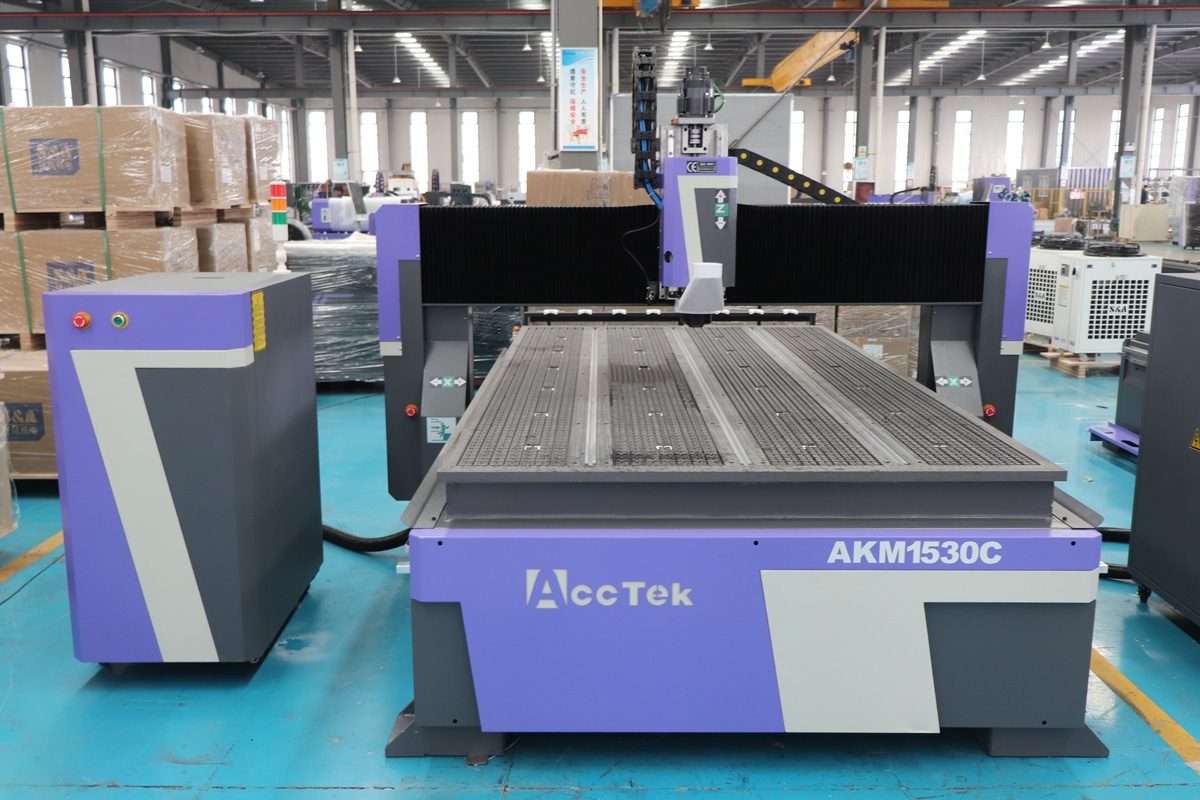
A vacuum table is a critical component of a CNC router, responsible for securely holding materials in place during cutting, engraving, and shaping operations. Its effectiveness directly impacts machining accuracy, surface quality, and overall workflow efficiency. However, over time, suction performance can degrade due to dust buildup, air leaks, worn gaskets, or poor spoilboard maintenance, leading to material shifting, imprecise cuts, and increased production errors.
Maintaining strong and consistent vacuum suction isn’t just about keeping the table clean—it requires regular inspection, spoilboard care, and proactive maintenance of the vacuum system components. In this article, we’ll walk you through practical steps and best practices to ensure your CNC router vacuum table continues to deliver optimal hold-down performance, reducing downtime and improving machining results.
Understanding CNC Router Vacuum Tables
To effectively maintain suction performance, it’s important to first understand how CNC router vacuum tables function and what components are involved. A vacuum table is a work-holding system that uses suction to hold flat materials securely in place during cutting operations. This method is widely used for its speed, versatility, and ability to eliminate the need for clamps or mechanical fasteners.
How a Vacuum Table Works
The vacuum system creates negative pressure beneath the workpiece, drawing air through small holes or a porous spoilboard surface. This pressure differential effectively presses the material onto the table. The stronger and more consistent the suction, the better the material is held down, preventing vibration, shifting, or warping during cutting.
Key Components
A CNC router vacuum table may seem like a simple flat surface, but it’s a carefully engineered system made up of several integrated components. Understanding the structure of the vacuum table helps identify where problems might arise.
- Vacuum Zones: The vacuum table is often divided into independently controlled sections or zones, allowing users to activate only the areas needed for a specific workpiece. This improves efficiency and suction power.
- Spoilboard: A sacrificial layer, commonly MDF or phenolic, is placed on top of the vacuum table. It allows air to flow while protecting the table’s surface from tool contact.
- Gaskets and Seals: These are used to seal the edges of workpieces or zone boundaries to prevent air leaks and maximize suction.
- Vacuum Pump or Blower: The heart of the system, which generates the suction force. It connects to the table through a series of pipes or hoses and may include filters, silencers, or check valves to optimize performance and reduce wear.
- Plenum Layer: This is the internal channeling beneath the spoil board that distributes airflow evenly to the vacuum holes.
Types of Vacuum Systems
The performance and maintenance needs of a CNC router vacuum table are closely tied to the type of vacuum system it uses. Understanding the main types of vacuum systems helps you apply the correct maintenance practices.
- Rotary Vane Vacuum Pumps: Rotary vane pumps are one of the most commonly used vacuum sources in CNC applications. They operate by rotating vanes inside a sealed chamber to create continuous suction.
- Regenerative Blowers: These blowers generate airflow by accelerating air through a spiral channel, creating a moderate vacuum level. They are best suited for holding porous materials like MDF.
- Venturi Systems: They use compressed air to create a vacuum via the Venturi effect. They are compact and efficient for small-scale or mobile setups.
- Vacuum Turbines: These are high-capacity systems used in industrial CNC routers. They combine strong airflow with high vacuum levels, suitable for large-format machining and demanding materials.
Strong, reliable suction ensures materials stay flat and fixed during processing. Poor suction can lead to part movement, uneven cuts, tool breakage, or safety hazards. Understanding the vacuum table’s design and operation is the first step toward maintaining its performance and preventing costly issues down the line.
Common Causes of Suction Loss
Even the most powerful vacuum system can experience performance issues if not properly maintained. Suction loss in a CNC router vacuum table is often gradual and easy to overlook, until materials start slipping or cutting precision suffers. Understanding the typical causes of suction loss is beneficial for diagnosing problems and preventing them in the first place.
- Clogged Spoilboard or Vacuum Holes: Dust, chips, and resin buildup can clog the porous spoilboard or the vacuum holes beneath it. Over time, this restricts airflow and reduces the vacuum’s ability to hold materials securely. A dirty spoilboard is one of the most common reasons for weak suction.
- Air Leaks in Hoses or Fittings: Even a small crack, loose fitting, or worn hose can introduce air into the vacuum system, reducing negative pressure at the table. These leaks often go unnoticed until suction drops significantly.
- Worn or Damaged Gaskets: Gaskets around vacuum zones or material outlines help contain suction. If these become worn, flattened, or torn, they allow air to escape, especially in unused or improperly sealed areas of the table.
- Poor Spoilboard Maintenance: A spoilboard that is uneven, overly compressed, or heavily worn may no longer allow proper airflow. Failing to surface the board regularly can lead to dead zones and poor material hold-down.
- Improper Zone Control: Leaving vacuum zones open when not in use dilutes suction across the entire table. This is particularly problematic with smaller workpieces, which require more focused suction to stay secure.
- Obstructed Filters or Dirty Vacuum Pump: Clogged filters in the vacuum pump or debris inside the blower can restrict suction capacity. Lack of routine maintenance on the vacuum unit itself will eventually lead to performance issues.
- Use of Porous or Warped Materials: Highly porous materials (like particleboard or foam) may allow air to pass through, making them harder to hold down unless sealed properly. Similarly, warped materials reduce surface contact, limiting vacuum effectiveness.
- Environmental Factors: Excess moisture or cold temperatures can affect vacuum performance by making materials swell or by causing condensation inside the system, which may lead to blockage or corrosion.
By staying aware of these common issues and incorporating routine checks into your workflow, you can minimize suction loss and keep your CNC router performing at its best. The next section will cover daily and weekly maintenance routines to help you stay ahead of these problems.
Daily and Weekly Maintenance Tasks for Vacuum Table
Consistent maintenance is the key to preserving the suction performance of your CNC router vacuum table. Establishing a routine that includes both daily and weekly checks helps prevent buildup, leaks, and component wear, ensuring stable material hold-down and smooth operation.
Daily Maintenance Tasks
Keeping your CNC router vacuum table in top condition starts with a few simple tasks performed each day. Perform these quick checks and cleanups at the beginning or end of each workday:
- Clean the Table Surface and Spoilboard: Remove dust, chips, and debris from the surface and vacuum holes. Pay attention to small holes or grooves where debris can settle. A clean table ensures unobstructed airflow and effective suction.
- Check Vacuum Zone Configuration: Make sure unused vacuum zones are turned off or sealed to concentrate suction only where needed. This prevents the loss of pressure and energy waste.
- Inspect for Loose Workpieces: If material movement is noticed during cutting, it may indicate low suction. Identify the zone and inspect for clogs, leaks, or improper sealing.
- Look for Obvious Air Leaks: Listen for hissing sounds or check hose fittings for looseness. Immediate action can prevent further drops in vacuum pressure.
Weekly Maintenance Tasks
While daily maintenance keeps your CNC router vacuum table running smoothly, weekly tasks are designed to catch developing issues and ensure deeper system reliability. These checks focus on the condition of critical components.
- Inspect and Clean Gaskets: Check the condition of gaskets in and around vacuum zones. Replace them if they’re cracked, flattened, or missing. Clean the channels to remove dust buildup.
- Surface the Spoilboard: Run a surfacing pass to flatten the spoilboard and restore airflow uniformity. This helps compensate for tool wear and material warping.
- Check All Hoses and Connections: Examine vacuum hoses and pipe fittings for signs of wear, brittleness, or damage. Tighten any loose connections and replace worn components.
- Clean Vacuum Pump Filters: Vacuum pumps often include intake filters that can become clogged with fine dust. Clean reusable filters with compressed air or replace disposable ones to ensure strong airflow.
- Verify Vacuum Pressure Levels: If your system has a pressure gauge, ensure it’s within the normal operating range. Sudden drops may indicate a hidden leak or clogged filter.
Regular daily and weekly maintenance prevents larger performance issues, extends the life of your vacuum components, and ensures your CNC router delivers consistent, high-precision results. Up next, we’ll look at how proper spoilboard management plays a central role in maintaining suction efficiency.
Spoilboard Management
The spoilboard is one of the most critical components of a CNC router vacuum table. It not only protects the table surface from tool cuts but also plays a major role in maintaining consistent suction across the work area. Poor spoilboard care is one of the most common causes of suction loss. Managing it properly ensures optimal vacuum performance and precision in machining.
Understanding the Role of the Spoilboard
The spoilboard is a sacrificial layer, typically made of MDF (medium-density fiberboard) or phenolic resin board, that sits on top of the vacuum table. Its porous structure allows air to pass through, enabling suction to hold the material in place. Because it’s designed to be cut into and replaced periodically, it requires ongoing attention and maintenance.
Surfacing the Spoilboard
Over time, the spoilboard surface becomes uneven from tool marks, compression, and wear. This can reduce suction by creating air gaps between the workpiece and the table.
- How to surface it: Use a surfacing bit to level the spoilboard, removing just enough material to expose a fresh, flat surface.
- When to surface: Depending on usage, do this weekly or whenever hold-down becomes inconsistent.
- Tip: Ensure you zero your tool correctly before surfacing to avoid removing too much material.
Cleaning and Clearing Air Channels
Dust and chips can clog the pores of the spoilboard and block airflow.
- Vacuum the spoilboard daily.
- Pay special attention to vacuum holes or grooves underneath.
- Avoid using compressed air that may drive debris deeper into the surface.
Replacing the Spoilboard
Eventually, the spoilboard wears out and can no longer be surfaced or cleaned effectively. Signs you need a new spoilboard:
- Suction performance remains poor after surfacing.
- The board is deeply grooved, warped, or uneven.
- It no longer allows sufficient air through.
Choosing the Right Material
The material you choose for your CNC router spoilboard has a direct impact on vacuum suction efficiency, machining accuracy, and overall durability.
- MDF is the most widely used spoilboard material for vacuum tables due to its affordability, flatness, and moderate porosity.
- Phenolic boards are engineered from layers of resin-impregnated paper or fabric, offering superior durability and resistance to wear, but cost more.
Match spoilboard material to your vacuum system and job type for best performance.
Sealing Edges and Unused Areas
To maximize suction on small parts:
- Use masking tape or vacuum gasket tape around the workpiece to prevent air leaks through exposed spoilboard areas.
- Close off unused vacuum zones to focus suction where it’s needed.
Proper spoilboard management is about ensuring consistent vacuum performance and protecting your CNC router from unnecessary strain. A well-maintained spoilboard is the foundation of reliable hold-down and high-quality machining.
Vacuum System Inspection and Care
The vacuum pump or blower is the heart of your CNC router’s vacuum table system. While components like the spoilboard and gaskets play important roles, the vacuum pump or blower is what generates the suction power that keeps your workpiece firmly in place. Here are practices to keep your vacuum system running smoothly and reliably.
Check Vacuum Pressure Regularly
Monitoring vacuum pressure helps you catch performance issues early.
- If your system has a vacuum gauge, ensure the pressure remains within the recommended range.
- Take note of normal operating pressure during clean, fully functional operation. This becomes your baseline.
- Compare daily or weekly readings to this baseline to spot abnormalities.
- Sudden pressure drops may indicate air leaks, clogged filters, or pump wear.
Inspect and Clean Filters
Most vacuum pumps are equipped with intake filters to prevent dust and debris from entering the system.
- Reusable filters: Tap out dust, clean with compressed air (blow from inside to out), and reinstall.
- Disposable filters: Replace according to the manufacturer’s schedule or sooner if heavily soiled.
Always use recommended filter types to avoid compatibility issues or airflow loss.
Maintain the Pump or Blower
Each type of vacuum system has different maintenance needs:
- Rotary vane pumps may require regular oil checks, oil changes, and vane inspection.
- Regenerative blowers are typically oil-free but need occasional bearing and impeller inspection.
- Venturi systems require dry, clean air from compressors. Check for moisture buildup or filter issues in the air supply.
Listen for Unusual Sounds
Grinding, whistling, or rattling noises can signal mechanical wear, air leaks, or internal blockages. What to do if you hear something unusual:
- Isolate the source by checking each hose, fitting, or component one at a time.
- Tighten loose connections and inspect for visible damage or wear.
- Shut down the system immediately if you suspect serious mechanical failure, and consult your equipment manual or a technician.
Inspect Hoses and Connections
Vacuum performance depends on airtight seals throughout the system.
- Look for cracked hoses, loose fittings, or worn connectors.
- Tighten, reseal, or replace components as necessary to maintain negative pressure.
Keep the Area Around the Pump Clean
Dust, debris, and poor airflow around the pump can lead to overheating, contamination, or even long-term mechanical damage.
- Vacuum or wipe down the area regularly to remove accumulated dust, especially around air inlets, vents, and filters.
- Avoid storing materials or tools on or around the pump housing, as they may restrict airflow or fall into moving components.
- Ensure adequate ventilation by keeping the pump area open and free from clutter.
A well-maintained vacuum system is key to achieving consistent suction, precise machining, and uninterrupted workflow. These proactive measures not only protect your equipment but also improve the overall reliability and performance of your CNC operations.
Best Practices for Optimal Suction Performance
To consistently achieve strong and reliable suction on your CNC router vacuum table, regular maintenance alone isn’t enough—you also need to apply smart operational habits. These best practices help maximize the efficiency of your vacuum system, reduce unnecessary load on the pump, and ensure precise and stable material hold-down in every job.
Use Masking Tape or Gasket Tape Around Small Parts
Small workpieces can leave large portions of the spoilboard exposed, allowing air to escape and weakening suction.
- Seal off unused spoilboard areas around the part with masking or gasket tape.
This focuses vacuum pressure on the workpiece, improving grip and preventing movement.
Block Off Unused Vacuum Zones
Leaving all zones open unnecessarily reduces suction strength in the active area.
- Activate only the zones you need for the size and position of your material.
- Close off unused zones with valves, caps, or gaskets to concentrate vacuum force where it’s most effective.
Use Fixtures or Sacrificial Layers When Needed
For irregularly shaped parts or extremely porous materials, additional fixtures or overlays can help:
- Use dedicated vacuum fixtures or jigs to improve sealing and accuracy.
- Consider a sacrificial layer between the spoilboard and workpiece if direct contact is problematic.
Warm Up the Vacuum System in Cold Environments
Cold temperatures can reduce suction efficiency or cause condensation inside hoses and pumps.
- Run the vacuum system for a few minutes before starting production to reach stable operating conditions.
- Consider using a moisture separator or air dryer for added protection.
By incorporating these best practices into your daily CNC routing workflow, you’ll ensure optimal suction performance, reduce the risk of material movement, and extend the life of your vacuum system. These simple habits can make a significant difference in cut quality, production efficiency, and overall machine reliability.
Troubleshooting Suction Problems
Even with regular maintenance, issues with suction performance can still arise. When materials begin to shift, vacuum pressure drops, or you notice inconsistent hold-down, it’s time to troubleshoot the system. These simple checks are effective for spotting hidden leaks, airflow restrictions, and other issues that compromise the performance of your CNC router’s vacuum system.
- Hand Test for Suction Strength: Place your hand over an active vacuum zone with no material on top. You should feel strong negative pressure pulling against your palm. Weak or uneven suction across zones could indicate a leak, blockage, or zone valve malfunction. Compare zones to see if the problem is isolated or system-wide.
- Listen for Air Leaks: Run the vacuum system and listen closely near hoses, fittings, and table seams. A faint hissing or whistling sound often points to a small air leak. You can move your hand around suspect areas to feel escaping air or apply soapy water to hose joints, and bubbles will form where air is leaking.
- Zone Isolation Test: If your vacuum table is divided into zones, activate one zone at a time while blocking off the others. Place a flat, non-porous material over the open zone and check how well it holds. A weak grip or material movement in a specific zone usually means a localized issue, such as a damaged gasket, internal blockage, or leaking valve.
- Filter and Hose Flow Test: Disconnect hoses one by one (with the system off) and inspect them for clogs or dust buildup. You can blow compressed air through the hose or insert a flexible rod to check for obstructions. Also, remove and visually inspect filters for dust, and clean or replace them if needed.
- Material Movement Test: Start a job with a test piece and observe the material during initial movements or cutting. If it shifts unexpectedly or lifts during tool contact, suction may be insufficient. Pause the job, check the seal around the workpiece, and verify that masking tape or gaskets are in place if needed.
These simple tests are fast, reliable ways to identify suction loss caused by leaks, clogs, or faulty components. If suction problems persist after performing basic troubleshooting, it may be time to call for professional service. Additionally, if your vacuum system hasn’t been serviced in a long time or you’re unsure how to safely access internal components, contacting a qualified technician can prevent further damage and restore your system safely and efficiently.
Summarize
Maintaining strong and consistent suction performance on your CNC router vacuum table is key for accurate machining, reliable material hold-down, and efficient production. By taking proactive steps, you can prevent common issues that lead to suction loss. Incorporating daily and weekly maintenance routines, following best practices, and responding quickly to performance changes will keep your vacuum system running smoothly. With proper care, your CNC router’s vacuum table will continue to deliver the precision and stability your work demands. For more information, read “How to Choose the Right Vacuum Pump for a CNC Router Vacuum Table?”.
AccTek CNC is a professional CNC router manufacturer committed to delivering high-quality, reliable, and customizable solutions for a wide range of industries. Whether you’re involved in woodworking, signage, furniture production, or metal processing, AccTek offers various CNC router models tailored to your specific needs. With advanced technology, robust construction, and user-friendly controls, our machines ensure precision, efficiency, and long-term performance. Backed by strong technical support and responsive service, AccTek CNC is your trusted partner.