

- 10-15 Min Read
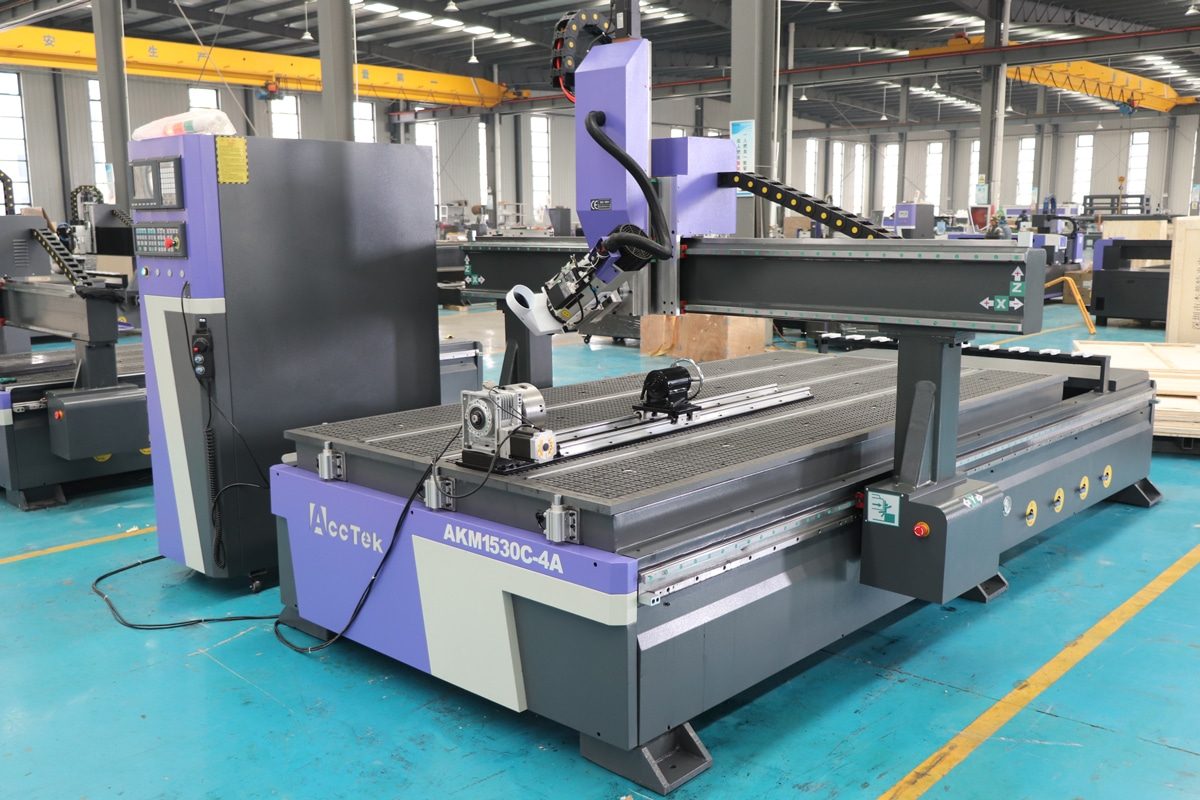
As CNC routing technology advances, manufacturers and workshops are turning to machines with enhanced multi-axis capabilities to achieve more complex and precise results. Among these options, rotary axis CNC routers and 4-axis CNC routers with a swing head are often compared. While both machines add a fourth axis beyond the standard X, Y, and Z movements, they do so in fundamentally different ways, resulting in distinct applications, benefits, and limitations.
A rotary axis CNC router adds a rotating fixture that turns the workpiece itself, making it ideal for cylindrical objects like table legs, stair spindles, and other rounded components. In contrast, a 4-axis swing head CNC router allows the spindle to tilt or rotate, enabling angled cuts, complex 3D surface carving, and detailed mold-making. This article explores how these two machines differ in structure, functionality, and application scope, helping you decide which is best suited for your specific production needs.
Overview of CNC Router Axes
Before comparing rotary axis CNC routers and 4-axis swing head CNC routers, it’s important to understand how CNC routers operate based on axis movement. The number and type of axes directly impact what a machine can produce, from simple cuts to intricate 3D carvings. Here is an overview of the different axis configurations found in CNC routers to help clarify how each setup influences functionality and machining potential.
Standard 3-Axis CNC Router
A standard 3-axis CNC router is the most common and foundational type of CNC machine. It operates using three linear axes: X, Y, and Z. The X-axis controls left-to-right movement, the Y-axis handles front-to-back movement, and the Z-axis governs up-and-down motion. These three directions allow the cutting tool to move across a flat surface and perform operations like cutting, drilling, engraving, and shallow 3D relief carving.
3-axis CNC routers are ideal for applications involving flat materials such as wood panels, acrylic sheets, MDF boards, and aluminum plates. They are widely used in industries like furniture manufacturing, sign making, and cabinetry. However, because all motion occurs in straight lines, these machines are limited when it comes to working on curved or angled surfaces, cylindrical parts, or complex 3D contours. This is where machines with an additional fourth axis offer more flexibility and functionality.
What Adds the Fourth Axis?
In CNC routing, the term fourth axis refers to an additional degree of motion beyond the standard X, Y, and Z movements. While a 3-axis CNC router moves linearly along three planes, the fourth axis introduces rotational movement, greatly expanding machining capabilities. However, this fourth axis can be implemented in two fundamentally different ways—either by rotating the workpiece or by rotating the tool (spindle).
One approach is the rotary axis, often referred to as the A-axis, which is typically an attachment mounted on the CNC router bed. It rotates the workpiece horizontally, allowing for 360-degree cylindrical machining—ideal for columns, tubes, and rounded components.
The other method is the swing-head design, where the spindle itself tilts or pivots around the A-axis. This setup allows the cutting tool to approach the workpiece from various angles, making it possible to cut angled surfaces, sculpt contours, and machine complex 3D geometries without repositioning the material.
Understanding the differences between 3-axis, rotary axis, and swing-head 4-axis configurations sets the stage for evaluating which machine is best suited for a specific task. While all CNC routers share basic motion principles, the addition of a fourth axis opens up entirely new possibilities in design and production. The next sections will explore how these two advanced setups differ in structure, application, and performance.
What Is a Rotary Axis CNC Router?
A rotary axis CNC router is a CNC machine equipped with an additional rotating axis—typically referred to as the A-axis—which turns the workpiece along its horizontal axis. This rotary component is often mounted parallel to the X-axis on the machine bed and can be either integrated into the machine or added as an optional attachment. The rest of the machine still operates on the standard X, Y, and Z axes. Here is more information about it:
Working Principle of Rotary Axis CNC Routers
Unlike standard CNC routers that work on stationary flat materials, a rotary axis router continuously rotates the material itself while the tool cuts from various angles. This allows the tool to access all sides of cylindrical or rounded workpieces in one setup. The rotary axis essentially acts like a lathe, but with the ability to carve, engrave, and profile intricate designs as the spindle follows programmed paths across the rotating surface.
Best Suited Applications of Rotary Axis CNC Routers
Rotary axis CNC routers are ideal for symmetrical round components. The tool still moves along the standard X, Y, and Z axes, but with the rotary axis, it can access the full surface of a round workpiece.
- Furniture Manufacturing: Crafting rounded furniture components such as table legs, chair legs, bedposts, and armrests. This makes it perfect for mass production and custom furniture work.
- Staircase and Railing Production: Used to produce balusters, newel posts, and handrail elements. The rotary axis allows intricate fluting, grooves, or twisted patterns to be applied with high precision, enhancing both functionality and visual appeal.
- Artistic Carving and Sculpture: Create cylindrical sculptures, statues, columns with relief carvings, and decorative pillars. These projects often require seamless detailing around curved surfaces.
- Musical Instrument Making: Useful for shaping round instrument bodies and components such as drum shells, wind instrument tubes, and decorative scrolls.
Advantages of Rotary Axis CNC Routers
- 360-Degree Machining in One Setup: Rotary axis CNC routers allow the workpiece to be rotated continuously or in indexed steps, enabling full-surface machining without the need to reposition the material manually.
- Ideal for Cylindrical and Symmetrical Parts: The rotary axis makes it easy to carve complex details or repeat patterns on circular profiles.
- Expanded Capabilities for 3-Axis Machines: By adding a rotary attachment, users can upgrade a standard 3-axis CNC router to perform 4-axis tasks at a relatively low cost.
- Enhanced Accuracy and Repeatability: The rotary system ensures consistent results by eliminating human error associated with manual rotation or repositioning.
Limitations of Rotary Axis CNC Routers
- Limited to Round or Rotationally Symmetrical Parts: Their functionality is largely restricted to objects that can be rotated around a central axis. Not suitable for flat or irregularly shaped workpieces.
- Not Ideal for Complex Surface Contouring: Cannot tilt the tool to approach a surface from different angles. This limits their use in sculpting complex 3D geometries, undercuts, or angled features on flat materials.
- Requires Specialized Fixturing: To securely hold and rotate the workpiece, rotary setups often need custom fixtures or chucks, especially for non-standard shapes or materials.
- Slower Than Flatbed Machining for Some Tasks: Continuous rotation may slow down production speed for certain projects compared to flatbed machining, especially when fine detailing or multiple tool changes are required.
Rotary axis CNC routers offer a cost-effective way to expand a standard 3-axis machine’s capabilities. However, their functionality is generally limited to rotating parts. They are not ideal for complex 3D surface machining on flat or angled surfaces, which is where swing-head 4-axis CNC routers come into play.
What Is a 4-Axis CNC Router?
A 4-axis CNC router with a swing head design is a type of CNC machine that adds an additional degree of freedom by allowing the spindle to tilt or rotate around the A-axis. Unlike rotary axis machines that rotate the material, swing head CNC routers keep the workpiece stationary while the tool itself moves at different angles, enabling complex machining on multiple planes. Here is more information about it:
Working Principle of 4-Axis CNC Router
In a 4-axis swing head CNC router, the spindle rotates along the A-axis, usually in a range of ±90 degrees. This rotation, combined with standard X, Y, and Z movements, allows the cutting tool to approach the material from various angles. This synchronized motion enables angled cuts, curved surface machining, and undercuts without repositioning the workpiece. CAM software generates multi-axis toolpaths that account for both position and tool orientation, making the swing head ideal for dynamic and complex projects.
Applications of 4-Axis CNC Router
4-axis swing head CNC routers are widely used in industries that require multi-angle and sculpted surface processing, such as:
- 3D Mold Making: Widely used in the production of 3D molds, especially those made from foam, wood, or resin. The tilting spindle allows the tool to follow complex contours and angles in a single setup.
- Complex Relief Carving: In sign making and decorative woodworking, 4-axis routers excel at producing detailed 3D relief carvings on panels, plaques, and architectural elements. The ability to tilt the spindle enables smoother surface transitions and undercut detailing.
- Angled Edge Profiling and Bevel Cuts: Highly effective for cutting beveled edges, chamfers, and angled slots on furniture parts, cabinet doors, and interior trim components. The tilting spindle allows precise control of the cutting angle, enhancing both the aesthetic and structural quality of the final product.
- Sculpture and Artistic Carving: The swing head allows the spindle to tilt and follow curved or organic surfaces with precision, making it perfect for creating detailed statues, relief art, abstract forms, and decorative elements.
Advantages of 4-Axis CNC Router
- Multi-Angle Machining in One Setup: The swing head design allows the spindle to tilt, enabling the machine to cut at various angles without repositioning the workpiece. This significantly reduces setup time and improves machining accuracy for complex parts.
- Enhanced 3D Surface Carving: With synchronized movement of the X, Y, Z, and A axes, the router can follow curved surfaces and contours with precision.
- Enhanced Surface Quality: The ability to control the spindle angle allows for smoother toolpaths and better access to deep or angled features, resulting in cleaner cuts, fewer tool marks, and superior surface quality.
- Greater Design Flexibility: Enables production of complex shapes required in custom woodwork, signmaking, and industrial prototyping.
Limitations of 4-Axis CNC Router
- Higher Machine and Software Costs: Swing head 4-axis machines are more expensive than 3-axis or rotary axis systems and require CAM software that supports multi-axis toolpaths.
- Increased Programming Complexity: Toolpath generation and collision avoidance are more complex, requiring skilled operators and advanced CAD/CAM knowledge.
- Steeper Learning Curve: Operating and maintaining a swing head system involves more training and expertise than simpler CNC machines.
The 4-axis CNC router with swing head design is a powerful solution for producing advanced geometries with precision and efficiency. It’s best suited for users who need maximum design flexibility and have the software tools and skills to take full advantage of its capabilities.
Differences Between Rotary Axis CNC Routers and 4-Axis CNC Routers
Understanding the differences between rotary axis CNC routers and 4-axis swing head CNC routers is beneficial for selecting the right machine for your specific application. From how each axis operates to the complexity of motion and software required, these two machine types serve very distinct purposes in manufacturing and craftsmanship. Below are the key differences:
Axis Movement and Control
- Rotary Axis CNC Router: The fourth axis rotates the workpiece (A-axis), usually via a chuck or fixture attached to the machine bed. The tool remains upright while the material turns. Motion is relatively simple, as it involves rotating the workpiece around a single fixed axis.
- 4-Axis CNC Router: The fourth axis rotates or tilts the spindle (A-axis), allowing the cutting tool to approach the workpiece from various angles while the workpiece remains stationary. Motion is significantly more complex, as the spindle can tilt and cut at variable angles simultaneously with linear movements.
Machining Capability
- Rotary Axis CNC Router: Best suited for cylindrical or symmetrical parts, enabling full 360° processing in a single setup. Commonly used in furniture making (e.g., chair/table legs), stair components, decorative posts, and sculptural columns.
- 4-Axis CNC Router: Designed for angled surface machining, undercuts, compound bevels, and sculpted 3D contours on flat or irregularly shaped workpieces. Preferred in artistic relief carving, car model prototyping, signage, and architectural millwork involving complex geometries.
Machine Structure and Software Requirements
- Rotary Axis CNC Router: Usually an optional attachment added to a standard 3-axis router. It does not change the machine’s primary structure. Typically uses indexing or simple rotary paths and is compatible with most standard 3-axis CAM software with rotary options.
- 4 Axis CNC Router: Integrated into the machine’s frame, requiring a reinforced gantry and advanced motion system for stable and precise angular movement. These machines demand dedicated 4-axis CAM software capable of generating complex toolpaths that include spindle tilt and dynamic angle changes.
Learning Curve
- Rotary Axis CNC Router: Easier to learn and operate, especially for users already familiar with 3-axis machining. Basic rotary operations can be programmed with minimal training, and many CAM systems support simple rotary toolpaths.
- 4-Axis CNC Router: Has a steeper learning curve. Operators must understand advanced multi-axis strategies, tool orientation control, and collision avoidance. Programming 4-axis toolpaths requires experience with specialized CAM software and a deeper understanding of machine kinematics.
Cost and Complexity
- Rotary Axis CNC Router: More cost-effective, especially for users upgrading an existing 3-axis router. The rotary attachment is an affordable and easier-to-operate add-on, and the investment is relatively low. This makes it suitable for small workshops or businesses with limited budgets.
- 4-Axis CNC Router: Involves a higher upfront investment due to the advanced mechanical structure, precision components, and multi-axis controller. Additionally, the required CAM software and training add to the overall cost. These machines are typically geared toward industrial users with a need for high-end, multi-angle machining.
The rotary axis CNC router is ideal for rotating and machining cylindrical workpieces, offering a straightforward and cost-effective solution for round part production. On the other hand, the 4-axis swing head CNC router provides advanced tool orientation and flexibility, making it better suited for angled cuts and complex 3D surfaces.
Choosing the Right Machine: Which One is Better for You?
Selecting between a rotary axis CNC router and a 4-axis CNC router depends on the type of work you do, your production requirements, and your budget. Each machine has its strengths and is designed for specific applications.
Workpiece Type
Consider the shape and geometry of the items you plan to machine.
- If you primarily work with cylindrical or round objects, such as table legs, balusters, or wooden columns, a rotary axis CNC router is the clear choice. It allows full 360° machining of rotating workpieces.
- If your projects include angled surfaces, sculpted panels, or complex contours on flat or irregular parts, a 4-axis swing head CNC router is more appropriate. It enables the spindle to tilt, making it ideal for non-rotational multi-surface machining.
Production Complexity
The complexity of your designs plays a major role in equipment selection.
- For simple engraving, turned parts, and symmetrical shapes, the rotary axis provides the necessary flexibility without added motion control.
- For advanced 3D carving, multi-plane toolpaths, and undercut features, the swing-head 4-axis CNC router is better suited. It can handle complex motion sequences required for prototyping and artistic work.
Budget and Scalability
Evaluate your current investment capacity and how the machine fits into long-term growth.
- Rotary axis CNC routers are generally more affordable, especially if added as an upgrade to an existing 3-axis machine. They’re a cost-effective way to expand capabilities for small workshops or custom woodshops.
- 4-axis swing head CNC routers require higher upfront investment in both machinery and software, but they offer more scalability and design freedom, ideal for businesses expecting to evolve into more sophisticated production.
Skill Level and Software Availability
The ease of use and software compatibility are necessary considerations.
- Rotary axis machines have a gentler learning curve and can be operated with basic CAM software that supports rotary or indexing functions.
- Swing head 4-axis CNC routers require advanced CAM software capable of generating simultaneous multi-axis toolpaths and proper spindle angle control. They also demand a higher level of operator training and experience.
Example Scenarios for Different Business Needs
- A small furniture shop looking to produce custom stair spindles and table legs can benefit from a rotary axis CNC router. It is simple to operate, low-cost, and tailored to round workpieces.
- A sign-making company or mold fabrication shop working with 3D designs, beveled edges, and artistic carvings would gain more value from a swing-head 4-axis CNC router due to its angular flexibility.
The right machine depends on your specific needs. For cylindrical turning, go with a rotary axis. For angled surface work and 3D sculpting, choose the swing head 4-axis CNC router. Evaluating your typical materials, part shapes, and production volume will help you make the best decision.
Summarize
The key difference between a rotary axis CNC router and a 4-axis CNC router lies in how the fourth axis functions, whether it rotates the workpiece or tilts the spindle. Rotary axis CNC routers offer a cost-effective and straightforward solution for machining cylindrical objects. On the other hand, 4-axis CNC routers provide greater flexibility for complex 3D surfaces. Understanding these distinctions enables you to select the machine that best suits your specific production needs and long-term objectives. Continue reading “What is a 5-Axis CNC Router?” to learn more about multi-axis systems.
Choosing the right CNC router doesn’t have to be complicated. Whether you need a rotary axis CNC router or a 4-axis swing head CNC router, AccTek CNC is here to help. As a trusted manufacturer with years of industry experience, we offer a full range of CNC routing equipment tailored to meet diverse application needs. Our expert team provides customizable configurations to ensure your machine fits your workflow, budget, and future growth. Contact us today to get personalized CNC routing solutions that power your productivity.