

- 13-18 Min Read
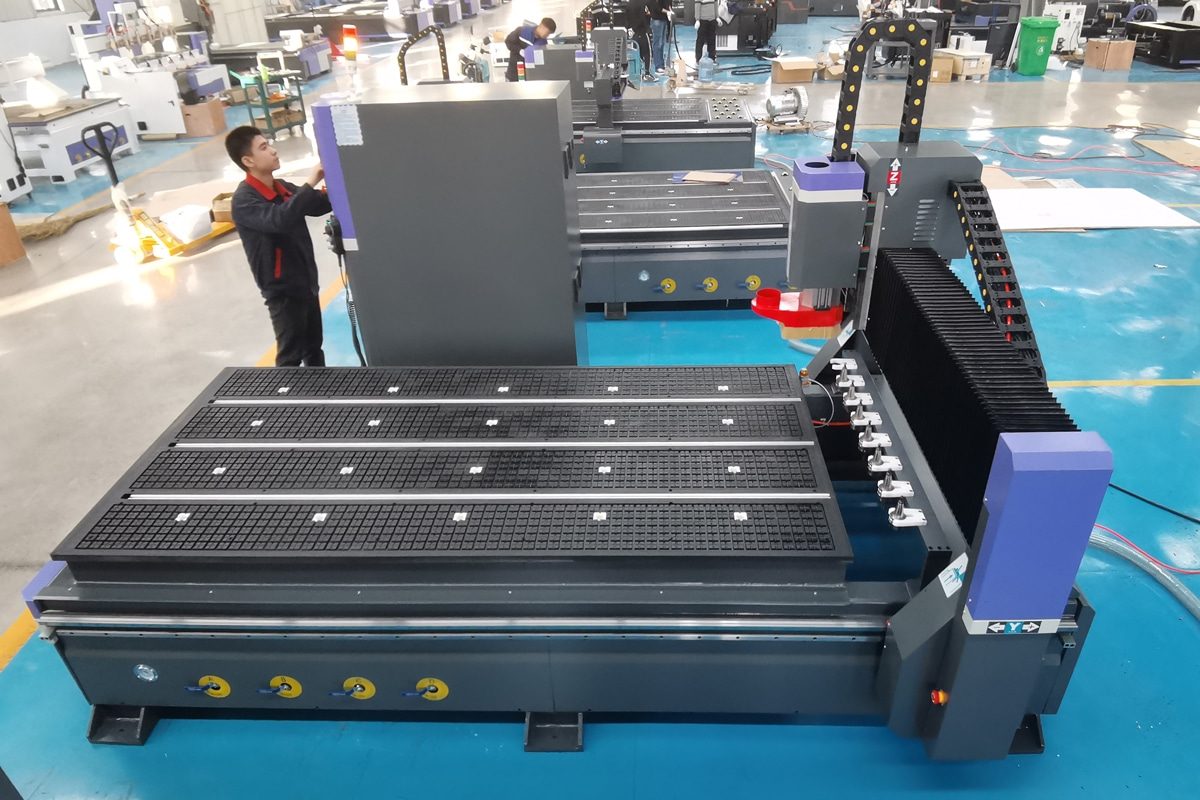
Starting your first CNC router can be an exciting step toward automated, precise, and efficient manufacturing—but for beginners, it often comes with a steep learning curve. From understanding what a CNC router does and how its components work, to choosing the right installation environment, setting up software, and running the first job, each stage requires careful attention and basic technical knowledge. Without a clear roadmap, new users may feel overwhelmed by the many steps involved between unboxing the machine and achieving reliable results.
Follows the complete learning path outlined in this article, guiding readers step by step through CNC fundamentals, machine setup, software preparation, calibration, first cuts, and daily operation. Structured to match the real-world experience of new operators, this guide emphasizes safety, practical tips, and common beginner pitfalls. By the end of the journey, readers will have a clear understanding of how to move from initial setup to confident operation, laying a strong foundation for further skill development and more advanced CNC projects.
Understanding CNC Routers: The Basics
Before setting up or operating a CNC router, it is first necessary to understand the fundamental concepts behind how the machine works. For beginners, learning what a CNC router is, the types of tasks it can perform, and how its key components work together helps remove much of the initial confusion. This foundational knowledge allows new users to better understand machine movements, tool behavior, and control logic, making the learning process smoother and more efficient.
What Is a CNC Router?
A CNC router is a computer-controlled cutting machine used to cut, carve, engrave, and shape a wide range of materials with high accuracy and repeatability. “CNC” stands for Computer Numerical Control, meaning the machine operates based on digital instructions rather than manual guidance. These instructions are written as G-code, which tells the machine exactly how fast to move, where to cut, and how deep the tool should go.
Unlike traditional manual routing, a CNC router uses motors and a controller to move a rotating cutting tool along multiple axes—typically the X (left–right), Y (front–back), and Z (up–down) directions. This automated movement allows the machine to produce consistent results, even for complex designs or high-volume production. CNC routers are commonly used in industries such as woodworking, signage, furniture making, plastics processing, and light metal fabrication.
Key Components of a CNC Router
A CNC router is made up of several essential components that work together to ensure accurate, stable, and efficient machining. Understanding these parts helps beginners operate the machine more confidently and diagnose issues when they arise.
- Machine Frame and Gantry: The frame forms the foundation of the CNC router, providing structural strength and stability. A rigid frame minimizes vibration during cutting, which directly affects accuracy and surface finish. The gantry spans across the frame and supports the moving parts, allowing the spindle to travel smoothly along the machine’s working area.
- Spindle: The spindle is the motorized unit that holds and rotates the cutting tool. It operates at variable speeds depending on the material and tool being used. A stable, well-powered spindle helps make clean cuts, provides consistent performance, and extends tool life.
- Drive System: The drive system controls how the machine moves along each axis. It typically consists of stepper or servo motors combined with ball screws, rack-and-pinion systems, or linear guides. This system ensures precise positioning and smooth motion during operation.
- Controller and Control System: The controller is the “brain”of the CNC router. It interprets G-code from the control software and sends commands to the motors and spindle. The control system may include a dedicated CNC controller, a computer, and a user interface for jogging, setting zero points, and starting or stopping jobs.
- Worktable and Clamping System: The worktable supports the material being machined. Depending on the machine, it may use T-slots, vacuum tables, or clamps to securely hold the workpiece in place. Proper workholding is based on safety and machining accuracy.
Understanding the basics of CNC routers is the first step toward confident and effective use. By learning how the machine operates and recognizing its core components, beginners can make informed decisions and avoid common mistakes. With this foundational knowledge in place, users are better prepared to proceed to machine setup, software configuration, and hands-on operation with greater clarity and confidence.
Choosing the Right Location
Before installing a CNC router, careful preparation is required to ensure smooth setup, accurate operation, and long-term machine reliability. Beginners must consider not only the physical placement of the machine but also the necessary safety precautions, power requirements, and environmental conditions. Proper planning at this stage reduces the risk of errors, prevents damage to the equipment, and sets the stage for efficient and safe operation.
Preparing for Installation and Setup
Properly selecting the location for your CNC router is one of the most important steps in preparing for installation. The right environment ensures stable operation, accurate machining, and safe working conditions.
- Space Requirements: The workspace should be sufficiently large to accommodate the machine, allow operators to move freely, and provide room for loading and unloading materials. Sufficient clearance around the CNC router also makes maintenance and inspection easier, reducing the risk of accidents or damage.
- Floor Stability and Vibration Control: Uneven or weak flooring can cause vibration, leading to poor surface finish, inaccurate cuts, and accelerated wear on machine components. For larger industrial CNC routers, reinforced concrete floors are often recommended, while smaller machines still benefit from a solid, well-leveled base.
- Power Supply and Grounding: Ensure that the location has access to a reliable power supply compatible with the CNC router’s requirements. Proper grounding helps both operator safety and the protection of the machine’s electronics.
Safety Considerations Before Setup
Safety should always be a top priority when preparing to install and operate a CNC router. Even before turning on the machine, taking the proper precautions helps prevent accidents, equipment damage, and long-term operational issues.
- Personal Protective Equipment (PPE): Operators should wear appropriate PPE, including safety glasses, hearing protection, and dust masks or respirators if working with materials that produce fine particles. Gloves may be used during material handling, but should be avoided near rotating tools to prevent entanglement.
- Emergency Stops and Safety Switches: Familiarize yourself with the location and function of emergency stop buttons and safety switches on the machine. Ensuring these features are accessible and functional, allowing for quick stopping of the machine in case of malfunction or emergency.
- Ventilation and Dust Collection: CNC routing can produce dust, fumes, and chips, especially when working with wood, plastics, or composites. Adequate ventilation and a proper dust extraction system protect both the operator and the machine, reducing health risks and preventing material buildup that can affect performance.
Thorough preparation is the foundation for a successful CNC router experience. By selecting the right location, ensuring floor stability, verifying power supply and grounding, and addressing key safety considerations, beginners can create a workspace that supports precise machining, protects operators, and promotes the long-term health of the machine. With these steps completed, users are ready to move confidently into the actual installation and setup process.
CNC Router Setup: Step by Step
Setting up a CNC router correctly is a critical step for achieving accurate, reliable, and safe operation. For beginners, the setup process may seem complex, but breaking it down into clear, step-by-step actions makes it manageable and ensures that no important details are overlooked. This section guides users through machine assembly, electrical and control system connections, and tool installation, providing a structured approach that lays the foundation for successful operation.
Machine Assembly and Positioning
Proper assembly and positioning of a CNC router ensure that all components are aligned correctly and that the machine sits securely in its workspace, reducing vibrations and maintaining cutting precision.
- Unpacking and Inspection: Begin by carefully removing the CNC router from its packaging. Check all components for damage that may have occurred during shipping, and verify that all parts listed in the manual are present.
- Leveling the Machine: Use a precision level to ensure the frame is completely horizontal. Some machines include adjustable leveling feet, which can be fine-tuned to achieve perfect balance.
- Positioning and Securing: Place the CNC router in its designated workspace with adequate clearance on all sides for material handling and operator movement. For larger machines, it may be necessary to bolt the frame to the floor or add stabilizing supports.
Electrical and Control System Setup
Proper connections of electrical ensure that the machine functions reliably, communicates correctly with the control software. Beginners should follow the manufacturer’s instructions carefully to avoid damage to the machine or controller.
- Connecting Power and Cables: Begin by connecting the machine to the appropriate power source, making sure the voltage and current match the specifications in the manual. Attach all necessary interface and signal cables, including connections between the controller, motors, and spindle.
- Controller and Software Installation: Install the CNC control software and any required drivers on the computer or dedicated controller. Ensure that the controller communicates correctly with the CNC router before proceeding.
- Initial Power-On Inspection: Once connections are complete, power on the machine and perform an initial inspection. Test each axis for smooth movement using manual jog functions, and check that the spindle responds to speed commands.
Tool Installation and Spindle Setup
Proper tool installation and spindle setup are key to achieving precise cuts and ensuring safe CNC router operation, so beginners should follow each step carefully.
- Selecting the Right Cutting Tools: Choose the appropriate tools for your material and project. For beginners, starting with basic end mills, V-bits, or engraving bits is recommended.
- Installing and Securing the Tool: Insert the cutting tool into the spindle collet, making sure it is seated properly and tightened securely. Double-check that the tool is straight and centered before moving on to the operation.
- Setting Spindle Speed: Adjust the spindle speed according to the material and tool specifications. Beginners should start with lower speeds for initial tests to avoid burning, chipping, or excessive wear.
Following a systematic setup process helps beginners prepare their CNC router for precise and efficient machining. By carefully assembling the machine, connecting the electrical and control systems, and installing tools correctly, operators can minimize errors, prevent damage, and establish safe working practices. With the machine fully set up, the next step is calibration and testing, bringing the CNC router closer to producing accurate and high-quality results.
Machine Calibration and Testing
Once a CNC router is fully assembled and connected, calibration and testing are essential steps to ensure accuracy, repeatability, and safe operation. Proper calibration aligns the machine’s movements with the programmed commands, while testing allows beginners to verify that everything is functioning correctly before cutting real materials.
Axis Calibration and Homing
Axis calibration and homing are fundamental steps in preparing a CNC router for accurate and repeatable machining. These procedures establish the machine’s reference positions, ensuring that every movement corresponds precisely to the programmed commands.
- Homing the Machine: Homing involves moving each axis to a predefined reference point, usually detected by limit switches or sensors. This process sets the machine’s “zero”position, allowing the controller to track all subsequent movements accurately.
- Calibrating Axis Movement: Axis calibration ensures that the distance the machine travels matches the commanded movement in the software. This involves measuring actual travel versus expected travel and making adjustments if needed.
Tool Length and Workpiece Zeroing
Accurate tool length and workpiece zeroing form the foundation for precise and predictable CNC routing, allowing beginners to achieve high-quality results from their very first project.
- Tool Length Calibration: Calibrate the Z-axis by setting the correct tool length relative to the workpiece surface. This can be done manually using a feeler gauge or tool setter, or automatically if the CNC router has a probe system.
- Workpiece Zeroing: Workpiece zeroing defines the starting point of the material in the CNC coordinate system. Typically, the X and Y zero points are set at a convenient corner or center of the workpiece, while the Z zero point is set at the top surface or, in some cases, the bottom.
Dry Runs and Test Cuts
Before cutting the actual workpiece, performing dry runs and test cuts is an essential step for ensuring that the CNC router operates safely and accurately. These procedures allow beginners to verify toolpaths, machine movements, and cutting parameters without risking valuable material or tools.
- Dry Runs: This allows you to observe the machine’s movement along the X, Y, and Z axes and confirm that the toolpaths match the intended design. Dry runs help detect potential collisions, incorrect coordinates, or programming errors before making real cuts.
- Test Cuts: This step lets beginners check cutting depth, feed rate, spindle speed, and overall cutting quality. Adjustments can be made based on the results to achieve the desired finish and accuracy.
Proper machine calibration and testing lay the foundation for successful CNC router operation. By carefully homing and calibrating the axes, setting tool lengths and workpiece zero points, and conducting dry runs and test cuts, beginners can identify and correct potential issues before production. These steps not only improve accuracy and repeatability but also enhance safety and efficiency, ensuring a smooth transition from setup to full operation.
From First Cut to Full Operation
Once a CNC router has been assembled, calibrated, and tested, it’s time to move from preparation to actual machining. This stage allows beginners to apply what they’ve learned, gain hands-on experience, and build confidence in operating the machine. Transitioning from test runs to full operation requires careful attention to cutting parameters, material handling, and monitoring to ensure consistent, high-quality results.
Running Your First CNC Job
This marks the transition from setup and testing to actual production. Careful preparation and attention during this initial operation are key to achieving accurate results and preventing mistakes.
- Preparing the Workpiece: Secure the material firmly on the worktable using clamps, vacuum tables, or other appropriate workholding methods. Ensure the workpiece is flat and level to prevent movement during cutting, which can affect accuracy and surface finish.
- Loading the Program: Import the G-code generated from your CAD/CAM software into the CNC controller. Verify that the correct file is selected, and review the toolpath preview to confirm the design aligns with the material and machine setup.
- Setting Cutting Parameters: Double-check spindle speed, feed rate, and cutting depth for the material and tool being used. Beginners should start with conservative settings, gradually adjusting as they gain confidence and observe how the material responds.
- Monitoring the Job: Keep a close eye on the machine throughout the operation. Watch for unusual noises, vibrations, or unexpected tool movements, and be ready to use the emergency stop if needed. Monitoring ensures that any issues are caught early, preventing damage to the tool or workpiece.
Material-Specific Operation Tips
Different materials require different approaches when using a CNC router. Understanding the unique characteristics of each material helps beginners achieve clean cuts, prevent damage, and extend tool life.
- Wood: Softwoods and hardwoods respond differently to cutting. Softwoods can handle higher feed rates, but hardwoods often require slower speeds and multiple passes to prevent burning or tear-out. Sharp, high-quality tools improve surface finish and reduce splintering.
- Plastics: Plastics are prone to melting or chipping if cut too quickly. Lower spindle speeds and moderate feed rates help maintain clean edges. Using tools designed specifically for plastics can reduce heat buildup and improve cutting quality.
- Metals: Machining metals requires specialized end mills and slower feed rates compared to wood or plastics. Proper cooling or lubrication is often necessary to prevent tool wear and overheating. Beginners should start with thin or soft metals before attempting harder materials.
- Composites and Other Materials: Materials like MDF, carbon fiber, or laminates can generate dust or require specific cutting strategies. Use dust collection systems, appropriate cutting tools, and multiple passes for best results.
Successfully moving from the first cut to full operation builds confidence and lays the foundation for consistent, high-quality machining. By carefully preparing workpieces, monitoring the machine, and adapting cutting parameters to the material, beginners can minimize errors, protect tools and materials, and develop the skills needed for more advanced projects. With experience, this process becomes second nature, allowing operators to take full advantage of their CNC router’s capabilities.
Basic Maintenance and Daily Care
Regular maintenance and daily care help keep a CNC router in optimal condition. For beginners, establishing consistent habits in cleaning, lubrication, wear checks, and software upkeep helps prevent mechanical problems, maintain cutting accuracy, and extend the life of both the machine and tools.
Routine Cleaning and Inspection
Routine cleaning and inspection help to keep a CNC router in optimal working condition. Regularly removing dust, chips, and debris prevents build-up that can interfere with machine movement, reduce accuracy, and accelerate wear on components.
- Daily Cleaning: After each use, wipe down the machine frame, gantry, and worktable to remove loose dust and debris. Pay special attention to areas around the spindle, linear guides, and ball screws, as accumulated material can affect smooth motion. Using a vacuum or compressed air can help clean hard-to-reach spots, but avoid blowing debris into sensitive electronics.
- Checking Moving Parts: Check for loose bolts, screws, or fittings that may have shifted during operation. Inspect belts, pulleys, and drive components for signs of wear or misalignment. Look over the spindle and cutting tools for damage, and replace them if necessary.
Lubrication and Wear Checks
Proper lubrication and regular wear checks are beneficial for maintaining smooth operation, precision, and the longevity of a CNC router. Neglecting these steps can lead to increased friction, premature wear, and reduced cutting accuracy.
- Lubrication of Moving Parts: Apply lubricant to linear guides, ball screws, and other moving components according to the manufacturer’s recommendations. Use the correct type of lubricant and avoid over-application, which can attract dust and debris. Regular lubrication ensures smooth axis movement and prevents excessive wear on mechanical parts.
- Checking for Wear and Damage: Inspect drive belts, pulleys, and couplings for signs of wear, stretching, or misalignment. Examine cutting tools, collets, and the spindle for damage or dullness, and replace them as needed. Early detection of worn or damaged components prevents breakdowns and ensures consistent cutting performance.
Software and System Maintenance
Maintaining the software and control system of a CNC router is as important as caring for the hardware. Regular attention ensures reliable operation, prevents data loss, and keeps the machine running efficiently.
- Backing Up Settings and Programs: Regularly back up machine parameters, tool libraries, and G-code programs. In the event of a software crash, accidental deletion, or hardware failure, having backups ensures that you can quickly restore settings and resume production without significant downtime.
- Software and Firmware Updates: Keep the CNC control software and machine firmware up to date. Updates often include bug fixes, performance improvements, and new features that enhance machine functionality and compatibility with modern CAD/CAM programs.
Following basic maintenance and daily care practices, beginners can keep their CNC router running smoothly, reduce the risk of unexpected breakdowns, and achieve consistent, high-quality results. Regular attention to cleaning, lubrication, wear checks, and system maintenance not only protects the machine and tools but also builds the foundation for reliable, long-term CNC operation.
Safety Practices During Operation
Safe operation is a critical part of using a CNC router, especially for beginners who are still gaining hands-on experience. Even with proper setup and calibration, accidents can occur if safety procedures are overlooked during daily operation. Safety practices to follow while the machine is running, helping operators protect themselves, maintain control of the process, and prevent damage to the equipment.
- Safe Startup and Shutdown Procedures: Always follow the recommended startup sequence, including checking tool installation, workpiece clamping, and machine zero points before running a program. When finishing a job, stop the spindle, return the machine to a safe position, and power down according to the manufacturer’s guidelines. Proper startup and shutdown reduce mechanical stress and improve overall safety.
- Staying Alert During Operation: Never leave a CNC router unattended while it is running, especially during new or complex jobs. Watch for unusual noises, vibrations, or cutting behavior, and be prepared to use the emergency stop if something goes wrong. Staying focused allows problems to be addressed before they escalate.
- Handling Emergencies and Unexpected Situations: Know the location of emergency stop buttons and ensure they are always accessible. If a tool breaks, a workpiece shifts, or the machine behaves unexpectedly, stop the operation immediately and investigate the cause before restarting.
- Long-term Safety Habits for Operators: Keep the workspace clean and free of clutter. Avoid loose clothing, jewelry, or long hair near moving parts. Use appropriate personal protective equipment, such as safety glasses and hearing protection, at all times.
Consistently applying safe operating practices helps create a secure and efficient CNC working environment. By following proper startup and shutdown procedures, staying alert during operation, responding correctly to emergencies, and maintaining an organized workspace, beginners can significantly reduce risks. Developing these habits early not only improves safety but also builds confidence and supports long-term, reliable CNC router operation.
Summarize
Beginning your journey with a CNC router may seem complex at first, but with a clear understanding of the fundamentals, careful setup, and proper calibration, the process becomes both manageable and rewarding. From preparation and installation to the first cut, full operation, and safe daily use, by following each stepbeginners can build confidence while achieving accurate, high-quality results. As experience grows, these foundational practices will support continuous improvement, allowing you to fully unlock the efficiency and creative potential of CNC router technology. Continue reading “Troubleshooting Guide: Common CNC Router Problems Explained” to learn how to troubleshoot machine problems and operate it with confidence.
AccTek is a professional CNC router manufacturer dedicated to providing reliable, high-performance solutions for users with different needs and experience levels. With a wide range of machine models available—from entry-level CNC routers for beginners to advanced 4-axis and 5-axis systems for industrial applications—we offer flexible options for woodworking, signage, metal processing, and custom manufacturing. Combined with stable machine construction, precise machining performance, and comprehensive technical support, AccTek CNC routers are a dependable choice for users looking to improve productivity and achieve consistent, high-quality results.