

- 10-14 Min Read
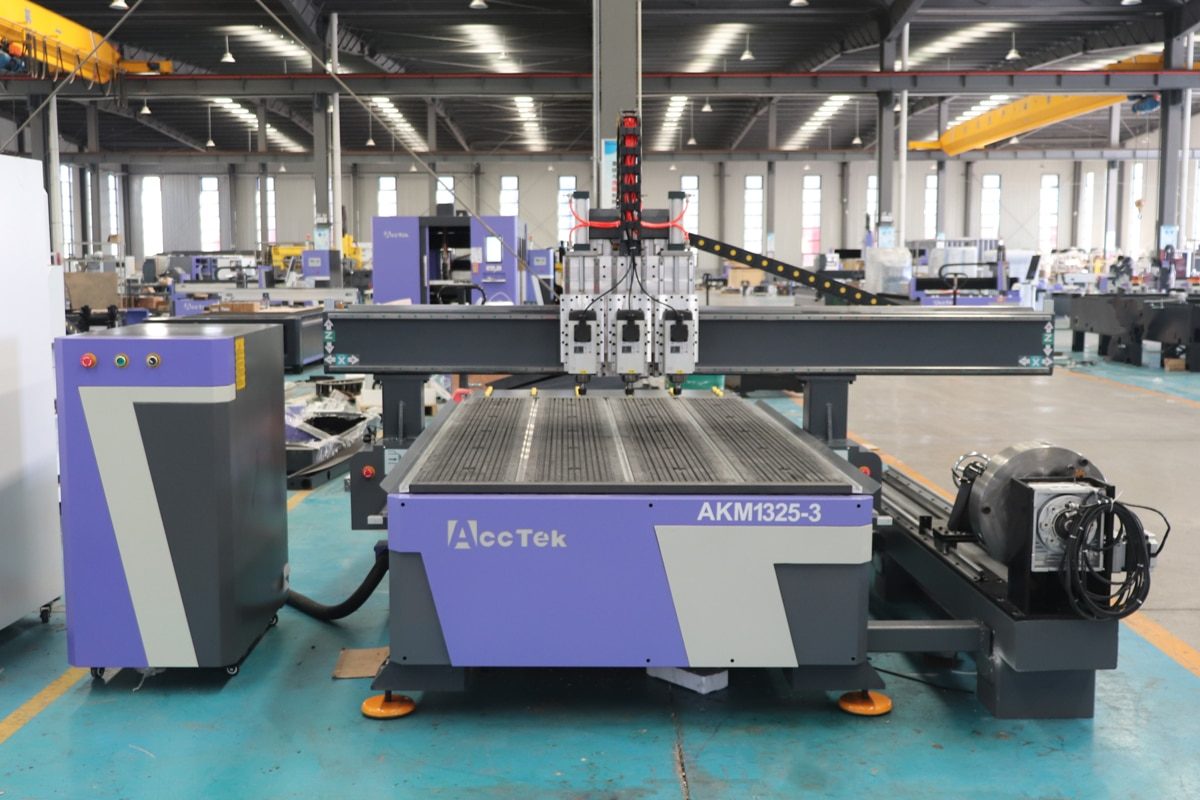
CNC routers are powerful and versatile tools widely used in woodworking, metalworking, signage, and prototyping. But as production needs evolve or new materials are introduced, many users begin to ask an important question: Can CNC routers be upgraded or expanded to meet changing demands? The answer is a resounding yes, CNC routers are often designed with flexibility in mind. In many cases, they can be upgraded or expanded to meet new needs.
From upgrading spindles and adding automatic tool changers to expanding axis capabilities or integrating dust collection systems, the possibilities for enhancement are extensive. In this article, we’ll explore the types of upgrades available, the benefits they bring, and the key considerations before modifying your CNC system. Whether you’re a small workshop looking to scale up or a professional aiming to boost productivity, understanding upgrade options can help you get more value from your investment.
Why Upgrade or Expand a CNC Router?
Upgrading or expanding a CNC router offers numerous advantages that go beyond just fixing worn components. Whether you’re a hobbyist aiming for greater precision or a business scaling up production, enhancements can deliver meaningful improvements across performance, versatility, and cost-efficiency. Here’s why many users choose to upgrade:
Improving Performance or Speed
Over time, even a reliable CNC router may start to fall short in terms of cutting speed or precision, especially when compared to newer models. Upgrading components such as the spindle, drive motors, or control system can greatly enhance your machine’s overall performance. A more powerful spindle allows for deeper and faster cuts, while switching from stepper to servo motors can improve acceleration and positioning accuracy. These enhancements lead to reduced cycle times, higher throughput, and smoother finishes—all without compromising quality.
Adding New Features
As your workshop grows, you may want to take on more complex projects or offer new services. Expanding your machine’s capabilities by adding features such as a rotary axis, automatic tool changer (ATC), vacuum hold-down system, or probe for auto-zeroing can make your CNC router more versatile. These add-ons enable 4-axis cutting, tool-free material setups, and better automation, allowing you to handle a wider range of jobs with greater efficiency and less manual labor. This opens the door to new services, customers, and project types without investing in an entirely new machine.
Adapting to New Production Needs or Materials
Your original CNC router may have been ideal for early projects, but production needs change. You may now be working with harder materials, larger workpieces, or more detailed designs. In such cases, upgrades like a stiffer gantry, better dust extraction, enhanced cooling systems, or advanced CAM software help your machine adapt to new challenges. Expanding your CNC router’s capacity ensures it remains a relevant and valuable asset in your workflow.
Extending Machine Life and Reducing Replacement Costs
Replacing a CNC router can be a major investment. Fortunately, many of its core components can be replaced or upgraded individually. By modernizing these parts, you can breathe new life into a machine that still has a solid frame and structure. This approach not only delays the cost of full replacement but also keeps your operations running without the long downtime associated with installing and learning an entirely new system. With smart enhancements, you can achieve performance levels comparable to newer models while protecting your original investment.
Upgrading or expanding a CNC router isn’t just about keeping up with technology—it’s about unlocking greater value from the machine you already own. Whether you’re seeking faster output, greater flexibility, longer machine lifespan, or the ability to take on new types of work, thoughtful enhancements can deliver impressive returns. With the right upgrades, your CNC router can continue to serve as a powerful tool in your production line for years to come.
Types of Upgrades and Expansions
CNC routers are highly customizable machines, and one of their greatest strengths lies in their ability to be modified over time. Whether you’re looking to increase productivity, improve cutting precision, or expand functionality, there are many upgrade paths available. Below are the most common types of upgrades and expansions, categorized by function:
Mechanical Upgrades
Mechanical enhancements focus on improving the physical structure and motion system of the CNC router, directly impacting precision, durability, and speed.
- Spindle Upgrade: Replacing a low-power spindle with a higher-wattage unit (e.g., 6kW or 7.5kW) increases cutting depth and efficiency, especially for tougher materials like hardwoods or aluminum.
- Drive System Enhancement: Switching from belt-driven to ball screw or rack-and-pinion drives can improve precision and reduce backlash. Replacing stepper motors with servo motors boosts speed, torque, and accuracy.
- Gantry and Frame Reinforcement: Strengthening the gantry or upgrading to a stiffer frame improves stability during high-speed cuts and reduces vibration for cleaner edges.
- Worktable Modifications: Adding a vacuum table for better material hold-down or expanding the bed size allows you to process larger workpieces more efficiently.
Electrical and Control System Upgrades
These upgrades improve the machine’s intelligence, control, and automation capabilities.
- Controller Upgrade: Upgrading from a basic DSP or manual interface to a more advanced system like Mach3, Mach4, LinuxCNC, or industrial controllers allows for better motion control, macro programming, and software integration.
- Motion Drivers and Motors: Enhanced drivers and switching to closed-loop servo systems allow for smoother operation and fewer positioning errors.
- Sensor and Limit Switch Improvements: Upgrading to optical or proximity sensors increases machine reliability and repeatability, reducing the chance of misalignment or overtravel.
Software Upgrades
Software improvements expand design capability and improve workflow efficiency.
- Advanced CAD/CAM Software: Moving from entry-level software to professional-grade tools (like Fusion 360, Aspire, or Vectric Pro) enhances your ability to design complex parts and generate optimized toolpaths.
- Firmware Updates: Keeping your controller firmware up to date ensures compatibility with new software, improves system stability, and may unlock new features.
Post-Processing and Simulation Tools: Installing simulation software allows you to preview toolpaths and avoid collisions or material waste before actual machining.
Functional Add-Ons and Accessories
These optional components expand your CNC router’s job capabilities and improve ease of use.
- Rotary Axis: Enables 4-axis or cylindrical engraving, ideal for producing posts, pipes, or rounded parts.
- Automatic Tool Changer (ATC): Eliminates manual tool changes during multi-tool operations, significantly reducing downtime and increasing automation.
- Tool Length Sensor (Auto Z-Probe): Automatically sets tool height for precision depth control without manual calibration.
- Mist or Coolant Systems: Adds cooling during cutting, especially useful when machining metals or plastics.
- Dust Collection System: Reduces cleanup time and protects the machine’s components from debris buildup.
- Touchscreen or Remote Pendant: Enhances user interaction and control flexibility on the shop floor.
CNC router upgrades and expansions come in many forms, from simple spindle swaps to complete control system overhauls. Each improvement can be beneficial in enhancing machine performance, adding new capabilities, and adapting to changing production needs. When chosen carefully, these upgrades not only make your workflow more efficient but also increase the long-term value of your CNC investment.
Limitations and Compatibility Issues
While upgrading or expanding a CNC router can offer many benefits, it’s necessary to understand the potential limitations and compatibility challenges that may arise. Not all upgrades are plug-and-play, and failing to account for certain factors could lead to wasted time, money, or even machine damage. Below are the most common issues to consider before making changes to your CNC system:
Mechanical Constraints
Your machine’s frame, gantry, and overall build quality determine what kinds of upgrades are physically possible. For example:
- Frame Rigidity: Adding a high-power spindle to a lightweight frame can introduce vibration, reducing accuracy.
- Z-Axis Travel: Taller tools or rotary devices may require more vertical clearance than your machine allows.
- Gantry Width and Table Size: Expanding the worktable or modifying the gantry requires significant re-engineering and may affect structural stability.
Always check if the mechanical structure can support the weight, torque, and size of the new components.
Electrical and Power Limitations
Upgrading to more powerful spindles, servos, or control boards may exceed your current power supply or electrical infrastructure.
- Power Supply Capacity: New components might require 220V instead of 110V, or draw more current than your existing circuit can handle.
- Wiring and Connectors: Thicker wiring or additional connectors may be required for higher-voltage components or added sensors.
- Incompatible Drivers or Motors: Older stepper drivers may not support newer motor technologies, and mismatched voltage levels can cause performance issues or damage.
Consult your wiring diagram and power rating specifications before making electrical changes.
Software and Firmware Compatibility
Even with physical and electrical compatibility, software integration may be a challenge.
- Outdated Firmware: Your current controller may not support the latest features unless updated, and some older boards can’t be upgraded.
- CAM/Post-Processor Issues: Not all CAM software supports every control system, and you may need custom post-processing files for optimal performance.
- Limited Axis Support: Adding a rotary or 4th axis may require both hardware and software updates to be recognized and controlled properly.
Always confirm software support and availability of proper firmware or drivers before upgrading.
Loss of Warranty or Technical Support
Modifying a CNC router may void the manufacturer’s warranty or reduce access to technical support.
- Some manufacturers may not provide assistance for user-modified systems.
- Replacement parts may become harder to source if the machine is no longer in its original configuration.
If warranty coverage is still active, consult the manufacturer before making major changes.
Required Technical Knowledge and Tools
Certain upgrades require a solid understanding of CNC mechanics, electronics, and software configuration.
- Improper installations can cause machine damage or safety hazards.
- Calibration, firmware flashing, and controller rewiring may require specialized tools or skills.
- Misaligned components or incorrect settings can result in crashes, lost steps, or subpar cut quality.
If you’re unsure, consider hiring a technician or consulting the manufacturer or a CNC upgrade specialist.
Upgrading a CNC router can be highly rewarding, but it’s not without risk. Before moving forward, it’s essential to evaluate mechanical compatibility, electrical capacity, software limitations, and your own technical ability. Taking time to assess these factors ensures a smoother upgrade process and protects your investment from costly mistakes.
Cost-Benefit Considerations
Before investing time and money into upgrading or expanding your CNC router, it’s essential to weigh the potential benefits against the actual costs. While enhancements can bring significant improvements, not every upgrade justifies the expense, especially if your machine is outdated or limited by design. The goal is to make smart decisions that improve productivity, extend equipment life, and maximize return on investment (ROI). Below are the key factors to consider:
Upgrade Cost vs. New Machine Cost
Start by comparing the total cost of planned upgrades with the price of a new CNC router that already includes those features. Typical Upgrade Costs:
- Individual Component Costs: High-quality spindles, servo motors, controllers, and software licenses can quickly add up.
- Labor and Installation: If you’re not doing the work yourself, professional installation and calibration can add to the expense.
- Downtime Costs: While upgrading, your machine may be offline, affecting production and revenue.
If the upgrade cost approaches 60–70% of a new machine’s price, it may be more practical to invest in a newer machine with better long-term value and future-proofing.
When Is Upgrading More Economical Than Replacing?
Upgrading is often the better option if your existing CNC router has a solid mechanical foundation and still meets most of your size or production requirements. You can replace or enhance specific components, such as the spindle, motor drivers, controller, or software, without the need to purchase an entirely new system. This can result in significant savings, especially for small businesses or workshops with limited budgets. Upgrading is most economical when:
- The base frame and motion system are in good condition.
- Only one or two components limit your machine’s performance.
- Your production needs have changed, but not drastically enough to warrant a full system overhaul.
Performance Gains and ROI
Evaluate how much efficiency, precision, or production capacity the upgrade will realistically add.
- Faster Cycle Times: Will a more powerful spindle or servo motor significantly reduce production time?
- Improved Output Quality: Can better software or motion systems reduce rework and waste?
- Higher Capacity: Will expansions (like a rotary axis or ATC) allow you to take on more complex or higher-value projects?
The value of the upgrade should be measurable in terms of improved output, faster turnaround times, or new revenue streams.
Compatibility and Hidden Costs
Sometimes one upgrade triggers another, which in turn creates hidden costs. Understanding the full scope of changes helps prevent cost overruns and project delays.
- Integration Effort: New components must be compatible with existing hardware and software. This often involves configuration changes, wiring adaptations, and potential firmware updates.
- Learning Curve: Switching to a new controller or CAM software may require operator retraining, which adds time and may temporarily reduce output accuracy or consistency.
By contrast, buying a new, pre-configured CNC router may involve a higher up-front cost but provide a faster, smoother transition into production with minimal disruption.
Upgrading or expanding a CNC router is not just a technical decision—it’s a financial one. By carefully evaluating costs, expected performance gains, and long-term value, you can determine whether an upgrade makes sense or if it’s time to invest in a new machine. A well-planned upgrade can breathe new life into your existing equipment, but only if the benefits clearly outweigh the investment.
Tips Before Upgrading a CNC Router
Upgrading a CNC router can significantly enhance its capabilities and extend its lifespan, but only when approached with careful planning. Before purchasing new components or making any modifications, it’s important to assess your machine, your goals, and your technical capacity. Here are essential tips to follow before starting your upgrade journey:
Consult the Original Manufacturer or a Qualified Technician
Before making any changes, reach out to the machine’s manufacturer or a certified technician. They can:
- Confirm which components are upgradeable.
- Advise on compatible parts and recommended specifications.
- Warn against changes that may void your warranty or create safety risks.
Expert guidance can prevent costly mistakes and ensure your upgrades are both safe and effective.
Evaluate Your Current Machine's Condition
Begin by inspecting the mechanical structure of your CNC router:
- Is the frame still rigid and stable?
- Are the linear guides, ball screws, and bearings in good condition?
- Are the electronics functioning reliably?
If the core structure is worn out or outdated, upgrading may only offer temporary benefits. In such cases, a new machine could be a more sustainable investment.
Define Your Upgrade Goals Clearly
Upgrades should serve a specific purpose, whether it’s faster cutting, higher precision, material compatibility, or added automation. Avoid upgrading for the sake of it. Instead, ask:
- What’s limiting your productivity now?
- What materials or jobs do you want to handle in the future?
- Which features will deliver the highest impact?
Having clear goals helps prioritize upgrades and avoid unnecessary expenses.
Check Compatibility Before Purchasing Parts
Not all aftermarket components will integrate smoothly with your machine. Before buying any component, confirm that it matches your existing machine:
- Mechanical fit: Will it physically mount to your CNC router?
- Electrical match: Do the voltage, current, and connector type align?
- Software support: Is it compatible with your current controller and CAM software?
Consult user manuals, forums, or the manufacturer when in doubt. Avoid mixing incompatible systems that could lead to performance issues or hardware failure.
Backup Your Machine Settings and Files
Before replacing hardware or updating software, create a complete backup:
- Save machine parameters and firmware settings.
- Back up G-code files, tool libraries, and calibration data.
- Take reference photos of wiring or component positions.
This documentation will be invaluable for restoring your machine if something goes wrong during the upgrade process.
A successful CNC router upgrade starts with careful planning and realistic expectations. By following the above tips, you’ll reduce the risk of costly errors and ensure your upgrades deliver lasting value. A thoughtful approach today leads to a smoother, more powerful machine tomorrow.
Summarize
Yes, CNC routers can be upgraded or expanded, and doing so can be a smart way to improve performance, add new functionality, and extend the machine’s usable life without the high cost of replacement. From mechanical enhancements to software improvements and functional add-ons, there are many ways to adapt a CNC router to meet changing production needs. However, successful upgrades require careful planning. With the right approach, even a modest upgrade can unlock significant improvements in precision, productivity, and versatility.
AccTek CNC is a professional and dependable CNC router manufacturer in China. If your current machine is reaching its limits or upgrades are becoming too costly, investing in a new CNC router from AccTek can be a smart, future-proof solution. With strong after-sales support and proven reliability, AccTek CNC provides not only the technology but also the guidance needed for long-term manufacturing success.