

- 15-20 Min Read
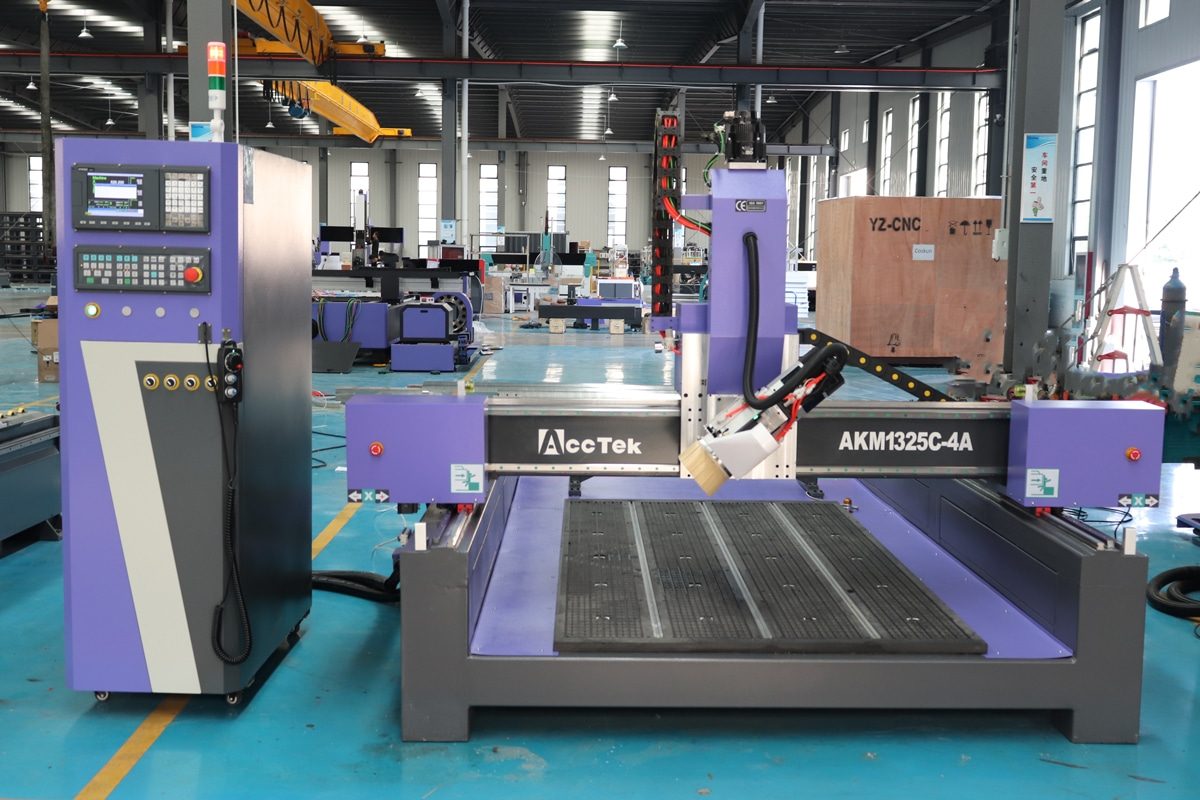
CNC routers have become essential tools in modern manufacturing and woodworking, offering precision, repeatability, and efficiency for a wide range of applications. Among the various types of CNC machines available, the 4-axis CNC router with a swing head stands out as a powerful and versatile option. Unlike traditional 3-axis CNC routers that move only along the X, Y, and Z axes, a 4-axis machine adds rotational movement, allowing the spindle to tilt at different angles. This extra degree of freedom opens up new possibilities for machining complex surfaces, bevels, angled cuts, and multi-sided parts.
For beginners, understanding the structure and operation of this type of machine may seem challenging at first. However, once broken down, the swing head design offers practical advantages and is easier to master than it initially appears. This guide is designed to help new users get started by explaining how a 4-axis CNC router with a swing head is built, how it operates, and what steps are required for proper configuration and use. Whether you’re setting up your first machine or looking to expand your CNC capabilities, this guide will give you the foundational knowledge you need to begin with confidence.
What is a 4-Axis CNC Router with Swing Head?
A 4-axis CNC router with a swing head is a type of computer-controlled cutting machine that adds a fourth axis of movement through a pivoting or tilting spindle head. This swing head, often referred to as the A-axis, allows the spindle to tilt forward and backward, enabling the machine to cut or carve at various angles without repositioning the workpiece manually.
Understanding the 4 Axes
X-Axis: The X-axis controls the side-to-side motion of the cutting tool across the machine bed. This horizontal movement runs along the width of the material and is one of the primary axes for shaping and contouring flat surfaces.
Y-Axis: The Y-axis moves the cutting head from front to back, managing the machine’s motion along the depth of the work area. Working together with the X-axis, it enables the CNC router to follow precise 2D paths or 3D contours on the surface of the material.
Z-Axis: The Z-axis governs the vertical motion of the spindle, allowing the cutting tool to move up and down. This movement determines the depth of each cut, engraving, or drill hole.
A-Axis: The A-axis is what distinguishes a 4-axis CNC router from a standard 3-axis model. In a swing head configuration, this axis allows the spindle to tilt forward and backward, typically rotating around the X-axis.
Swing Head VS Rotary Axis
A swing head CNC router features a spindle mounted on a pivot that allows it to tilt forward and backward, usually around the X-axis. This means the cutting tool itself changes angle, enabling the machine to approach the workpiece from different directions without moving the material. The tilt motion A-axis adds flexibility for angled cuts, bevels, and complex 3D contours on flat or fixed-position workpieces. Swing head systems excel when working with large, flat, or irregularly shaped materials that are difficult to reposition. They allow angled cuts without clamping and repositioning the workpiece multiple times.
In contrast, a rotary axis CNC router involves adding a rotating fixture or table that spins the workpiece itself around an axis, often the X- or Y-axis. Instead of moving the cutting tool’s angle, the material rotates to expose different surfaces for machining. This setup is especially useful for cylindrical or round objects like pipes, columns, or spindles, allowing continuous 360-degree carving or engraving. Rotary axis systems require securely mounting the workpiece on a rotary table or chuck, which is ideal for symmetrical or cylindrical parts but less practical for large or flat panels.
Typical Work Envelope and Movement Limitations
The swing head of a 4-axis CNC router adds an angular dimension to the work envelope by allowing the spindle to tilt forward and backward, generally within a range of about ±90 degrees, though some machines may offer wider or more limited tilt angles. This rotational capability extends the spindle’s effective machining volume, as the tool can reach angled surfaces that would otherwise require repositioning the workpiece.
Despite its versatility, the 4-axis swing head design does have some movement limitations. The tilt angle is mechanically constrained to prevent collisions between the spindle and machine frame or workpiece fixtures, often limiting full 180-degree rotation. Additionally, as the swing head tilts, the effective cutting area can shrink because parts of the spindle assembly may block access to certain zones near the edges of the bed.
With a solid grasp of how the 4-axis CNC router with swing head operates, beginners can better visualize how this technology can enhance their projects. Understanding these fundamentals is the first step toward mastering the machine’s configuration and operation, which we will cover in the following sections.
Core Components of the 4-Axis CNC Router
To effectively operate a 4-axis CNC router, you must first understand its core components. For beginners, knowing what each component does and how they work together provides a solid foundation for proper setup, safe operation, and effective troubleshooting.
Machine Frame and Bed
The frame is the structural foundation of the CNC router, designed to support all moving parts and absorb vibrations generated during machining. Typically constructed from heavy-duty welded steel or industrial-grade aluminum, the frame must be both rigid and stable to maintain precision over time.
The bed, also known as the worktable, is where the material (workpiece) is placed and secured during operation. It’s mounted on the frame and aligned with the X and Y axes to provide a flat, stable surface for cutting. Beds often feature T-slot profiles or vacuum table systems, which allow for flexible and reliable clamping of various materials.
Spindle
The spindle holds and rotates the cutting tool at varying speeds, often adjustable between a few thousand to tens of thousands of RPM. In a 4-axis CNC router with a swing head, the spindle is mounted on the tilting head, meaning it must perform reliably even at steep angles.
There are two main types of spindles: air-cooled and water-cooled. Air-cooled spindles are easier to maintain and suitable for lighter-duty applications, while water-cooled spindles are quieter, run cooler for longer periods, and are better suited for extended or high-load machining tasks. The spindle’s power rating should be chosen based on the materials you plan to cut and the complexity of your projects.
Swing Head (A-Axis)
The swing head, also known as the A-axis, is what transforms a standard 3-axis CNC router into a 4-axis machine. It is a pivoting mechanism that allows the spindle to tilt forward and backward, typically rotating around the X-axis. This tilting motion adds an angular degree of freedom, enabling the cutting tool to approach the material from different angles.
Mechanically, the swing head is mounted to the Z-axis assembly and is powered by a high-precision servo motor or stepper motor, often connected to a gear reduction system to achieve smooth, controlled rotation. Most swing heads offer a tilt range of ±90 degrees, although some machines may have more limited or extended movement depending on their design.
Control System
A dedicated CNC controller interprets the G-code commands to coordinate all axes and spindle movements. Common control systems include DSP handheld controllers, PC-based systems like Mach3 or Mach4, and industrial-grade controllers such as Syntec or FANUC. Each type offers different levels of functionality, responsiveness, and ease of use. For beginners, a user-friendly interface with clear visualization and intuitive controls can make a significant difference in learning and workflow efficiency.
Drive System
The drive system is responsible for converting the controller’s electronic signals into precise mechanical motion across the X, Y, Z, and A axes. It consists of motors, transmission mechanisms, and motion components such as ball screws or rack-and-pinion systems. The accuracy, speed, and responsiveness of the entire CNC router heavily depend on the performance and design of its drive system.
Most 4-axis CNC routers use either servo motors to drive each axis. These offer better precision, higher torque, closed-loop feedback, and smoother motion, especially important for controlling the swing head (A-axis) during angled machining. For linear movement on the X, Y, and Z axes, the transmission mechanism may use either ball screws or rack-and-pinion systems. The swing head’s A-axis typically uses a geared motor or harmonic drive to ensure smooth and controlled rotation, even under the weight of the spindle.
Each component of a 4-axis CNC router contributes to its overall performance, accuracy, and reliability. A strong frame ensures stability, while the spindle and swing head allow for complex, angled machining. The control system and drive mechanisms all work together to execute precise toolpaths across multiple axes. By understanding how these elements interact, you’ll be better equipped to operate the machine confidently and get the most out of its capabilities.
4-Axis CNC Router Setup and Configuration
Setting up a 4-axis CNC router involves more than just unboxing and powering on the machine. To fully leverage its advanced cutting capabilities, users must carefully follow a series of mechanical, electrical, and software configuration steps. This process ensures that the machine operates safely, accurately, and efficiently from the very beginning.
Initial Installation
- Foundation: Choose a location with a solid, level floor capable of supporting the machine’s weight and minimizing vibration during operation. Use a precision level to check the flatness of the installation area. If the floor is uneven, shim the machine base or adjust its leveling feet accordingly. Bolt the frame securely to the floor if required.
- Space Requirements: Leave enough clearance around the machine for loading materials, tool changes, and maintenance access. Keep in mind that the swing head’s tilting motion adds vertical and horizontal movement beyond the typical cutting envelope, so leave room for full A-axis rotation without obstruction.
- Electrical and Safety Checks: Connect the machine to the control unit and check all wiring for secure connections. Install emergency stop buttons, limit switches, and other safety features according to instructions. Make sure that power to the motors and spindle can be safely controlled. Before powering up, double-check the wiring for the swing head motor and its driver.
Software and Controller Setup
- The first step is to install your CNC machine’s control software, which manages real-time machine operations. After installation, you’ll need to configure the machine parameters. Special attention should be given to enabling and properly tuning the A-axis, since this axis controls the swing head and often requires customized settings.
- Next, set up your CAM software, which is used to create toolpaths from your 2D or 3D design files. Ensure the software supports 4-axis machining and offers control over the tilt angle of the spindle (A-axis rotation). When generating toolpaths, you’ll often define both the position and the angle of the cutting tool.
- A critical step in 4-axis machining is selecting or creating a post-processor that supports swing head functionality. A 3-axis post-processor will not account for A-axis movements, so make sure you are using a 4-axis-compatible version. Test basic movement along X, Y, and Z axes before enabling A-axis functionality.
Axis Calibration and Homing
- X, Y, and Z Axis Calibration: This involves measuring the actual travel distance of each axis against the commanded distance. You can use a dial indicator, precision ruler, or a laser measuring tool to check accuracy. Adjust the steps-per-unit settings in the control software to match the actual travel distance.
- A-Axis (Swing Head) Calibration: Perform a tilt calibration routine to make sure the spindle returns accurately to zero and aligns with the vertical. Some machines have built-in routines or require manual tramming using a dial indicator.
- Homing and Soft Limits: After all axes are calibrated, set up homing switches or sensors to define machine origin points. Once homing is established, configure soft limits in your control software to prevent the machine from moving beyond its safe mechanical travel range.
Tool Setup
- Tool Installation and Probe Configuration: Install your first cutting tool and, if available, configure a tool length sensor or touch probe. Set the Z-height and define the tool length offsets, especially important when working with tilted toolpaths. This step ensures the machine maintains accurate depth regardless of the spindle’s tilt angle.
- Verifying Tool Alignment for Angled Cuts: After setting the tool length, verify that the tool’s tip is correctly positioned for use at various A-axis angles. Use test runs or digital measurement tools to check whether the tool follows the intended path without deviation or gouging.
A well-executed setup lays the foundation for smooth operation and long-term performance of your 4-axis swing head CNC router. Taking the time to configure the system properly not only reduces the risk of errors and downtime but also empowers you to take full advantage of the swing head’s versatility in handling complex, multi-angle projects.
Basic Operation Workflow of 4-Axis CNC Router
Operating a 4-axis CNC router follows a structured sequence of steps to ensure accurate, safe, and efficient machining. While the workflow is similar to a standard CNC machine, the swing head adds complexity due to the fourth (A) axis tilt, which must be properly managed throughout the process. Below is a breakdown of the typical operation workflow, from preparation to execution.
- Importing Design Files: Begin by creating or importing your 3D part model into CAD software. For angled or multi-surface machining, ensure that your geometry reflects the correct orientation and features for A-axis tilting. Export the completed design in a format compatible with your CAM software (e.g., .STEP, .IGES, or .DXF).
- Generating Toolpaths with 4-Axis Movement: Load the design into CAM software that supports 4-axis programming. Define the tools, cutting strategies, and material setup. Set up operations that include A-axis tilting where needed, such as beveling, angled holes, or multi-face contouring. Use a 4-axis post-processor to generate G-code that includes A-axis commands.
- Uploading G-code to the Controller: Transfer the generated G-code file to the CNC controller via USB, Ethernet, or direct software connection. Before starting, double-check that the correct file is selected and that the controller is set to the appropriate work coordinate system.
- Material and Workpiece Setup: Securely mount the workpiece to the CNC bed using clamps, vacuum tables, or fixtures. Double-check that the material is aligned properly, especially if the A-axis will tilt the spindle at significant angles, as this affects clearance and reach.
- Running Simulations and Dry Runs: Before executing the job, run a simulation in the CAM software or on the CNC controller’s preview screen. Look for any unexpected toolpaths, axis collisions, or over-travel. Optionally, perform a physical dry run with the spindle off to observe actual axis movements, especially A-axis swings.
- Executing the Job: Start the program and monitor the initial tool movements closely. Watch for correct spindle tilt, proper tool engagement, and any unusual vibration or noise. Be ready to pause the machine if adjustments are needed. Once confident, let the job run to completion.
- Job Completion and Inspection: After the job finishes, raise the spindle and stop the machine. Remove the workpiece and inspect it for dimensional accuracy, surface quality, and correct feature orientation. If needed, fine-tune toolpaths or machine settings for future runs.
Following a consistent workflow not only improves machining accuracy but also reduces the likelihood of errors, material waste, and machine wear. By mastering each stage—from toolpath programming to machine execution—you’ll be better equipped to handle complex jobs with confidence. A well-organized operation process is the foundation for achieving high-quality results and making the most of your 4-axis CNC router’s advanced capabilities.
Common Operational Challenges and Troubleshooting
Even with careful setup and operation, CNC routers with swing heads can present unique challenges, especially for beginners. Understanding the most common issues and how to resolve them will help you maintain smooth operation and reduce downtime. Below are several frequently encountered problems, along with practical troubleshooting tips.
Inaccurate Cuts or Misalignment
Inaccurate cuts or misaligned features are among the most common issues faced by users of 4-axis CNC routers. These problems typically arise from improper machine setup, miscalibrated axes, or inconsistencies in tool length compensation. Here is the solution:
- Recheck Zero Points: Make sure the machine and work offsets are correctly set based on the actual material surface or corner.
- Calibrate A-Axis Properly: Ensure the swing head’s rotation angle is precisely calibrated to avoid skewed cuts during tilt operations.
- Verify Tool Length Offsets: Use a reliable tool length sensor or probe to ensure accurate Z-axis values for each tool, especially when switching between tools or tilt angles.
- Inspect Clamping Stability: Confirm the workpiece is flat, level, and firmly secured to prevent movement during angled cuts.
Swing Head Collisions or Over-Travel
Swing head collisions or axis over-travel can be serious issues in 4-axis CNC routing. These problems typically occur when the A-axis (swing head) rotates beyond its mechanical limits or comes into contact with clamps, fixtures, or the work surface due to poorly planned movements. Here is the solution:
- Use Accurate CAM Simulation: Always run a simulation in your CAM software to visualize A-axis tilting and identify potential collisions before running the job.
- Check Clamp and Fixture Positioning: Make sure clamps or fixtures are placed outside of the swing head’s path, and avoid high-profile setups near tilt zones.
- Configure Soft Limits in the Controller: Set proper machine boundaries in the controller to prevent the head from moving into restricted areas.
Excessive Vibration During Tilted Cuts
When operating a 4-axis CNC router with the swing head tilted, you may experience excessive vibration, especially during aggressive or deep cuts. Here is the solution:
- Improve Clamping Stability: Ensure the workpiece is firmly secured with even pressure across the surface. Consider using a vacuum table, vises, or custom jigs for angled parts.
- Adjust Feed and Speed Settings: Reduce feed rate or increase spindle speed slightly to minimize tool chatter. Refer to the recommended cutting parameters for your material and tool type.
- Use Sharp, Proper Tools: Inspect tools for wear and ensure you’re using a cutter suitable for the material and tilt angle. Opt for tools with a shorter flute length to increase rigidity.
Toolpath Errors with A-Axis
Toolpath errors involving the A-axis are common when first transitioning from 3-axis to 4-axis machining. Here is the solution:
- Use the Correct Post-Processor: Ensure your CAM software is configured with a post-processor specifically designed for your machine and controller that supports 4-axis output and A-axis tilting.
- Check G-code Output: Open the G-code in a text editor and verify the presence and correctness of A-axis commands. If they’re missing or out of range, review your CAM settings.
- Configure Rotary Axis in CAM: Define the A-axis as a rotary head (not rotary table) and input appropriate limits or constraints to avoid unrealistic tilts.
Spindle Tilting in the Wrong Direction
This problem typically stems from a configuration mismatch between the control software or the machine’s physical wiring. Here is the solution:
- Test A-Axis Manually: Use the controller’s jog function to rotate the A-axis and observe whether the spindle tilts in the intended direction (positive vs. negative angles).
- Check Motor Wiring and Direction Settings: Ensure the A-axis motor isn’t wired in reverse. If the mechanical movement is opposite to the programmed direction, reverse the motor direction setting in the controller.
- Align CAM Orientation Settings: In your CAM software, ensure the machine setup defines the correct axis orientation and rotation logic to match your machine’s mechanics.
Troubleshooting a 4-axis CNC router can feel complex at first, but most operational issues can be resolved with a methodical approach. By understanding common challenges and their root causes, you’ll be better prepared to handle problems quickly and keep your machine running smoothly.
Maintenance and Safety Tips for 4-Axis CNC Router
These 4-axis CNC routers have more moving parts and axis coordination than traditional 3-axis machines, which makes regular upkeep and safety protection even more important. Below are key maintenance practices and safety tips to help you keep your equipment in top condition:
Daily Cleaning and Inspection
- Remove Chips and Dust: Use vacuum to clear chips, sawdust, and dust from the workbed, guide rails, and spindle area after every job. Clean around the swing head (A-axis) to prevent buildup that could restrict movement or cause calibration drift.
- Check for Loose Components: Look over the tool holder, collet nut, A-axis locking components, and fixture clamps. Tighten any bolts or fasteners that may have vibrated loose during operation.
- Spindle and Tool Holder Maintenance: Clean tool holders and collets regularly to ensure firm, accurate tool clamping. Run spindle warm-up cycles daily before cutting to maintain bearing health.
Lubrication of Moving Parts
- Linear Guide Rails and Ball Screws: Apply high-quality grease or oil to the linear rails and ball screw threads according to the machine manufacturer’s schedule. Wipe off excess debris before applying lubricant to avoid grinding particles into the moving surfaces.
- A-Axis Swing Head Gearbox or Pivot Mechanism: For swing heads with a gear-driven tilt mechanism, ensure the gears are lubricated with the manufacturer-recommended grease, especially after heavy tilting cycles. If the A-axis uses a harmonic drive or rotary bearing, check lubrication ports or reservoirs and refill as specified in the maintenance manual.
- Use Proper Lubricants: Only apply the lubricants specified by the machine’s manufacturer. Using the wrong type can damage seals or attract excess dust.
Calibration Checks
- Linear Axes (X, Y, Z): Use a dial indicator or laser calibration tool to check for backlash and positional deviation on all linear axes.
- A-Axis (Swing Head Rotation): Periodically recalibrate the A-axis to maintain angular accuracy.
- Tool Length Sensor Calibration: Calibrate the tool height sensor regularly to ensure accurate Z-depth when using different tools.
- Machine Homing Accuracy: Test machine homing and zeroing repeatability to ensure consistent results.
- Log Calibration Results: Keep a maintenance log noting calibration measurements and adjustments. This helps track drift over time and identify recurring alignment issues.
Safety Protocols for New Users
- Always Use Personal Protective Equipment (PPE): Wear safety glasses or a face shield to protect from chips and debris. Use hearing protection when running high-speed spindles. Avoid loose clothing, jewelry, or anything that could get caught in moving parts.
- Use Simulations and Dry Runs: Before running a live job, simulate the toolpath in the software and perform a dry run to check for collisions, especially critical with swing head motion.
- Clamp Materials Securely: Always ensure workpieces are firmly secured with appropriate clamps or vacuum tables.
- Never Reach Into a Running Machine: If adjustments are needed, pause or stop the machine completely before entering the cutting area.
- Monitor During Operation: Never leave the machine unattended during a job, especially during a first-time or complex 4-axis run.
Following a consistent maintenance schedule and adhering to safety best practices, users can significantly reduce the risk of mechanical failure, production errors, or personal injury. Whether it’s daily cleaning, accurate lubrication, or checking calibration, each task contributes to the overall health of the machine. When paired with a strong safety mindset, these habits help ensure that your 4-axis CNC router delivers optimal results safely and efficiently job after job.
Summarize
While learning to operate a 4-axis CNC router with a swing head may seem complex at first, understanding the core components, mastering the setup, and following proper operational and safety procedures will give beginners the confidence to unlock the full potential of the machine. As your skills grow, the swing head system becomes a powerful tool for expanding your capabilities, boosting productivity, and taking on more intricate and rewarding CNC projects. By continuing to read “How Does a Rotary Axis CNC Router Differ From a 4-Axis CNC Router?” you can determine which machine is best for your specific production needs.
If you’re looking for a reliable and capable CNC router supplier, AccTek is a strong choice. As a professional CNC router manufacturer, we offer a wide range of machine models tailored to meet the diverse needs of woodworking, metalworking, plastic fabrication, and more. Whether you’re a beginner or an experienced operator, AccTek provides not only high-performance equipment but also comprehensive technical support to ensure smooth installation, training, and long-term operation. Our commitment to quality, innovation, and customer satisfaction makes us a trusted partner for businesses and workshops seeking efficient and precise CNC solutions.