
Introduction
Find The Right CNC Router For You
By Configuration
Match your routing tasks with ATC, 3 Axis, 4 Axis, 5 Axis, Rotary Axis, or Multi Head options.
By Material
Select CNC routers for wood, foam, plastic, metal, or stone to match your material processing needs.
By Level
Find hobby, home, mini, small, commercial, or industrial CNC routers for your production scale.
By Worktable Size
Choose 6090, 6012, 1212, 1325, 1530, 2030, or 2040 CNC routers for your materials.
Applicable Materials
Applicable Industries
How to Choose CNC Routers

Processing Materials
Choose CNC routers based on the materials you process most often, such as wood, MDF, acrylic, plastics, foam, or composites. Different materials have different hardness, density, and cutting resistance. These factors affect machine structure, spindle power, cutting speed, tooling selection, and dust control requirements, so material compatibility should be the first consideration.
Working Area
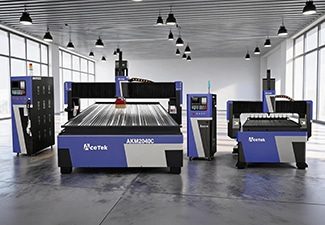
The working area should match your common sheet size, product dimensions, and production workflow. Small CNC routers are suitable for custom parts, samples, signs, and workshops with limited space, while large-format routers are better for furniture panels, doors, cabinets, full-size sheets, and batch production that requires higher efficiency.
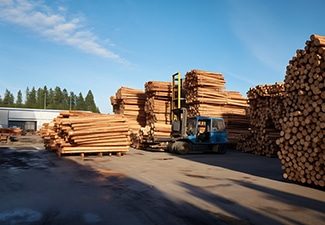
Production Volume
For occasional use, prototyping, or small custom jobs, a basic CNC router may be enough. For daily production or industrial manufacturing, choose a machine with stronger components, faster processing speed, automatic functions, better cooling, and higher structural stability to support continuous operation and maintain consistent machining quality.

Software Compatibility
Check whether the CNC router supports your design software, CAM software, and common file formats. Good software compatibility makes drawing import, toolpath generation, parameter setting, and production management easier. It also helps connect design, programming, and machining more smoothly, reducing communication errors and improving overall production efficiency.
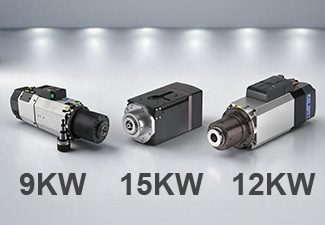
Spindle Power
Spindle power affects cutting depth, processing speed, cutting stability, and tool performance. Light engraving or thin material cutting may only require a lower-power spindle, while thick boards, hardwood, dense plastics, and continuous production need a stronger spindle to maintain efficiency, reduce tool stress, and achieve cleaner cutting results.
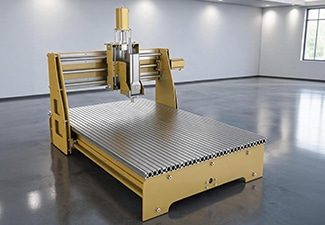
Machine Structure
A strong and stable machine structure helps reduce vibration, maintain accuracy, and improve long-term reliability. For heavy cutting, large-format processing, or high-speed production, choose a CNC router with a rigid welded frame, high-quality guide rails, a reliable transmission system, and durable components that can support stable machining over time.
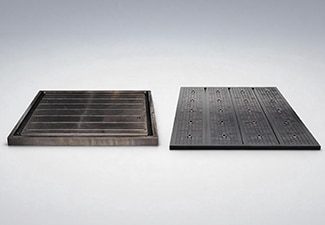
Worktable Type
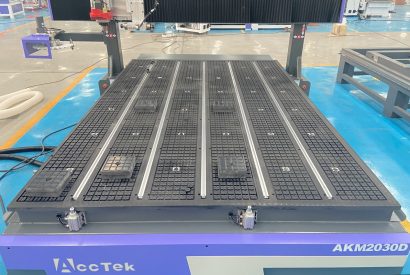
Choose the worktable type according to your material size, clamping method, and production needs. T-slot worktables are flexible for fixing small parts, irregular workpieces, and custom jobs, while vacuum tables are better for holding large sheets quickly and firmly, helping reduce loading time and improve production efficiency.
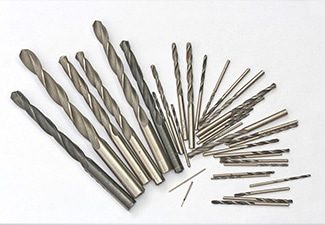
Tool Configuration
Different applications require different router bits, engraving tools, drill bits, carving tools, and cutting tools. Proper tool configuration improves cutting quality, reduces edge chipping, extends tool life, and allows the machine to complete more types of processing. Matching the right tools to the material helps achieve more accurate and consistent results.
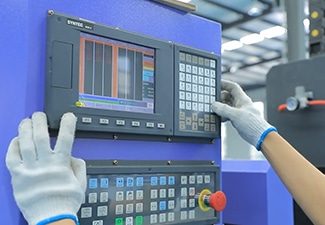
Control System
The control system affects operation convenience, file compatibility, machining accuracy, and production stability. A user-friendly controller allows operators to set parameters, load programs, manage toolpaths, monitor machine status, and reduce operating errors more easily. A reliable control system can also improve workflow efficiency and support smoother daily production.
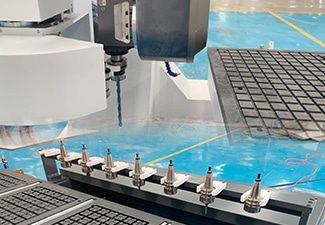
Automatic Tool Changer
An automatic tool changer is useful when one job requires multiple operations, such as cutting, engraving, drilling, grooving, and edge trimming. It reduces manual tool changes, saves labor time, improves machining continuity, and increases efficiency for complex designs, customized products, cabinet production, furniture manufacturing, and batch processing.
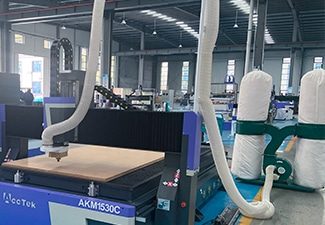
Dust Collection System
CNC routing often produces dust, chips, shavings, and fine particles during cutting or engraving. A good dust collection system helps keep the workshop cleaner, protects guide rails and machine components, improves operator visibility, reduces cleanup time, and creates a safer and more comfortable working environment for long-term production.
Supplier Support
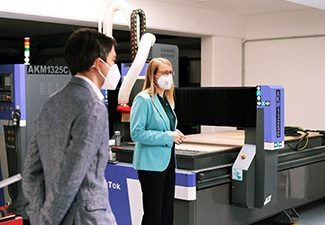
Reliable supplier support is important for machine installation, operator training, troubleshooting, spare parts supply, software guidance, and long-term maintenance. A professional supplier can help you choose the right configuration, solve technical problems faster, reduce downtime, and make the CNC router easier to operate throughout its service life.
Comparison With Other Machines
| Comparison Item | Rotary Axis CNC Routers | CNC Milling Machines | Laser Cutting Machines | 3D Printers |
|---|---|---|---|---|
| Working Method | Uses a rotating axis with router tools to carve, cut, drill, and engrave round or cylindrical workpieces. | Uses rotating cutters to remove material from fixed workpieces with high control. | Uses a focused laser beam to cut, engrave, or mark suitable materials. | Builds objects layer by layer from a digital 3D model. |
| Main Advantage | Ideal for processing columns, chair legs, stair posts, round signs, and 3D decorative parts. | Better for compact, detailed parts that require strict dimensional control. | Best for flat cutting, surface engraving, and fine pattern work. | Best for prototypes, models, samples, and complex custom shapes. |
| Axis Movement | Combines X, Y, Z movement with a rotary axis for round surface processing. | Usually works with linear-axis movement, with some models supporting advanced rotation. | Usually follows 2D cutting paths on flat materials. | Moves according to sliced layers to form a complete 3D object. |
| Workpiece Shape | Best for cylindrical, round, curved, and column-shaped materials. | Better for blocks, small parts, and precision-shaped workpieces. | Mainly suitable for flat sheets and surface designs. | Creates shapes directly, so the starting material form is not required. |
| Common Materials | Suitable for wood, MDF, plywood, acrylic, plastic, foam, rubber, and composite boards. | Suitable for wood, plastics, resin boards, and other machinable materials. | Suitable for acrylic, wood, leather, fabric, paper, cardboard, and certain plastics. | Suitable for PLA, ABS, resin, nylon, and other printable materials. |
| Cylindrical Processing | Excellent for carving and engraving around round objects. | Can process round parts with special fixtures or rotary setups. | Can engrave round surfaces with a rotary attachment, but cutting depth is limited. | Can print round objects directly without needing rotation during processing. |
| 3D Carving Ability | Strong for relief carving, round carving, column engraving, and decorative shaping. | Strong for accurate 3D shaping on smaller parts. | Better for surface engraving than deep 3D carving. | Excellent for complex 3D forms and internal structures. |
| Production Efficiency | Efficient for repeated round parts and decorative components. | Efficient for precision parts, but less practical for large decorative columns. | Fast for thin sheet cutting and surface engraving. | Usually slower because parts are made layer by layer. |
| Work Area | Can process flat materials and round workpieces when equipped with the right table and rotary device. | Usually has a smaller working area than large-format routers. | Available in different bed sizes, mainly for flat work. | Build size is usually limited compared with routing tables. |
| Cutting Depth | Can perform deep carving, grooving, drilling, and shaped cutting on suitable materials. | Strong for deep pockets, grooves, and controlled material removal. | Cutting depth depends on material type, thickness, and laser power. | Does not cut depth; it creates the full part by adding material. |
| Surface Finish | Produces clean carved surfaces and rounded details with proper tools and settings. | Can create smooth and accurate surfaces on detailed parts. | Produces clean edges on suitable materials, though some may show heat marks. | Surface may show visible layer lines and may need finishing. |
| Detail Capability | Good for patterns, reliefs, grooves, spiral designs, and decorative round surfaces. | Excellent for fine details and accurate part features. | Excellent for fine lines, text, logos, and delicate engraving. | Excellent for organic shapes, curved forms, and complex model details. |
| Tool Use | Uses router bits, carving bits, engraving bits, drill bits, and round-surface tools. | Uses cutters, drills, and other precision tools. | Does not use physical cutting bits. | Uses a nozzle, print head, or resin curing system. |
| Setup Requirements | Requires workpiece centering, rotary axis alignment, tool setting, and secure clamping. | Requires careful fixture setup, tool selection, and parameter control. | Requires focus setting, speed adjustment, power testing, and exhaust setup. | Requires slicing, material settings, bed leveling, and support design. |
| Operator Skill | Operators need CAD/CAM knowledge, rotary toolpath setup, feed control, and material fixing skills. | Requires strong technical knowledge for accurate cutting and shaping. | Requires file preparation, laser parameter testing, and safety awareness. | Requires 3D modeling, slicing, calibration, and print troubleshooting. |
| Edge and Detail Quality | Quality depends on tool sharpness, spindle speed, feed rate, rotary stability, and material support. | Can produce very accurate edges and smooth surfaces on suitable parts. | Can create smooth cutting lines and fine engraved details. | Edges and surfaces are formed by layers and may need sanding or trimming. |
| Waste Generation | Produces chips and dust during carving, cutting, and drilling. | Produces chips and dust through material removal. | Produces fumes and light residue, so ventilation is important. | Produces little cutting waste, but support structures and failed prints may create waste. |
| Maintenance Needs | Requires spindle, tools, guide rails, rotary device, dust collection, and worktable maintenance. | Requires cutter, spindle, lubrication, and motion system maintenance. | Requires lens, mirror, cooling, exhaust, and laser source maintenance. | Requires nozzle, print bed, resin tank, motion parts, and calibration maintenance. |
| Cost Performance | Offers strong value for workshops making both flat panels and round decorative parts. | Better value for precision-focused compact parts. | Cost-effective for engraving and thin sheet cutting. | Cost-effective for prototypes, samples, and low-volume custom models. |
| Overall Advantage | Best for round carving, cylindrical engraving, column work, furniture parts, and decorative 3D routing. | Best for compact, detailed, and high-accuracy shaped parts. | Best for fast flat cutting, engraving, and decorative surface patterns. | Best for building complex 3D prototypes and custom model shapes. |
Why To Choose AccTek CNC
High Precision & Efficiency
Our CNC routers are designed to deliver accurate cutting, engraving, drilling, and carving results. With stable motion systems and reliable control, our machines help reduce errors, improve processing speed, and maintain consistent quality during custom and batch production.
Robust And Durable Design
Our CNC routers use strong machine frames, quality guide rails, and reliable transmission components to support long-term operation. The solid structure helps reduce vibration, improve cutting stability, and keep the machine performing well during high-speed and continuous production.
Intelligent Control Systems
Our CNC routers are equipped with user-friendly control systems that make operation easier for both new and experienced users. The machines support smooth toolpath control, stable movement, convenient parameter settings, and compatibility with commonly used design and CAM software.
Flexible Customization
We offer flexible CNC router configurations according to different materials, working sizes, cutting thicknesses, and production needs. Customers can choose suitable spindle power, table type, rotary device, automatic tool changer, drilling unit, dust collection system, and other optional accessories.
Wide Application Range
Our CNC routers can be used in furniture making, advertising signs, woodworking, acrylic processing, foam modeling, crafts, decoration, packaging, and product development. One machine can support many processing tasks, helping customers expand production possibilities and accept more orders.
Complete Technical Support
Our company provides professional support before and after purchase, including machine selection, configuration advice, installation guidance, operation training, and troubleshooting. Our technical team helps customers use the machine correctly, optimize processing parameters, and reduce unnecessary downtime.
Reliable After-Sales Service
We focus on long-term customer use, not only machine delivery. Our company provides spare parts support, maintenance advice, remote assistance, and practical solutions when problems occur, helping customers keep their CNC routers running smoothly and efficiently.
Cost-Effective Production Solution
Choosing Our means investing in a CNC router that balances performance, durability, and value. Our machines help reduce labor costs, improve material use, increase output consistency, and support stable business growth for workshops and production factories.
Customer Reviews
Why To Choose AccTek CNC
Related Resources
Why a 4-Axis CNC Router with Swing Head is Ideal for Complex Cuts?
How to Improve Efficiency and Precision with Stone CNC Routers
How to Deal with Dust and Debris Generated During CNC Routing?
CNC Routing Techniques for Wood: Hardwood vs Softwood
Frequently Asked Questions
How Do Rotary Axis CNC Routers Work?
- Digital Design and Programming: The process begins with a CAD design or 3D model. The file is imported into CAM software, where the operator creates toolpaths for rotary machining. The software controls cutting depth, feed speed, spindle speed, tool type, rotation angle, and machining sequence. Correct rotary-axis settings are important because the design must match the workpiece diameter and rotation direction.
- Rotary Axis Movement: A rotary axis usually works as the fourth axis of the CNC router. The X, Y, and Z axes control linear movement, while the rotary axis turns the workpiece around its centerline. As the material rotates, the cutting tool can process different sides without the operator manually repositioning the workpiece.
- Spindle Cutting Operation: The spindle holds the cutting tool and rotates at high speed. It moves along the programmed route while the rotary device turns the material. Different tools can be used for rough cutting, fine carving, engraving, grooving, drilling, and surface finishing.
- Workpiece Clamping: The material is usually fixed between a chuck and tailstock, or held by a rotary fixture. Proper centering and secure clamping are very important. If the workpiece is not aligned with the rotary center, the finished part may have uneven carving, dimensional errors, or vibration marks.
- Wrapped and Indexed Machining: Rotary axis CNC routers can work in different ways. In wrapped machining, a flat design is wrapped around a cylindrical surface. In indexed machining, the workpiece rotates to a fixed angle, stops, and then the CNC router processes that side before moving to the next angle.
- Control System Coordination: The CNC controller coordinates spindle movement, feed speed, and rotary-axis rotation according to the G-code. Smooth coordination helps improve accuracy and surface quality.
How Much Does The Rotary Axis CNC Router Cost?
- Standard Rotary Axis CNC Routers: Standard rotary axis CNC routers usually cost around $6,000-$10,000. These machines are suitable for users who need both flatbed processing and cylindrical workpiece machining. They can process wood, MDF, acrylic, plastic, foam, and similar materials. Common applications include chair legs, table legs, stair posts, decorative columns, round signs, sculptures, and carved cylindrical parts. The price depends on the working table size, rotary axis diameter, spindle power, motor system, guide rail quality, and controller configuration.
- 4-Head Rotary Axis CNC Routers: 4-head rotary axis CNC routers usually cost around $9,000-$12,000. These machines are designed for higher production efficiency because four spindles can process multiple workpieces at the same time. They are especially useful for batch production of chair legs, table legs, stair columns, balusters, and repeated decorative parts. Compared with single-head rotary axis CNC routers, a 4-head model has more spindles, more rotary fixtures, a stronger frame, and a more complex control system, so the price is higher.
- Rotary Device Configuration: The size and quality of the rotary axis also affect the price. Larger rotary devices can hold longer or thicker workpieces, while stronger chucks, tailstocks, reducers, and motors provide better stability and accuracy during rotation.
- Machine Structure and Working Size: A larger working area or heavier frame usually increases the cost. A stable machine body helps reduce vibration and improves surface quality during cylindrical carving and long-term machining.
- Spindle and Control System: Spindle power, spindle brand, cooling method, motor type, and controller performance also influence the final price. Better components usually provide smoother operation, higher accuracy, and longer service life.
- Other Cost Factors: Vacuum table, T-slot table, dust collector, air pump, software, tool sets, packaging, shipping, installation, and after-sales service may also affect the total investment.
What File Formats Do Rotary Axis CNC Routers Support?
- G-Code Files: G-code is the final and most important file format for rotary axis CNC routers. Common extensions include .nc, .tap, .cnc, .gcode, and .txt. These files contain machine commands for axis movement, spindle speed, feed rate, cutting depth, tool position, and rotary-axis rotation.
- DXF Files: DXF files are widely used for 2D cutting, engraving, drilling, and profile machining. For rotary work, a DXF design may be wrapped around a cylindrical surface or used for indexed machining. It is commonly used for decorative patterns, letters, signs, and simple engraving designs.
- DWG Files: DWG files are often created in AutoCAD or similar design software. They are useful for detailed drawings, production layouts, and dimensional designs. Before machining, DWG files usually need to be imported into CAM software and converted into toolpaths.
- STL Files: STL is one of the most commonly used formats for 3D rotary carving. It is suitable for chair legs, table legs, stair posts, decorative columns, sculptures, cylindrical molds, and curved surface machining. CAM software reads the 3D model and generates roughing and finishing toolpaths.
- STEP and IGES Files: STEP and IGES formats are used for more accurate 3D models and product designs. They are suitable for complex curved parts, custom-shaped products, and workpieces that require better surface geometry than simple mesh files.
- AI, EPS, and SVG Files: These vector formats are often used for logos, graphic engraving, decorative patterns, and sign making. They must be processed through CAM software before the machine can cut or engrave them.
- Image Files: Some software can import JPG, PNG, BMP, or TIFF files for engraving or relief conversion, but extra processing is usually required.
What Are The Disadvantages Of Rotary-Axis CNC Routers?
- More Complex Setup: Rotary-axis CNC routers require more careful setup than ordinary 3-axis CNC routers. The workpiece must be centered correctly, fixed securely, and aligned with the rotary axis. If the center point, chuck position, or tailstock alignment is wrong, the finished product may have uneven carving, incorrect dimensions, or visible machining errors.
- Higher Operator Skill Requirement: Operators need to understand rotary-axis programming, workpiece diameter settings, rotation direction, toolpath wrapping, indexed machining, and safe clearance. Compared with flat panel processing, rotary machining is more difficult to learn and may require more training and experience.
- Limited Workpiece Shape: Rotary-axis CNC routers are mainly designed for round, cylindrical, or regularly shaped workpieces. They are not always suitable for very irregular parts, unstable materials, or workpieces that cannot be clamped firmly between the chuck and tailstock.
- Longer Programming Time: Rotary machining often needs special CAM settings and toolpath strategies. The operator may need to create wrapped designs, 3D models, or multi-side machining programs. This can take more time than simple 2D cutting or engraving.
- Risk of Vibration: Long or thin cylindrical materials may vibrate during rotation and cutting. Vibration can reduce surface quality, shorten tool life, and affect machining accuracy. Extra supports or slower cutting parameters may be needed for longer workpieces.
- Lower Efficiency for Simple Flat Work: If the main production task is flat panel cutting, cabinet making, sign making, or simple engraving, the rotary axis may not be used often. In this case, the added cost and setup complexity may not bring enough value.
- More Maintenance Points: The rotary device includes chucks, tailstocks, bearings, reducers, motors, and alignment parts. These components need regular inspection, cleaning, and lubrication to maintain smooth and accurate rotation.
What Materials Are Not Suitable For Use With Rotary Axis CNC Routers?
- Very Brittle Materials: Glass, ceramics, and other brittle materials are generally not suitable for rotary axis CNC routers. These materials can crack, chip, or break under cutting pressure, especially when the workpiece is rotated and clamped between a chuck and tailstock. They also require special tools and processing methods that standard router systems may not support.
- Soft and Flexible Materials: Very soft rubber, thin foam, flexible plastic, sponge-like materials, or elastic materials may deform during clamping and rotation. If the material bends, twists, or compresses, the cutting path may become inaccurate. These materials may also vibrate or tear instead of producing clean cutting edges.
- Thin or Weak Workpieces: Materials that are too thin, hollow, weak, or poorly supported may not be suitable for rotary machining. When the CNC router cuts the surface, the workpiece may shake, collapse, or move away from the tool. Extra support may help in some cases, but weak materials still increase the risk of errors.
- Oversized or Overweight Materials: Every rotary device has limits for length, diameter, and load capacity. If the workpiece is too long, too wide, or too heavy, the rotary axis may not rotate smoothly. This can cause motor overload, poor surface quality, vibration, and inaccurate machining.
- Irregularly Shaped Materials: Rotary axis CNC routers work best with round, cylindrical, square, or regularly shaped workpieces. Very irregular materials that cannot be centered or clamped firmly are difficult to process safely and accurately.
- Wet, Warped, or Unstable Materials: Wet wood, warped boards, cracked blanks, or materials with internal defects can cause uneven cutting and unstable rotation. The finished surface may be rough, distorted, or inconsistent.
- Hazardous or Unknown Materials: Materials that release toxic dust, harmful fumes, or unsafe particles during cutting should be avoided unless their safety is confirmed and proper dust collection is available.
What Skills Are Required To Operate Rotary Axis CNC Routers?
- CAD Design Skills: Operators should be able to read or create 2D and 3D design files for cylindrical and curved products. Common designs include chair legs, table legs, stair posts, decorative columns, sculptures, round signs, and carved patterns. The design should match the actual workpiece size, diameter, and machining requirements.
- CAM Programming Skills: Rotary axis CNC routers require CAM software to generate toolpaths for wrapped machining, indexed machining, roughing, finishing, engraving, and surface carving. Operators should understand how to set the workpiece diameter, rotary direction, cutting depth, feed speed, spindle speed, toolpath order, and post-processor. Incorrect programming may cause misaligned patterns or unsafe machine movement.
- Rotary Axis Setup Skills: Setting up the rotary axis correctly is very important. Operators need to align the chuck, tailstock, and workpiece centerline. They should also set the rotary zero point, check the rotation direction, and confirm that the toolpath matches the actual material position. Poor setup can lead to uneven carving or dimensional errors.
- Workpiece Clamping Skills: Rotary machining requires secure and balanced clamping. Operators should know how to fix round, square, or irregular blanks between the chuck and tailstock. The workpiece must not slip, bend, or vibrate during rotation. Long or thin materials may need extra support.
- Tool Selection Skills: Different materials and designs require different tools, such as straight bits, engraving bits, ball nose tools, roughing tools, and finishing tools. Operators should understand tool diameter, cutting length, sharpness, and suitable applications.
- Parameter Adjustment Skills: Operators must adjust spindle speed, feed rate, cutting depth, and stepover based on the material, tool, and surface finish requirements. Proper parameters help reduce vibration and improve carving quality.
- Controller Operation Skills: Operators should understand file loading, axis movement, zero setting, rotary-axis commands, emergency stop, limit alarms, and troubleshooting.
- Safety and Maintenance Skills: Rotary axis CNC routers require safe operation, regular cleaning, lubrication, tool inspection, spindle checks, and rotary device maintenance.
What Kind Of Working Environment Do Rotary Axis CNC Routers Require?
- Flat and Solid Floor: The machine should be installed on a flat, strong, and vibration-resistant floor. Uneven ground may affect machine leveling, rotary axis alignment, and cutting accuracy. A solid concrete floor is usually preferred because it helps reduce vibration during high-speed cutting and long workpiece rotation.
- Enough Working Space: The workshop should have enough space around the machine for loading materials, unloading finished parts, adjusting the rotary device, and performing maintenance. Extra clearance is especially important when processing long chair legs, table legs, stair posts, decorative columns, or other cylindrical workpieces.
- Stable Power Supply: Rotary axis CNC routers need a reliable power supply that matches the machine’s voltage and power requirements. The spindle, motors, controller, rotary axis, vacuum pump, dust collector, and other accessories all require stable electricity. Proper grounding helps protect electrical components and reduce signal interference.
- Dust Collection and Ventilation: CNC routing produces dust, chips, and particles when processing wood, MDF, acrylic, plastic, foam, and composite materials. A suitable dust collector and good workshop ventilation help keep the machine clean, protect operators, and improve machining quality. Fine dust should not be allowed to build up around the spindle, guide rails, rotary device, or electrical cabinet.
- Temperature and Humidity Control: The working environment should avoid high humidity, condensation, extreme heat, and excessive dust. Stable temperature and humidity help protect the spindle, control system, guide rails, motors, bearings, and rotary axis components from rust, corrosion, and electrical problems.
- Material Storage Area: Materials should be stored in a clean, dry, and organized area. Workpieces should be straight, stable, and suitable for clamping before machining. Wet, warped, or cracked materials may cause vibration and poor cutting results.
- Safety Conditions: The workshop should include good lighting, clear operating zones, emergency access, fire protection, protective equipment, and trained operators. Operators should keep hands, clothing, and tools away from the rotating workpiece during operation.
How To Maintain Rotary Axis CNC Routers?
- Daily Cleaning: After each working day, operators should clean dust, chips, and debris from the machine table, spindle area, guide rails, ball screws, rack and pinion system, and rotary device. Dust buildup can affect machine movement, reduce cutting accuracy, and increase wear on mechanical parts.
- Rotary Axis Inspection: The rotary device should be checked regularly because it directly affects cylindrical and curved machining accuracy. Operators should inspect the chuck, tailstock, bearings, reducer, motor, and alignment. The rotary axis should rotate smoothly without abnormal noise, shaking, or looseness.
- Lubrication Maintenance: Guide rails, sliders, ball screws, gears, bearings, and other moving parts should be lubricated according to the manufacturer’s maintenance schedule. Proper lubrication reduces friction, prevents rust, and helps the machine move smoothly during cutting and rotation.
- Spindle Maintenance: The spindle should be kept clean and protected from dust. Operators should check spindle temperature, running sound, tool clamping condition, and cooling performance. For water-cooled spindles, clean cooling water should be replaced regularly. For air-cooled spindles, the fan and air passage should remain clear.
- Tool and Fixture Inspection: Cutting tools should be checked for wear, breakage, dull edges, or incorrect installation. Collets, tool holders, clamps, chucks, and tailstock centers should be clean and secure. Poor tool clamping or unstable workholding can cause vibration, poor surface quality, and safety risks.
- Electrical System Check: The electrical cabinet should be kept clean, dry, and well-ventilated. Operators should inspect cables, connectors, limit switches, sensors, grounding, and emergency stop buttons regularly to prevent faults.
- Dust Collection Maintenance: Dust collectors, hoses, filters, and dust bags should be cleaned and checked often. Strong dust removal helps protect the spindle, guide rails, rotary axis, and electrical parts.