

Introduction
Find CNC Router Solutions by Material
Find CNC Router Solutions by Industry
CNC Router Processes and Capabilities
Precision Profile Cutting
CNC routers follow programmed contours to create straight edges, curves, internal openings, and complex external shapes. Lead-ins, tabs, ramping paths, and finishing passes can be incorporated to maintain part stability, improve dimensional accuracy, and produce cleaner finished edges.
Drilling, Boring, and Countersinking
Programmed drilling creates individual holes, repeated patterns, countersinks, counterbores, and assembly points at defined coordinates. Dedicated drill banks or boring units can increase productivity while maintaining consistent hole diameter, depth, spacing, and alignment across multiple components.
Pocketing and Recess Machining
Pocketing removes material from selected areas without cutting completely through the workpiece. Controlled depth passes can produce shallow recesses, deep cavities, stepped pockets, mounting areas, and concealed features while maintaining consistent dimensions, flat bottoms, and defined boundaries.
Grooving, Slotting, and Channeling
CNC routers can produce straight or curved grooves, slots, dados, channels, and tracks with controlled widths and depths. These features can support assembly, accommodate inserts, create decorative patterns, or provide pathways for wiring, seals, fasteners, and other integrated components.
Engraving, Lettering, and V-Carving
Fine engraving tools and V-shaped cutters create text, logos, line art, identification marks, and decorative details. Cutting depth, tool angle, spacing, and toolpath strategy control line width, visual depth, corner sharpness, readability, and the overall appearance of the finished design.
Relief Carving and 2.5D Machining
Relief carving uses varying cutting depths to create raised or recessed designs with a dimensional appearance. Roughing passes remove larger volumes efficiently, while finishing tools reproduce fine contours, textures, transitions, and intricate details from a prepared digital model.
Three-Dimensional Contour Machining
Three-dimensional machining creates freeform surfaces, curved forms, models, molds, and sculpted components. Ball-nose or tapered tools follow closely spaced toolpaths across multiple depth levels, producing smooth transitions and complex geometry that cannot be achieved through basic two-dimensional cutting.
Roughing and Finish Machining
Roughing operations remove excess material quickly using efficient toolpaths and deeper passes. Finishing operations use smaller stepovers, shallower cuts, or specialized tools to refine dimensions, reproduce fine details, improve smoothness, and achieve the required final surface quality.
Edge Profiling, Beveling, and Chamfering
Specialized router bits shape exposed edges into bevels, chamfers, radiused corners, decorative profiles, or assembly-ready forms. Consistent tool positioning produces uniform edge geometry, while controlled passes help prevent excessive tool marks and preserve delicate details around the component perimeter.
Joinery and Assembly Features
CNC routers can produce mortises, tenons, dovetails, finger joints, lock joints, slots, alignment holes, and other interlocking features. Digital control improves fit consistency and allows several connection details to be incorporated into a component during the same machining cycle.
Inlays and Precision Fitting
Accurate pocketing and profile cutting support the production of fitted inlays, inserts, plugs, and mating components. Tool compensation, corner-clearance strategies, and controlled finishing passes help achieve precise fits while preserving intricate outlines, narrow sections, and fine decorative details.
Surface Planing and Flattening
Surfacing operations remove a controlled amount from the top of a workpiece or spoilboard to establish a flat, level reference surface. This process can correct unevenness, calibrate thickness, prepare surfaces for later operations, and restore vacuum-table performance.
Nesting and Batch Production
Nesting software arranges multiple components within the available working area to maximize space utilization and reduce waste. The CNC router then processes the nested parts in a programmed sequence, supporting consistent batches, shorter preparation times, part identification, and organized assembly.
Rotary-Axis Machining
The rotary axis turns the workpiece while the cutting tool moves along its length and circumference. This configuration enables fluting, profiling, engraving, and three-dimensional carving around cylindrical or irregular forms without repeated manual repositioning between separate machining operations.
Multi-Sided and Multi-Axis Machining
Four-axis and five-axis systems allow the cutting tool or workpiece to approach geometry from multiple directions. This capability supports angled surfaces, compound curves, side features, and complex contours while reducing manual repositioning and the number of separate fixtures required.
Automatic Tool Changing
The automatic tool changer switches between cutting, drilling, engraving, profiling, roughing, and finishing tools during a programmed cycle. Completing multiple operations without manual tool replacement reduces setup time, limits operator intervention, and improves workflow consistency and overall productivity.
Multi-Head and Simultaneous Processing
Multi-head configurations can operate several tools independently or process repeated components simultaneously. Depending on the machine design, they can increase output, reduce cycle times, create duplicate parts, or complete different operations without repeatedly stopping production for manual adjustments.
Repeatable Custom and Batch Manufacturing
Digital programs allow approved designs and process parameters to be stored, recalled, and reproduced. This repeatability supports one-off customized work as well as larger production batches while maintaining consistent dimensions, machining sequences, feature placement, and finished appearance.
Customer Cases
Sorry, we couldn't find any posts. Please try a different search.
How to Choose CNC Routers

Processing Materials
Choose CNC routers based on the materials you process most often, such as wood, MDF, acrylic, plastics, foam, or composites. Different materials have different hardness, density, and cutting resistance. These factors affect machine structure, spindle power, cutting speed, tooling selection, and dust control requirements, so material compatibility should be the first consideration.
Working Area
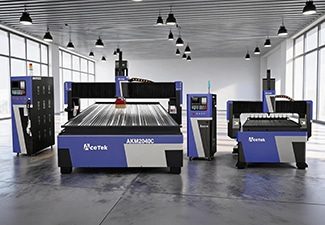
The working area should match your common sheet size, product dimensions, and production workflow. Small CNC routers are suitable for custom parts, samples, signs, and workshops with limited space, while large-format routers are better for furniture panels, doors, cabinets, full-size sheets, and batch production that requires higher efficiency.
Production Volume
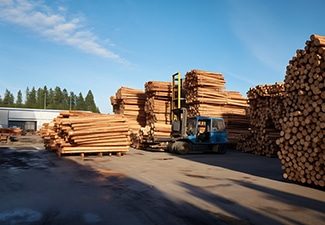
For occasional use, prototyping, or small custom jobs, a basic CNC router may be enough. For daily production or industrial manufacturing, choose a machine with stronger components, faster processing speed, automatic functions, better cooling, and higher structural stability to support continuous operation and maintain consistent machining quality.

Software Compatibility
Check whether the CNC router supports your design software, CAM software, and common file formats. Good software compatibility makes drawing import, toolpath generation, parameter setting, and production management easier. It also helps connect design, programming, and machining more smoothly, reducing communication errors and improving overall production efficiency.
Spindle Power
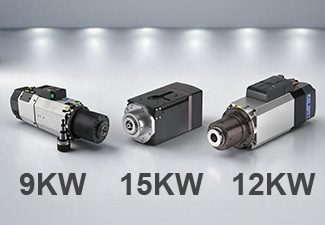
Spindle power affects cutting depth, processing speed, cutting stability, and tool performance. Light engraving or thin material cutting may only require a lower-power spindle, while thick boards, hardwood, dense plastics, and continuous production need a stronger spindle to maintain efficiency, reduce tool stress, and achieve cleaner cutting results.
Machine Structure
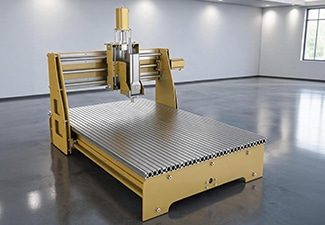
A strong and stable machine structure helps reduce vibration, maintain accuracy, and improve long-term reliability. For heavy cutting, large-format processing, or high-speed production, choose a CNC router with a rigid welded frame, high-quality guide rails, a reliable transmission system, and durable components that can support stable machining over time.
Worktable Type
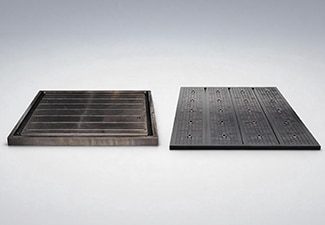
Choose the worktable type according to your material size, clamping method, and production needs. T-slot worktables are flexible for fixing small parts, irregular workpieces, and custom jobs, while vacuum tables are better for holding large sheets quickly and firmly, helping reduce loading time and improve production efficiency.
Tool Configuration
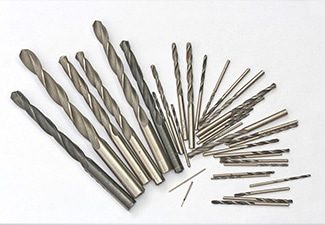
Different applications require different router bits, engraving tools, drill bits, carving tools, and cutting tools. Proper tool configuration improves cutting quality, reduces edge chipping, extends tool life, and allows the machine to complete more types of processing. Matching the right tools to the material helps achieve more accurate and consistent results.
Control System
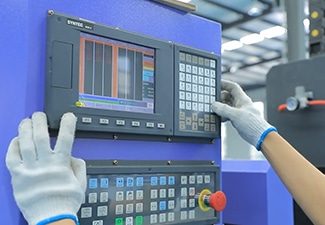
The control system affects operation convenience, file compatibility, machining accuracy, and production stability. A user-friendly controller allows operators to set parameters, load programs, manage toolpaths, monitor machine status, and reduce operating errors more easily. A reliable control system can also improve workflow efficiency and support smoother daily production.
Automatic Tool Changer
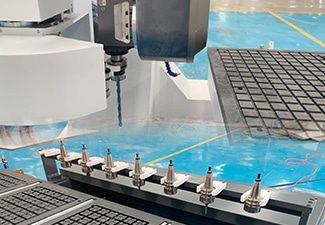
An automatic tool changer is useful when one job requires multiple operations, such as cutting, engraving, drilling, grooving, and edge trimming. It reduces manual tool changes, saves labor time, improves machining continuity, and increases efficiency for complex designs, customized products, cabinet production, furniture manufacturing, and batch processing.
Dust Collection System
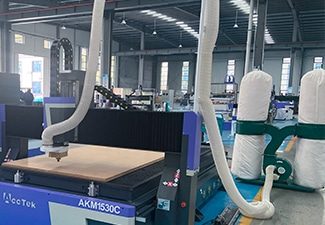
CNC routing often produces dust, chips, shavings, and fine particles during cutting or engraving. A good dust collection system helps keep the workshop cleaner, protects guide rails and machine components, improves operator visibility, reduces cleanup time, and creates a safer and more comfortable working environment for long-term production.
Supplier Support
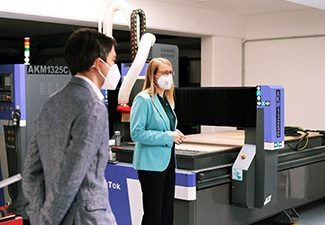
Reliable supplier support is important for machine installation, operator training, troubleshooting, spare parts supply, software guidance, and long-term maintenance. A professional supplier can help you choose the right configuration, solve technical problems faster, reduce downtime, and make the CNC router easier to operate throughout its service life.