

- 15-20 Dakika Okuma
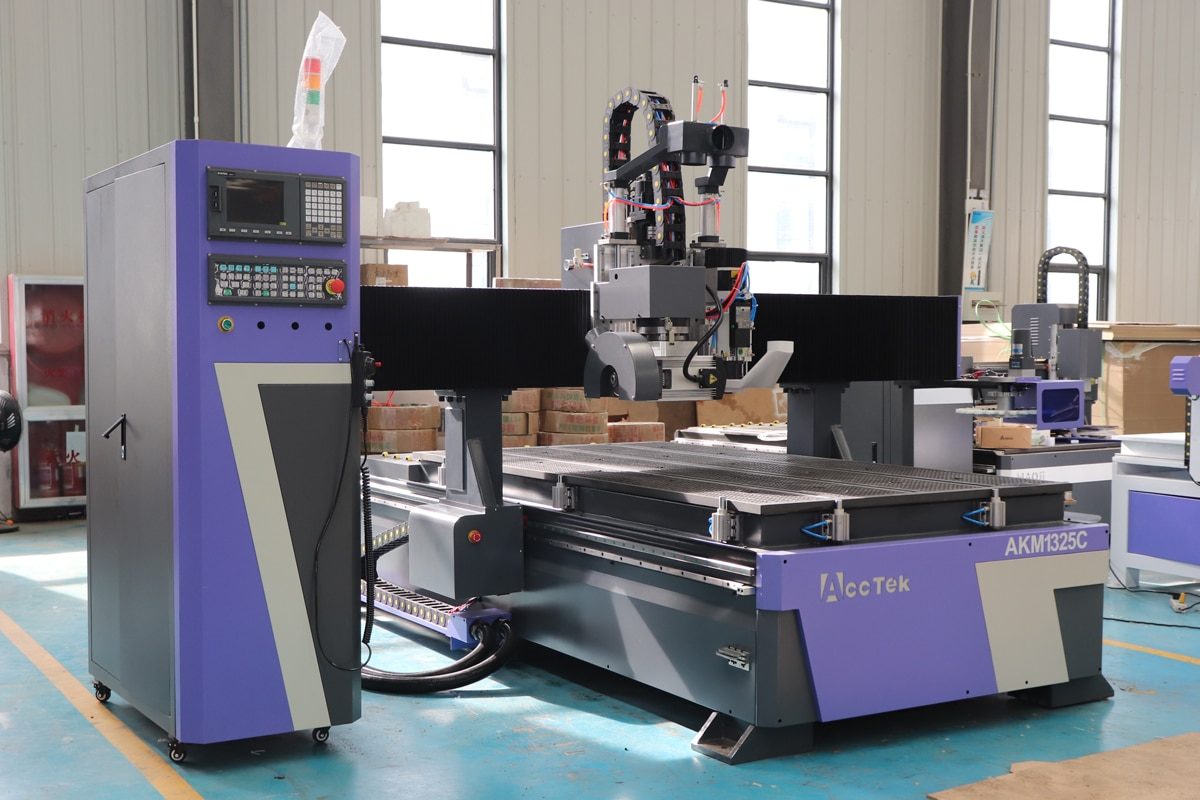
CNC router'lar, hassas, verimli ve tekrarlanabilir kesim sonuçları sunabilme yetenekleri sayesinde hobi meraklıları, küçük atölyeler ve büyük üreticiler arasında giderek daha popüler hale geldi. Ancak CNC işleme dünyasına yeni girenler için, çok çeşitli makine türleri nereden başlayacaklarını belirlemeyi zorlaştırabilir. Hobi seviyesindeki ünitelerden tam ölçekli endüstriyel sistemlere kadar her makine kategorisi, öğrenme eğrilerini, proje sonuçlarını ve genel kullanıcı memnuniyetini büyük ölçüde etkileyebilecek benzersiz güçlü ve zayıf yönler sunar.
Farklılıkları anlamak, doğru makineyi seçmenin, yaygın başlangıç hatalarından kaçınmanın ve uzun vadeli başarıya ulaşmanın ilk adımıdır. Farklı eksen konfigürasyonları, yapısal tasarımlar ve iş mili seçenekleri, bir makinenin performansını ve hangi tür projeleri kaldırabileceğini belirlemede önemli rol oynar. Bu makale, bu ayrımları basit ve pratik bir şekilde açıklayarak, yeni başlayanların bilinçli kararlar alabilmeleri ve yaygın hatalardan kaçınabilmeleri için ihtiyaç duydukları netliği kazanmalarına yardımcı olur. Bu temel ayrımları anlayarak, yeni başlayanlar ihtiyaçlarını ve uzun vadeli hedeflerini gerçekten karşılayan makineyi seçebilirler.
Hobi CNC Router'lar
Hobi amaçlı CNC router'lar, büyük bir yatırım veya karmaşık kurulum gerektirmeden CNC teknolojisini keşfetmek isteyen yeni başlayanlar için mükemmel bir başlangıç noktasıdır. Küçük projeler, yaratıcı çalışmalar ve uygulamalı öğrenme için tasarlanan bu makineler, CNC işleme dünyasına erişilebilir bir giriş sağlar. Kompakt boyutları, kullanıcı dostu çalışma şekilleri ve yumuşak malzemelerle uyumlulukları sayesinde, hobi amaçlı CNC router'lar yeni kullanıcıların kesme, oyma ve gravürleme ile deneyler yaparken özgüven kazanmalarına olanak tanır.
Ana Özellikler
Hobi amaçlı kullanılan CNC router'lar profesyonel modellere göre daha küçük ve basit olsalar da, öğrenme ve hafif iş projeleri için ideal kılan temel özellikler sunarlar.
- Kompakt ve Yerden Tasarruf Sağlayan Tasarım: Hobi amaçlı CNC router'lar genellikle küçük ve hafiftir, bu da onları masa, tezgah veya küçük atölye alanına yerleştirmeyi kolaylaştırır. Boyutları, ev kullanımı ve sınırlı çalışma alanına sahip yeni başlayanlar için idealdir.
- Uygun Fiyat Aralığı: Bu makineler bütçe dostu olacak şekilde tasarlanmıştır ve büyük bir finansal yatırım gerektirmeden CNC işleme alanına erişilebilir bir giriş noktası sunar.
- Başlangıç Seviyesindeki Kullanıcılar İçin Kolay Kullanım: Hobi amaçlı CNC router'lar genellikle basitleştirilmiş kontroller, sezgisel yazılım uyumluluğu ve kolay montaj özellikleriyle gelir; bu da yeni kullanıcıların bunalmadan temel bilgileri öğrenmelerine yardımcı olur.
- Düşük Güçlü İş Milleri: Orta düzeyde iş mili gücüne sahip bu makineler, ahşap, akrilik, köpük ve plastik gibi daha yumuşak malzemelerin kesilmesi ve oyulması için uygundur ve bu da onları öğrenme ve küçük yaratıcı projeler için ideal hale getirir.
- Temel Yapı ve Bileşenler: Birçok hobi amaçlı model, maliyeti ve bakım karmaşıklığını azaltan hafif çerçeveler, kayış tahrikli sistemler ve daha basit mekanik tasarımlar kullanır.
- Düşük Bakım Gereksinimleri: Daha az gelişmiş bileşene sahip olan hobi amaçlı CNC router'lar minimum bakım gerektirir, bu da yeni başlayanların öğrenmeye ve yaratmaya daha fazla odaklanmasını sağlar.
Uygun uygulamalar
Hobi amaçlı CNC router'ların kompakt boyutu, kullanım kolaylığı ve daha yumuşak malzemelerle çalışabilme özelliği, onları kişisel üretim, küçük el sanatları işletmeleri ve uygulamalı öğrenme için ideal hale getiriyor.
- Tabela Yapımı ve Yazı İşleme: Ahşap tabelalar, isim levhaları, dekoratif paneller ve kişiselleştirilmiş tasarımlar oymak için mükemmeldir.
- Kendin Yap El Sanatları ve Sanat Eserleri: Süs eşyaları, özel hediyeler, duvar sanatı, hobi modelleri ve detaylı gravürler oluşturmak için idealdir.
- Akrilik ve Plastik İşleme: Sergileme parçaları, muhafaza panelleri, rozetler ve dekoratif akrilik ürünler üretmek için kullanışlıdır.
- Eğitim ve Öğretim Amaçlı Kullanım: Öğrenciler, yeni başlayanlar ve atölyeler için CNC temellerini ve yazılım becerilerini öğrenmek için mükemmeldir.
Yeni Kullanıcılar İçin Artıları ve Eksileri
Hobi amaçlı CNC router'ların avantajlarını ve dezavantajlarını bilmek, yeni kullanıcıların gerçekçi beklentiler belirlemelerine, öğrenme deneyimlerinden en iyi şekilde yararlanmalarına ve hobi amaçlı bir CNC router'ın projeleri ve hedefleri için doğru seçim olup olmadığına karar vermelerine yardımcı olur.
- Artıları: Hobi amaçlı CNC router'lar, uygun fiyat, kompakt boyut ve kullanım kolaylığı gibi çeşitli avantajlar sunar. Yeni kullanıcıların, zorlu bir öğrenme eğrisi veya önemli bir yatırım gerektirmeden CNC işletimi ve yazılımının temellerini öğrenmelerini sağlarlar. Düşük bakım gereksinimleri ve yumuşak malzemeler için güvenli bir çalışma ortamı ile bu makineler, uygulamalı deneyler ve küçük ölçekli yaratıcı projeler için erişilebilir bir platform sunar.
- Dezavantajları: Faydalarına rağmen, hobi amaçlı CNC router'ların bazı sınırlamaları da vardır. Küçük çalışma alanları ve düşük güçlü iş milleri, işleyebilecekleri projelerin boyutunu ve türünü kısıtlayarak, ağır iş veya yüksek hacimli üretim için uygunsuz hale getirir. Ek olarak, genellikle çok eksenli yetenekler veya otomatik takım değiştiriciler gibi gelişmiş özelliklerden yoksundurlar; bu da gelecekte daha karmaşık veya profesyonel düzeyde projeler üstlenmek isteyen kullanıcılar için büyüme olanaklarını sınırlayabilir.
Hobi amaçlı CNC router'ların daha küçük çalışma alanları ve daha düşük iş mili gücü gibi sınırlamaları olsa da, yeni başlayanlar için temel beceriler geliştirmek için mükemmel bir seçim olmaya devam ediyorlar. Yeni kullanıcılar, temel özelliklerini, uygun uygulamalarını ve potansiyel avantaj ve dezavantajlarını anlayarak bilinçli kararlar verebilir, sorunsuz bir öğrenme deneyimi yaşayabilir ve gelecekte daha gelişmiş CNC projeleri için temel oluşturabilirler.
Masaüstü CNC Yönlendiriciler
Masaüstü CNC router'lar, hobi amaçlı modeller ile tam ölçekli endüstriyel router'lar arasındaki boşluğu dolduran orta boy makinelerdir. Küçük atölyeler, eğitim ortamları ve prototip laboratuvarları için tasarlanmış olup, giriş seviyesi hobi makinelerine göre daha fazla hassasiyet, kararlılık ve çok yönlülük sunarlar. Masaüstü CNC router'lar, yeni başlayanların ve küçük işletme kullanıcılarının daha karmaşık projeler üstlenmelerine, daha geniş bir malzeme yelpazesini işlemelerine ve aynı zamanda öğrenme ve deneme için erişilebilir olmalarına olanak tanır.
Tipik özellikler
Masaüstü CNC router'lar, başlangıç seviyesindeki kullanıcılar için kullanım kolaylığı ile profesyonel düzeyde yetenek arasında bir denge kurar. Tipik özelliklerini anlamak, yeni kullanıcıların bu makinelerin hobi amaçlı modellere göre neden daha çok yönlü olduğunu görmelerine yardımcı olurken, aynı zamanda erişilebilir ve kullanımı kolay olmalarını da sağlar.
- Orta Boy Çalışma Alanı: Masaüstü CNC router'lar, hobi amaçlı kullanılan makinelerden daha geniş çalışma alanları sunarak kullanıcıların orta ölçekli projeleri daha fazla esneklikle ele almalarına olanak tanır.
- Sağlam çerçeve yapısı: Geliştirilmiş yapısal stabilite, kesim sırasında titreşimi azaltarak daha yüksek hassasiyet ve daha pürüzsüz yüzeyler elde edilmesini sağlar.
- Daha Yüksek Güçlü İş Milleri: Daha güçlü iş mili motorları, ahşap, plastik ve hatta bazı yumuşak metallerin kesilmesini ve oyulmasını sağlayarak proje olanaklarını genişletir.
- Gelişmiş Yazılım Uyumluluğu: Çoğu masaüstü yönlendirici, çok çeşitli CAD/CAM yazılımlarını destekleyerek karmaşık tasarımlar ve takım yolları oluşturmayı kolaylaştırır.
- Kullanıcı Dostu Kontroller: Dokunmatik ekran panelleri, USB veya bilgisayar bağlantısı ve önceden yüklenmiş sürücüler gibi özellikler, yeni başlayanlar için makinenin kullanımını kolaylaştırır.
Uygun uygulamalar
Masaüstü CNC router'lar, hobi amaçlı kullanılan makinelerden daha çok yönlüdür ve bu da onları daha geniş bir proje ve malzeme yelpazesi için ideal hale getirir. Aşağıda, masaüstü CNC router'ların en iyi performans gösterdiği en yaygın uygulamalardan bazıları yer almaktadır.
- Küçük Mobilya ve Dolap Parçaları: Panellerin kesilmesi, kenarların şekillendirilmesi ve dekoratif detayların oyulması.
- Tabela ve Gravür: Profesyonel kalitede tabelalar, logolar ve sanatsal gravürler tasarlıyoruz.
- Plastik ve Akrilik İmalatı: Vitrinler, paneller ve dekoratif eşyalar üretimi.
- Eğitim ve Öğretim Amaçlı Kullanım: CNC temellerini öğretmek için okullar, atölyeler ve eğitim laboratuvarları için uygundur.
- Orta Ölçekli Yaratıcı Projeler: Hobi amaçlı modellere göre daha yüksek hassasiyetle kişiselleştirilmiş hediyeler, sanat eserleri veya özel bileşenler üretmek.
Yeni Kullanıcılar İçin Artıları ve Eksileri
Masaüstü CNC router'a yatırım yapmadan önce, yeni başlayanların bu orta boy makinelerin hem avantajlarını hem de sınırlamalarını anlamaları gerekir. Artıları ve eksileri bilmek, kullanıcıların gerçekçi beklentiler belirlemelerine, ihtiyaçlarına uygun modeli seçmelerine ve öğrenme ve yaratıcı projelerinden en iyi şekilde yararlanmalarına yardımcı olur.
- Artıları: Masaüstü CNC router'lar, hobi amaçlı kullanılan makinelerden daha yüksek hassasiyet, daha sağlam yapı ve daha fazla çok yönlülük sunar. Daha geniş bir malzeme yelpazesini işleyebilir, daha karmaşık tasarımları destekleyebilir ve genellikle dokunmatik ekran kontrolleri ve yazılım uyumluluğu gibi kullanıcı dostu özellikler içerirler. Bu makineler, yeni başlayanların endüstriyel seviyedeki ekipmanlara hemen geçmeden basit projelerden daha gelişmiş prototiplere veya yaratıcı çalışmalara geçmelerine olanak tanıyarak beceri gelişimine imkan sağlar.
- Dezavantajları: Hobi amaçlı modellere göre daha yetenekli olsalar da, masaüstü CNC router'lar daha pahalıdır ve kurulumu ve bakımı için biraz daha yüksek düzeyde teknik bilgi gerektirir. Çalışma alanları endüstriyel makinelerle karşılaştırıldığında hala sınırlıdır ve yüksek hacimli üretim veya çok sert malzemelerin kesimi için uygun olmayabilirler. Ağır iş performansı bekleyen kullanıcılar için, proje karmaşıklığı arttıkça masaüstü router'lar zamanla kısıtlayıcı hale gelebilir.
Masaüstü CNC router'lar, hobi amaçlı modellerin sağlayabileceğinden daha fazla güç ve esnekliğe ihtiyaç duyan yeni başlayanlar ve küçük ölçekli kullanıcılar için pratik bir çözüm sunar. Kullanıcılar, özelliklerini, tipik uygulamalarını ve sınırlamalarını anlayarak, hem mevcut projeleri hem de gelecekteki büyümeyi destekleyen, becerilerini geliştiren ve tam ölçekli endüstriyel ekipman için gereken yatırımı yapmadan profesyonel kalitede işler tamamlayan bir makineyi güvenle seçebilirler.
Endüstriyel CNC Router'lar
Endüstriyel CNC router'lar, yüksek hacimli üretim, büyük ölçekli projeler ve profesyonel düzeyde hassasiyet için tasarlanmış ağır hizmet tipi makinelerdir. Hobi amaçlı veya masaüstü CNC router'lardan farklı olarak, endüstriyel modeller zorlu iş yüklerini ve sürekli çalışmayı kaldıracak şekilde üretilmiştir. Yeni başlayanlar için, hemen kullanmaya hazır olmasalar bile, endüstriyel CNC router'ları anlamak önemlidir, çünkü bu makineler profesyonel ortamlarda performans, dayanıklılık ve gelişmiş yetenekler konusunda standartları belirler.
Ana Özellikler
Endüstriyel CNC router'lar, yüksek performanslı, büyük ölçekli ve profesyonel uygulamalar için tasarlanmıştır. Bu makinelerin temel özelliklerini anlamak, yeni başlayanların ve potansiyel kullanıcıların bu makineleri hobi ve masaüstü modellerinden ayıran özellikleri takdir etmelerine yardımcı olur.
- Geniş Çalışma Alanı: Büyük boyutlu panelleri, mobilya parçalarını veya büyük ölçekli projeleri rahatlıkla işleyebilir.
- Yüksek Güçlü İş Milleri: Yoğun ahşap, metal, plastik ve kompozit malzemeleri verimli bir şekilde kesebilme özelliğine sahiptir.
- Sağlam Çerçeve Yapısı: Ağır hizmet tipi çerçeveler ve vinçler titreşimi en aza indirerek yüksek hassasiyet ve tekrarlanabilirlik sağlar.
- Çok Eksenli Çalışma Özelliği: Birçok model, karmaşık 3 boyutlu şekiller ve detaylı tasarımlar için 4 eksenli veya 5 eksenli çalışma imkanı sunar.
- Gelişmiş Yazılım Entegrasyonu: Hassas takım yolu kontrolü için profesyonel CAD/CAM yazılımlarıyla birlikte çalışır.
- İsteğe bağlı Aksesuarlar: Otomatik takım değiştiricilerDöner ataşmanlar ve toz toplama sistemleri verimliliği ve çok yönlülüğü artırır.
- Dayanıklılık ve Kesintisiz Çalışma: Doğruluktan ödün vermeden uzun saatler süren endüstriyel ölçekli üretime dayanacak şekilde tasarlanmıştır.
Uygun uygulamalar
Endüstriyel CNC router'lar, hobi amaçlı veya masaüstü makinelerin kapasitesinin ötesine geçen büyük ölçekli, yüksek hassasiyetli projeleri işlemek üzere tasarlanmıştır. Boyutları, güçleri ve gelişmiş özellikleri, onları birçok sektörde çok çeşitli profesyonel uygulamalar için uygun hale getirir.
- Mobilya ve Dolap İmalatı: Büyük panellerin kesilmesi, dekoratif pervazların şekillendirilmesi ve çok parçalı montajların yüksek hassasiyetle üretilmesi.
- Tabela Üretimi: Ticari tabelalar için ahşap, plastik ve kompozit panellerin yüksek hacimli kesimi ve gravürü.
- 3D Heykel ve Sanatsal Projeler: Ahşap, köpük veya kompozit malzemelerden karmaşık heykeller, kalıplar veya dekoratif parçalar oyma.
- Endüstriyel Üretim: Yapısal bileşenler, paneller ve özel ekipman parçaları için yüksek hacimli işleme.
Yeni Kullanıcılar İçin Artıları ve Eksileri
Endüstriyel CNC router'lar eşsiz performans sunar, ancak yeni başlayanların bilmesi gereken bazı hususlar da vardır. Bu makinelerin avantajlarını ve sınırlamalarını anlamak, yeni kullanıcıların ister gelecekteki büyümeyi planlıyor olsunlar isterse de CNC router'ların tüm yetenekleri hakkında bilgi edinmek istiyor olsunlar, bilinçli kararlar vermelerine yardımcı olur.
- Artıları: Endüstriyel CNC router'lar, benzersiz güç, hassasiyet ve çok yönlülük sunarak neredeyse her türlü malzeme ve proje boyutunu işleyebilme kapasitesine sahiptir. Çok eksenli işleme, otomatik takım değiştiriciler ve sağlam yazılım uyumluluğu gibi gelişmiş özellikler sunarak profesyonel düzeyde üretim ve yaratıcılığı mümkün kılarlar. Bu makineler dayanıklılık ve sürekli çalışma için tasarlanmıştır ve uzun süreli kullanımda tutarlı sonuçlar sağlar.
- Dezavantajları: Yeteneklerine rağmen, endüstriyel CNC router'lar pahalıdır, önemli bir çalışma alanı gerektirir ve hobi amaçlı veya masaüstü makinelerine kıyasla daha dik bir öğrenme eğrisi içerir. Bakım, kurulum ve takım üretimi daha karmaşık ve maliyetli olabilir, bu da onları küçük veya basit projelerle yeni başlayanlar için daha az uygun hale getirir. Bu makinelerin ölçeği ve gücü, daha önce CNC deneyimi olmayan kullanıcılar için de göz korkutucu olabilir.
Endüstriyel CNC router'lar, profesyonel uygulamalar için yüksek performans ve çok yönlülük sunarak CNC teknolojisinin zirvesini temsil eder. Genellikle yeni başlayanlar için ilk tercih olmasalar da, yeteneklerini anlamak, kullanıcıların CNC işleme teknolojisinin tüm potansiyelini takdir etmelerine ve beceriler ve proje karmaşıklığı arttıkça gelecekteki büyümeyi planlamalarına yardımcı olur.
Eksen Tipine Göre Sınıflandırma
CNC routerlar, kullandıkları eksen sayısına göre de sınıflandırılabilir; bu da kesici takımın nasıl hareket ettiğini belirler ve doğrudan bir CNC routerın işleyebileceği projelerin karmaşıklığını ve çeşitliliğini etkiler. Daha fazla eksen genellikle daha fazla esneklik, daha derin oyma yetenekleri ve karmaşık 3 boyutlu şekilleri işleme yeteneği anlamına gelir; ancak aynı zamanda daha yüksek maliyetler ve daha dik öğrenme eğrileri de getirirler. Aşağıda en yaygın eksen tiplerine ve sunduklarına genel bir bakış yer almaktadır.
3 Eksenli CNC Router'lar
3 eksenli bir CNC router , kesici aleti X, Y ve Z eksenleri boyunca hareket ettirir. Bu, yeni başlayanlar ve genel kullanım için en yaygın tiptir. Düz kesim, gravür, oyma, delme ve basit 3 boyutlu oyma işlemleri için idealdir. Çoğu hobi, masaüstü ve giriş seviyesi endüstriyel makine bu kategoriye girer. İşte yeni başlayanlar için faydaları:
- Öğrenmesi ve Kullanımı Kolay: 3 eksenli CNC routerlar, basit X, Y ve Z hareketlerini kullanan, en basit ve yeni başlayanlar için en uygun makinelerdir. Bu, karmaşıklığı azaltır ve yeni kullanıcıların takım yollarını, kesme stratejilerini ve temel CNC prensiplerini anlamasını kolaylaştırır.
- Uygun Fiyatlı Giriş Noktası: 4 eksenli ve 5 eksenli sistemlerle karşılaştırıldığında, 3 eksenli CNC router'lar çok daha bütçe dostudur. Hem ilk yatırım hem de devam eden bakım maliyetleri daha düşüktür, bu da onları hobi amaçlı kullanıcılar ve küçük işletmeler için ideal bir başlangıç seçeneği haline getirir.
- Geniş Pratik Uygulama Yelpazesi: Basit yapılarına rağmen, 3 eksenli CNC routerlar tabela yapımı, panel kesimi, gravür, delme ve temel 3 boyutlu oyma gibi birçok günlük işi halledebilirler.
Döner Eksenli CNC Routerlar
Döner eksenli bir CNC router , iş parçasının dönmesine olanak tanıyan dönme hareketi ekler. Bu, özellikle masa ayakları, heykeller, sütunlar ve karmaşık kavisli yüzeyler gibi silindirik işler için kullanışlıdır. Aşağıda, bir acemi kullanıcının bu yükseltmeye hazır olabileceğini gösteren temel işaretler bulunmaktadır.
- Silindirik şekiller oluşturmak istiyorsanız: Projeleriniz düz panellerden yuvarlak panellere doğru ilerliyorsa, döner eksen değerli bir araç haline gelir.
- İşletmenizin Daha Karmaşık Ürünlere İhtiyacı Var: Küçük çaplı ahşap işleme veya el sanatları işletmeleri kuran yeni başlayanlar, daha üst düzey veya benzersiz ürünler sunmak istediklerinde genellikle daha gelişmiş ürünlere yönelirler.
- Üretim verimliliğini artırmak istiyorsunuz: Bazı parçalar için döner eksen, iş akışını önemli ölçüde hızlandırır. Verimliliğiniz yavaş veya manuel süreçler nedeniyle engelleniyorsa, bir yükseltme büyük bir zaman tasarrufu sağlayabilir.
4 Eksenli CNC Router'lar
4 eksenli CNC router , geleneksel 3 eksenli router'lara göre daha fazla çok yönlülük sunmak üzere tasarlanmış gelişmiş bir makinedir ve tam 5 eksenli sistemlerin karmaşıklığına sahip değildir. 4 eksenli bir makinenin en önemli özelliği, kesme milini ek bir eksen boyunca döndürebilme yeteneğidir; bu da malzemeye farklı açılardan yaklaşmasına olanak tanır. 4 eksenli CNC router'lar, 3 eksenli makinelerden daha gelişmiştir ve yeni başlayanlar için çeşitli avantajlar sunar:
- Açılarla Çalışmayı Öğrenmek: Döner başlıklı bir makine, yeni başlayanlara CNC işlemede temel beceriler olan açılı kesimler ve dönme hareketi kavramını tanıtır.
- 5 Eksenli Makinelere Kıyasla Kullanım Kolaylığı: Gelişmiş programlama ve makine çalıştırma becerileri gerektiren 5 eksenli router'ların aksine, 4 eksenli makinelerin öğrenilmesi daha kolaydır ve çok yönlülükte önemli bir gelişme sağlar.
- Uygun Maliyetli Geçiş: 3 eksenli sistemlerin ötesine geçmek isteyen yeni başlayanlar için, 4 eksenli bir makine, tam 5 eksenli bir sistemin yüksek maliyetine katlanmadan, iş akışlarına daha karmaşık işleme yöntemlerini dahil etmenin uygun fiyatlı bir yolunu sunar.
5 Eksenli CNC Router'lar
5 eksenli bir CNC router , üç doğrusal eksenin yanı sıra iki ek dönme ekseni boyunca hareket sağlar. Bu, kesici takımın malzemeye neredeyse her yönden yaklaşmasına olanak tanıyarak, daha az kurulumla son derece karmaşık 3 boyutlu geometrilerin üretilmesini sağlar. 5 eksenli CNC router'ların neden nadiren başlangıç seviyesi olduğu:
- Operasyonun Karmaşıklığı: Birden fazla ekseni yönetmek, makine dinamikleri, takım yolu planlaması ve hassas programlama konusunda ileri düzeyde bir anlayış gerektirir. Yeni başlayanlar için, özellikle temel 3 eksenli hareketi kontrol etmeyi öğrenirken, bu karmaşıklıklar bunaltıcı olabilir.
- Gelişmiş Programlama Gereksinimleri: 5 eksenli bir makineyi programlamak, özel CAM yazılımı kullanmayı gerektirir. Bu takım yollarını oluşturmak, kesici takımın iş parçasıyla her açıdan nasıl etkileşim kurduğuna dair daha derin bir anlayış gerektirir; bu da zaman içinde geliştirilen bir beceridir.
- Daha Yüksek Yatırım ve Bakım Maliyetleri: 5 eksenli CNC router'lar, hem ilk satın alma fiyatı hem de devam eden bakım açısından 3 eksenli ve 4 eksenli makinelerden önemli ölçüde daha pahalıdır. Uzun vadeli CNC hedeflerinden henüz emin olmayan yeni başlayanlar için bu yatırım finansal bir engel olabilir.
Yeni başlayanların çoğu için, basitliği ve geniş uygulama yelpazesi nedeniyle 3 eksenli bir CNC router ideal başlangıç noktasıdır. Kullanıcılar deneyim kazandıkça veya daha karmaşık 3D projeler üstlendikçe, 4 eksenli bir makine pratik bir yükseltme haline gelir. 5 eksenli CNC router'lar eşsiz yetenekler sunar, ancak genellikle ileri düzey kullanıcılar ve profesyonel üreticiler için ayrılmıştır. İster yeni başlıyor olun ister daha karmaşık işleme tekniklerini keşfetmeye hazır olun, eksen tiplerinin projelerinizi nasıl etkilediğini bilmek, bilinçli bir seçim yapmanıza ve öğrenme sürecinizi etkili bir şekilde yönlendirmenize yardımcı olacaktır.
Doğru CNC Router Tipini Seçmek: Dikkat Edilmesi Gereken Önemli Noktalar
İster yeni başlayan, ister hobi amaçlı kullanan veya profesyonel olun, ihtiyaçlarınıza uygun doğru CNC router'ı seçmek, makinenizden en iyi şekilde yararlanmanızı sağlamak açısından faydalıdır. Seçtiğiniz CNC router türü, projelerinizi verimli, hassas ve bütçeniz dahilinde tamamlama yeteneğinizi önemli ölçüde etkileyecektir. Aşağıda, özel ihtiyaçlarınız için doğru router'ı seçmenize yardımcı olacak temel hususlar yer almaktadır.
- Kullanım Amacı ve Proje Türü: Temel gravür, tabela yapımı veya küçük ölçekli ağaç işleme için genellikle 3 eksenli bir CNC router yeterlidir. Bununla birlikte, projeleriniz daha karmaşık geometriler, detaylı oyma veya birden fazla açıyla çalışma içeriyorsa, döner eksenli veya 5 eksenli bir router düşünebilirsiniz. Örneğin, döner eksenli bir router masa ayakları gibi silindirik iş parçaları için mükemmeldir, 5 eksenli bir router ise gelişmiş 3D heykel yapımı için gereklidir.
- Bütçe ve Sahip Olma Maliyeti: Hobi amaçlı CNC router'lar ve masaüstü modeller daha düşük başlangıç maliyetleri sunar ve genellikle küçük atölyeler, üreticiler ve işin inceliklerini öğrenenler için yeterlidir. Öte yandan, endüstriyel CNC router'lar önemli bir yatırımdır ancak çok daha yüksek hassasiyet, daha geniş çalışma alanları ve daha hızlı üretim yetenekleri sağlar. Ayrıca, bakım, takım ve yazılım güncellemeleri gibi devam eden maliyetleri de göz önünde bulundurun. Bugün bütçenize uygun bir makine, projeleriniz gelişirse gelecekteki büyüme için de ölçeklenebilir olmalıdır.
- Makine Boyutu ve Çalışma Alanı: Büyük paneller, mobilya parçaları veya tam boyutlu mimari modellerle çalışıyorsanız, daha büyük bir çalışma masasına sahip daha büyük bir CNC router'a ihtiyacınız olacaktır. Öte yandan, küçük ölçekli tasarımlara veya detaylı gravüre odaklanıyorsanız, kompakt bir masaüstü model veya hobi amaçlı bir router yeterli olacaktır. Ayrıca, atölyenizde mevcut olan fiziksel alanı da göz önünde bulundurun; daha büyük makineler daha fazla alan ve sabit, özel bir çalışma alanı gerektirecektir.
- Deneyim ve Beceri Seviyesi: Yeni başlayanlar genellikle kullanımı ve kurulumu daha basit olan 3 eksenli hobi veya masaüstü CNC router ile başlamaktan fayda görürler. Daha deneyimli hale geldikçe ve projeleriniz daha gelişmiş hale geldikçe, 4 eksenli veya 5 eksenli bir router'a geçmeyi düşünebilirsiniz. Bu makinelerin programlanması ve çalıştırılması daha fazla teknik uzmanlık gerektirir, bu nedenle yeni başlayanlar için uygun olmayabilirler. Ayrıca, yazılım karmaşıklığını da göz önünde bulundurun; daha gelişmiş makineler genellikle daha karmaşık CAM yazılımı gerektirir ve bu da daha dik bir öğrenme eğrisine sahip olabilir.
- Destek, Bakım ve Yükseltmeler: Bir makine seçerken, müşteri desteğinin mevcudiyetini ve yedek parçalara veya yükseltmelere erişim kolaylığını göz önünde bulundurun. Hobi amaçlı ve masaüstü yönlendiriciler genellikle çok sayıda çevrimiçi eğitim, aktif forum ve kolayca bulunabilen bileşenlerle birlikte gelir; bu da yeni başlayanlar için büyük bir avantaj olabilir. Endüstriyel makineler daha gelişmiş destek paketleriyle birlikte gelebilir, ancak genellikle daha fazla teknik bilgi ve düzenli profesyonel bakım gerektirirler.
Doğru CNC router'ı seçmek, projelerinizin karmaşıklığı, bütçeniz, çalışmayı planladığınız malzemeler ve beceri seviyeniz de dahil olmak üzere çeşitli faktörlerin dengelenmesini gerektirir. Bu önemli hususları dikkate alarak, hem mevcut gereksinimlerinize hem de gelecekteki hedeflerinize uygun bir makine seçmek için daha donanımlı olacaksınız. İster yeni başlıyor olun ister yeteneklerinizi genişletmek istiyor olun, bu hususları anlamak, ihtiyaçlarınıza uygun doğru CNC router'a yatırım yapmanızı ve CNC yolculuğunuzda başarıya ulaşmanızı sağlayacaktır.
Herhangi Bir CNC Router Türüyle Başlayan Yeni Başlayanlar İçin İpuçları
CNC router ile çalışmaya başlamak, özellikle hassas işleme dünyasına yeni girenler için heyecan verici ancak zorlu bir deneyim olabilir. Bununla birlikte, doğru yaklaşım ve zihniyetle, kısa sürede işin püf noktalarını kavrayabilir ve yüksek kaliteli projeler üretmeye başlayabilirsiniz. İster hobi amaçlı bir model, ister masaüstü bir makine, hatta endüstriyel bir router kullanıyor olun, aşağıdaki ipuçları ilk öğrenme sürecini atlatmanıza ve işe başlarken sorunsuz bir şekilde çalışmanıza yardımcı olacaktır.
- Basit Projelerle Başlayın: Yeni başlayan biri olarak karmaşık tasarımlara atlamak cazip gelebilir, ancak temel, küçük ölçekli projelerle başlamak becerilerinizi kademeli olarak geliştirmenize yardımcı olacaktır. Şekil kesme, metin kazıma veya temel 2 boyutlu tasarımlar oluşturma gibi basit görevler, makinenin hareketlerine, hızlarına ve yazılımına aşina olmanızı sağlayacaktır. Bu uygulamalı pratik, gelecekte daha gelişmiş projelerin üstesinden gelmek için sağlam bir temel oluşturacaktır.
- Yazılımı Tanıyın: Her CNC router, makineyi tasarlamak ve kontrol etmek için kendi yazılım setiyle birlikte gelir. Yeni başlayan biri olarak, router'ınızın kullandığı yazılımın inceliklerini öğrenmek için zaman ayırmanız gerekir. Tasarım ve takım yolu oluşturma sürecini anlamak için eğitim videoları izleyerek ve kullanım kılavuzlarını okuyarak başlayın. Yazılımı ne kadar iyi anlarsanız, makinenin çalışması o kadar sorunsuz olacaktır.
- Kalibrasyon ve Kuruluma Odaklanın: CNC router'ınızın doğru şekilde kalibre edildiğinden ve tüm bileşenlerin düzgün hizalandığından emin olun. Her projeye başlamadan önce, hataları en aza indirmek için çalışma alanını, takım ayarlarını ve malzeme konumlandırmasını iki kez kontrol edin.
- Takım ve Malzemeleri Anlamak: Farklı projeler farklı türde takımlar gerektirir ve malzemeniz için doğru takımı kullanmak kalite ve verimlilikte önemli bir fark yaratabilir. Yeni başlayan biri olarak, çeşitli CNC takımları ve bunların ahşap, plastik ve metal gibi malzemelerle nasıl etkileşimde bulundukları hakkında bilgi edinmek için zaman ayırın.
- Önce Güvenliğe Önem Verin: Makineyi çalıştırırken daima koruyucu ekipman (örneğin, güvenlik gözlüğü, kulak koruyucu ve toz maskesi) kullanın. Çalışma alanının temiz ve engelsiz olduğundan emin olun ve ellerinizi ve bol giysilerinizi hareketli parçalardan uzak tutun. En önemlisi, çalışma sırasında herhangi bir sorun yaşanması durumunda acil durdurma düğmelerini ve makinenin güvenlik özelliklerini öğrenin.
- Çevrimiçi Kaynaklardan Yararlanın: Yeni başlayanların CNC router'larla çalışmaya başlamasına yardımcı olacak çok sayıda çevrimiçi bilgi mevcuttur. CNC forumlarına katılın, YouTube eğitim videolarını izleyin ve deneyimli operatörlerin makalelerini okuyun. Başkalarının deneyimlerinden öğrenmek, sorunları gidermenize, yeni teknikler keşfetmenize ve öğrenme sürecinizi hızlandırmanıza yardımcı olabilir.
- Proje Günlüğü Tutun: Projelerinizi, ayarlarınızı ve yol boyunca karşılaştığınız zorlukları belgelemek, ilerlemenizi takip etmenize ve hataları tekrarlamaktan kaçınmanıza yardımcı olacaktır. Takım ayarlarını, malzeme türlerini, ilerleme hızlarını ve her projenin sonuçlarını kaydederek sürecinizi iyileştirebilir ve zaman içinde daha tutarlı sonuçlar elde edebilirsiniz.
Bu ipuçlarını takip ederek, yeni başlayanlar temel bilgileri sağlam bir şekilde anlayarak CNC router projelerine güvenle yaklaşabilirler. Unutmayın, CNC işleme, pratik ve sabırla zamanla gelişen bir beceridir. Basit başlayın, düzenli olun ve hata yapmaktan korkmayın. Deneyim kazandıkça, daha karmaşık ve tatmin edici projelerle uğraşacak, CNC router'ınızın yeteneklerine tam olarak hakim olacak ve yeni yaratıcı olanakların kilidini açacaksınız.
Özetlemek
CNC işleme alanında yolculuğa başlamak isteyen yeni başlayanlar için ilk adım, farklı CNC router türlerini anlamaktır. Proje hedefleriniz, bütçeniz ve deneyim seviyeniz gibi faktörleri dikkatlice değerlendirerek, yalnızca temelleri öğrenmenize yardımcı olmakla kalmayıp, ilerledikçe yaratıcı ve profesyonel fırsatlarınızı da genişletecek doğru CNC router'ı seçebilirsiniz. Önemli olan, ihtiyaçlarınıza uygun doğru makineyle başlamak ve daha fazla uygulamalı deneyim kazandıkça öğrenmeye ve gelişmeye devam etmektir. Pratik tavsiyeler için "Endüstriyel CNC Router'ları Güvenli ve Verimli Bir Şekilde Çalıştırmak İçin En İyi Uygulamalar" başlıklı yazıyı okumaya devam edin.
AccTek CNC, hobi amaçlı kullananlardan endüstriyel profesyonellere kadar geniş bir kullanıcı yelpazesine hitap eden yüksek kaliteli makineler sunmaya kendini adamış profesyonel bir CNC router üreticisidir. Çeşitli CNC router ürün yelpazesiyle AccTek, farklı sektörlerin ve beceri seviyelerinin ihtiyaçlarını karşılayan özel çözümler sunmaktadır. Makinelerimiz hassasiyet, güvenilirlik ve son teknoloji özellikleriyle bilinir ve hem yeni başlayanlar hem de deneyimli operatörler için mükemmel bir seçimdir. AccTek CNC'nin teknik desteği ve kapsamlı eğitim kaynaklarıyla, CNC işleme alanında başarılı olmak için ihtiyacınız olan araçlara ve uzmanlığa sahip olacağınızdan emin olabilirsiniz.