

- 12-17 minuti di lettura
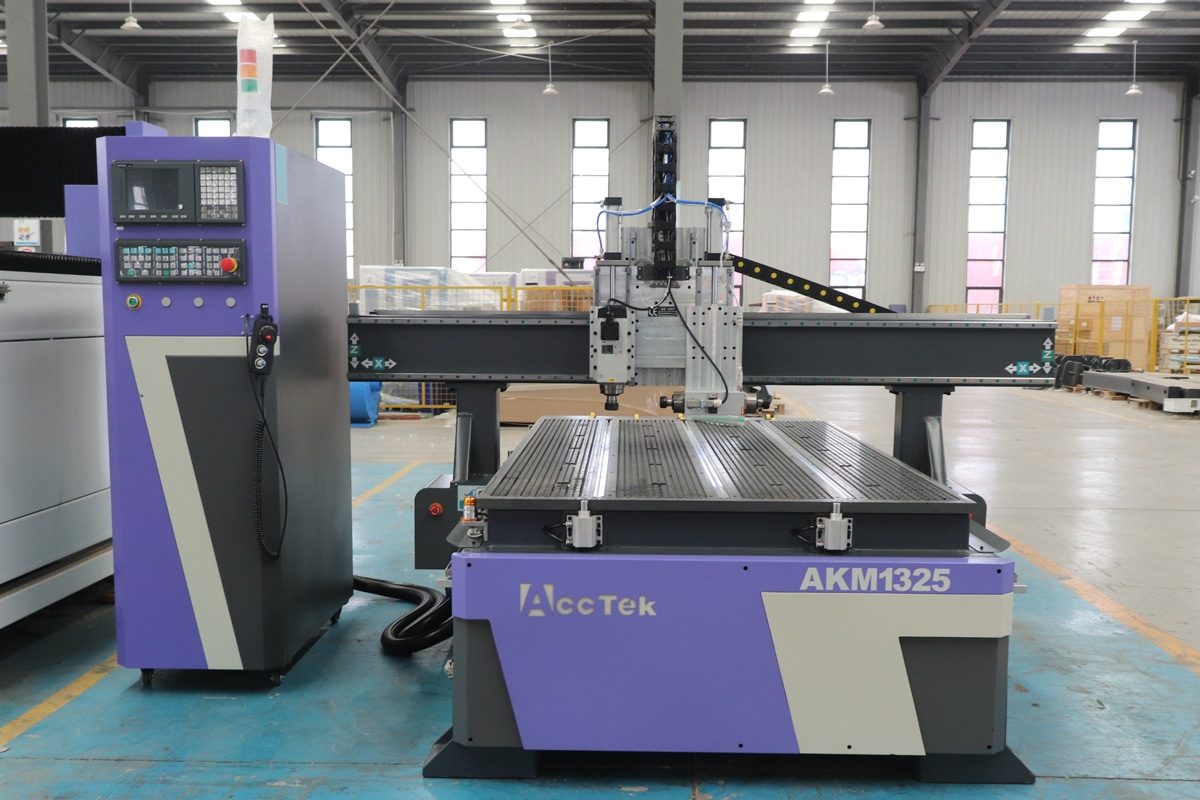
For beginners, choosing a CNC router is more than just buying a machine—it is an investment in learning efficiency, production quality, and future capability. Router CNC are widely used in woodworking, sign-making, engraving, and light industrial applications, but the wide range of available models and technical specifications can easily overwhelm first-time buyers. Choosing the wrong machine can lead to poor cutting results, a steep learning curve, or costly upgrades down the line, while the right CNC router can make learning smoother and more productive.
A beginner-friendly CNC router should strike the right balance between performance, ease of use, and reliability. This article focuses on the key performance features beginners should look for when choosing their first CNC router. Rather than diving into overly complex technical details, it breaks down the essential elements that affect accuracy, ease of use, reliability, and long-term value. By understanding these core features, beginners can make a confident, informed decision and select a CNC router that supports both current projects and future growth.
Understanding Beginner Needs and Use Cases
Before selecting a CNC router, beginners need to clearly understand their own needs and how they plan to use the machine. Not all CNC routers are equally suited for every application, and the wrong choice can lead to frustration, poor results, or unnecessary expenses. By identifying typical projects, skill levels, and intended usage, beginners can narrow down their options and focus on machines that provide the right balance of performance, ease of use, and learning potential.
Typical Applications for Beginners
Most beginners start using CNC routers for practical, easy-to-learn applications that allow them to understand basic machine operation while producing useful results. These early projects help build confidence, improve material handling skills, and develop an understanding of cutting parameters without requiring advanced machining experience.
- Woodworking: CNC routers are widely used to cut, carve, and engrave solid wood, MDF, and plywood for furniture components, decorative panels, cabinets, and craft items. These materials are forgiving, cost-effective, and well-suited for learning toolpath strategies, feed rates, and depth control.
- Sign-Making and Engraving: CNC routers can easily produce custom signs, logos, and engraved text on wood, acrylic, PVC, and composite boards. These applications require relatively light cutting loads and emphasize precision and repeatability, making them ideal for learning accuracy and design-to-production workflows.
- Light Metal Processing: Some beginners also explore cutting plastics and soft metals such as aluminum. While these materials demand more careful control of spindle speed and feed rates, they remain achievable with beginner-friendly CNC routers that have sufficient rigidity and proper tooling.
Livello di abilità e curva di apprendimento
Beginners using CNC routers include hobbyists, small business owners, and educational or training users, each with different experience levels, learning goals, and operational demands. A suitable beginner CNC router should match the user’s current skills while offering a manageable learning curve and room for gradual improvement.
- Hobby Users: Hobby users are typically beginners with little to no prior experience with CNC. For this group, ease of use is the top priority. User-friendly control systems, clear software compatibility, and minimal setup requirements help hobby users quickly produce results and stay motivated.
- Small Business Users: Small business users often begin as beginners but aim to reach consistent, repeatable production in a relatively short time. These users benefit from machines that offer stable performance, reliable accuracy, and adjustable settings that can be fine-tuned as experience grows.
- Educational and Training Users: Educational and training users typically include instructors and students with varying skill levels. CNC routers used for education should emphasize safety, durability, and intuitive controls, allowing students to grasp CNC fundamentals before progressing to more advanced techniques.
By assessing typical applications, skill levels, and usage goals, beginners gain a clear picture of what they truly need in a CNC router. Understanding these factors helps them avoid common mistakes, such as overbuying features, underestimating machine complexity, or choosing a machine that cannot grow with their skills. With a well-defined understanding of beginner needs and use cases, users can confidently choose a CNC router that delivers both immediate usability and long-term value.
Core Performance Features Beginners Should Prioritize
When selecting a CNC router, beginners should focus on core performance features that directly impact ease of use, cutting quality, and long-term reliability. While advanced users may prioritize high-speed production or specialized functions, beginners benefit most from a stable, accurate, and forgiving machine during the learning process. Understanding these essential features helps beginners make informed decisions and avoid common pitfalls such as poor cutting results, frequent maintenance issues, or limited upgrade potential.
Machine Structure and Frame Stability
A CNC router’s frame and overall structure form the backbone of the machine, directly affecting its precision, durability, and ease of use. For beginners, a well-built frame reduces vibrations and supports consistent results, making it easier to learn machine operation and produce high-quality workpieces.
- Frame Material: Steel frames offer superior rigidity and durability, making them ideal for handling heavier materials and repeated use. Reinforced aluminum frames are lighter and more affordable, suitable for hobby projects and smaller workpieces.
- Structural Design: A well-designed CNC router frame distributes stress evenly and minimizes flexing during operation. Features such as reinforced joints or box-shaped supports, and solid cross beams enhance stability and help maintain tool alignment.
Vibration Reduction: A stable frame reduces chatter and maintains consistent contact between the tool and material. For beginners, minimizing vibrations makes the learning process more forgiving.
Prestazioni del mandrino
The spindle is the heart of a CNC router, directly determining the machine’s cutting ability, precision, and versatility. A reliable spindle reduces errors, minimizes tool wear, and provides a smoother learning experience for first-time users.
- Spindle Power: Beginners should select a spindle with enough power for their intended applications. Lower-power spindles suitable for wood, MDF, acrylic, and light plastics. Medium-power spindles can handle thicker wood, soft metals like aluminum, and small-scale production work.
- Speed Range: Beginners benefit from spindles that allow adjustable RPM, as this enables experimentation with feed rates, cutting depths, and material types without damaging the machine or tools.
- Cooling Method: Air-cooled spindles are easier to maintain and generally more beginner-friendly. Water-cooled spindles provide better heat dissipation for continuous cutting, maintaining stable performance over long periods.
Sistema di movimento e componenti di azionamento
The motion system and drive components of a CNC router control how the machine moves along its axes, directly affecting cutting accuracy, smoothness, and repeatability. For beginners, a reliable and precise motion system makes it easier to achieve clean cuts and reduces frustration during the learning process.
- Ball Screws vs. Rack-and-Pinion: Ball acrews offer high precision, low backlash, and smooth movement, making them ideal for accurate woodworking and engraving. Rack-and-pinion systems offer faster movement but slightly lower precision, which may be acceptable for large-scale woodworking or signage.
- Linear Guides: High-quality guides reduce friction, minimize vibration, and improve repeatability. For beginners, linear guides make the operation smoother, simplify learning about feed rates and toolpaths, and help produce cleaner cuts.
- Impact on Accuracy and Stability: The combination of drive components and guides directly affects cutting precision. Beginners benefit from consistent results, as it allows them to focus on learning CNC fundamentals without constantly compensating for machine inaccuracies.
By prioritizing key performance features, beginners can select a CNC router that balances usability with capability. A machine with a stable frame, reliable spindle, precise motion system, and user-friendly controls not only produces better results but also supports a smoother learning experience. Focusing on these core elements ensures that first-time users gain confidence, develop skills efficiently, and invest in a machine that can grow with their projects and ambitions.
Sistema di controllo e compatibilità software
The control system and software compatibility of a CNC router have a direct impact on how easy the machine is to learn and operate. For beginners, an intuitive control system reduces the learning curve and helps prevent operational errors, while broad software compatibility ensures smooth transitions from design to machining. Choosing the right combination allows beginners to focus on understanding CNC fundamentals rather than struggling with complex interfaces or unsupported file formats.
CNC Controller Options
The CNC controller serves as the brain of the machine, interpreting commands, driving motion, and providing the interface through which the user operates the router. For beginners, selecting the right controller option can significantly affect the learning experience, ease of setup, and overall efficiency of machine operation.
- Standalone Controllers: They typically feature simple screens, straightforward menus, and dedicated buttons for basic functions. For beginners, standalone controllers offer a user-friendly experience with minimal setup, making it easier to focus on mastering machine operation without needing additional software or a computer connection.
- PC-Based Control Systems: They rely on a separate computer running control software to manage machine motion and interface with the user. This option provides greater flexibility and advanced features, including complex motion profiles, custom macros, and more detailed diagnostics. Beginners with some computer experience or those planning to expand their machining capabilities may benefit from this option.
Compatibilità Software
Software compatibility is a key consideration for beginners because it determines how easily designs can be created, converted into toolpaths, and transferred to the CNC router.
- Compatibility with Common CAD Software: Beginners often start with widely used and beginner-friendly CAD programs for creating designs and drawings. A CNC router should be able to accept files generated by popular CAD software, making it easy to design shapes, text, and patterns without advanced design experience.
- Support for CAM Software and Toolpath Generation: CAM software converts designs into machine-readable toolpaths. Beginner-friendly CNC routers should work smoothly with common CAM programs, allowing users to set cutting depths, feeds, speeds, and tool selections without complex configuration.
- Standard File Format Support: Support for standard file formats, such as G-code, ensures smooth communication between software and the CNC controller. When a machine accepts widely used formats, beginners can easily switch between different CAD/CAM programs as their skills grow, without being locked into a single software ecosystem.
Selecting a CNC router with a beginner-friendly control system and broad software compatibility, users can greatly reduce the learning curve and improve overall productivity. A clear interface, reliable controller options, and support for common CAD/CAM software enable beginners to focus on developing their skills rather than troubleshooting technical issues. Together, these factors ensure a smoother learning experience and provide the flexibility needed as projects and skill levels advance.
Cutting Performance and Working Capabilities
Cutting performance and working capabilities define what a beginner can realistically achieve with a CNC router. These factors determine not only the quality of the finished parts but also the range of materials, project sizes, and applications the machine can handle. For beginners, choosing a CNC router with appropriate cutting performance ensures smooth operation, consistent results, and fewer limitations as skills develop.
- Working Area and Table Size: The working area determines the maximum size of materials a CNC router can process. Beginners should select a table size that matches their typical projects, such as small signs, panels, or furniture components, without overspending on an oversized machine. A properly sized working area improves efficiency, reduces material waste, and makes the machine easier to operate in limited workshop space.
- Material Compatibility: A beginner-friendly CNC router should be capable of handling commonly used materials, including wood, MDF, plywood, plastics, acrylic, and light metals such as aluminum. Stable cutting performance across these materials depends on spindle power, frame rigidity, and motion system quality. Understanding material compatibility helps beginners choose a machine that aligns with their intended applications and avoids performance issues.
- Cutting Depth and Feed Capability: Cutting depth and feed rates influence both efficiency and surface quality. Beginners benefit from machines that offer stable performance at moderate cutting depths and adjustable feed rates, allowing them to experiment safely and learn optimal cutting parameters. Consistent cutting capability reduces the risk of tool breakage and improves overall machining confidence.
- Precision and Surface Finish: Good cutting performance results in clean edges and smooth surfaces, reducing the need for manual finishing. A CNC router with reliable precision helps beginners produce professional-looking results even with simple projects. Consistent accuracy also makes it easier to repeat designs and improve craftsmanship over time.
A machine with the right working area, stable cutting ability, and reliable precision makes learning more efficient and results more consistent. By evaluating cutting performance and working capabilities, beginners can ensure their CNC router is well-suited to their intended projects and materials. Focusing on these elements helps beginners avoid limitations, improve machining confidence, and select a CNC router that remains useful as skills and project demands grow.
Caratteristiche di sicurezza e affidabilità
Safety and reliability features are essential for beginners, as they protect both the user and the machine during daily operation. CNC routers involve high-speed cutting tools, moving components, and electrical systems, making built-in safety measures and dependable construction especially important for first-time users. A machine with strong safety and reliability features helps reduce accidents, minimize downtime, and create a more confident learning environment.
- Safety Protection Systems: Beginner-friendly CNC routers should be equipped with basic safety protections such as emergency stop buttons, limit switches, and overload protection. An easily accessible emergency stop allows the machine to be halted immediately in unexpected situations, while limit switches prevent overtravel that could damage the machine. These features help beginners operate the CNC router with greater confidence and control.
- Electrical and Control Safety: Reliable electrical components and well-organized wiring reduce the risk of malfunctions and improve overall machine stability. Proper grounding, circuit protection, and high-quality control cabinets help ensure safe operation, especially for beginners who may not yet be familiar with troubleshooting electrical issues. A stable control system also prevents sudden errors or unexpected movements during cutting.
- Component Quality and Durability: High-quality components contribute to both safety and long-term reliability. Durable motors, spindles, and motion components operate more smoothly and predictably, reducing the chance of sudden failures. For beginners, reliable parts mean fewer interruptions and a smoother learning experience without frequent maintenance or repairs.
- Consistent Performance and Longevity: A CNC router designed for reliability maintains consistent accuracy and performance over time. Reduced vibration, stable motion, and dependable electronics help extend machine lifespan and maintain cutting quality. For beginners, this reliability ensures that learning efforts are rewarded with consistent results and fewer technical setbacks.
Choosing a CNC router with comprehensive safety measures and dependable construction, beginners can reduce risks and focus on developing their skills. Reliable components, stable electrical systems, and effective safety protections help prevent accidents, minimize downtime, and ensure consistent results. These features provide long-term value, allowing beginners to learn and operate with greater confidence while maintaining safe and reliable performance.
Expandability and Upgrade Potential
Expandability and upgrade potential are important considerations for beginners who want a CNC router that can grow with their skills and project needs. While a basic machine may be sufficient for initial learning and simple projects, the ability to add new features or upgrade components ensures long-term value and avoids the need to purchase a new machine as experience increases. Understanding these possibilities helps beginners choose a CNC router that remains practical and versatile over time.
- Rotary Axis and Multi-Axis Expansion: Some CNC routers offer options to add a asse rotante or additional axes, allowing for more complex machining tasks such as 3D carving, cylindrical engraving, or multi-sided cutting. Beginners who plan to advance from basic 2D projects to more sophisticated designs benefit from machines with modular expansions. This flexibility enables gradual learning without overwhelming the user with advanced features upfront.
- Tool Change and Automation Options: Cambio utensile automatico can significantly improve efficiency for more complex projects. While beginners may start with manual tool changes, choosing a CNC router that supports future automation allows users to expand production capabilities over time. Machines that support tool changers also provide a pathway to learning more advanced CNC operations as skills grow.
- Software and Controller Upgrades: Machines that allow software or controller upgrades provide additional functionality, improved performance, and compatibility with newer design tools. Beginners benefit from routers that can evolve alongside their software knowledge, ensuring the machine remains capable of handling more advanced projects in the future.
- Modular Design and Accessory Compatibility: A modular design allows for easy replacement or enhancement of components such as spindles, linear guides, or vacuum tables. Beginner-friendly CNC routers that support accessories and add-ons provide more flexibility and a longer useful life, making them a better long-term investment.
Prioritizing expandability and upgrade potential, beginners can invest in a CNC router that grows with their experience and ambitions. Features such as multi-axis compatibility, tool changers, modular components, and software upgrades offer long-term flexibility, enabling users to transition from basic projects to more advanced machining tasks. A machine with upgrade potential ensures that beginners continue to benefit from their initial investment as they explore new creative and production possibilities.
Ease of Setup, Maintenance, and Support
For beginners, the ease of setting up a CNC router, performing routine maintenance, and accessing support resources is just as important as the machine’s core performance. Even the most capable machine can become difficult to use if it requires complex assembly, frequent maintenance, or lacks accessible technical guidance. Machines designed with beginner-friendly installation, clear maintenance procedures, and reliable support help users focus on learning and producing quality work rather than troubleshooting.
- Installation and Initial Setup: Beginner-friendly CNC routers often come partially assembled or pre-configured, minimizing the time and effort needed for setup. Clear instructions, step-by-step guides, and simple wiring layouts make it easier for first-time users to get the machine running correctly. Features such as pre-aligned axes, calibrated spindles, and pre-installed software can further simplify the process, allowing beginners to focus on learning basic operation and creating their first projects without unnecessary delays or frustration.
- Routine Maintenance: Routine maintenance keeps a CNC router operating smoothly and extends its lifespan. Beginner-friendly machines feature accessible lubrication points, easy-to-replace parts, and straightforward cleaning procedures. By making maintenance simple and predictable, beginners can focus on learning proper machine operation without frequent interruptions or complex repairs.
- Technical Support and After-Sales Service: Reliable technical support is necessary for beginners who may encounter questions or issues during operation. Access to responsive customer service, online resources, manuals, and community forums helps users troubleshoot problems quickly and continue learning without prolonged downtime. Good after-sales support also provides peace of mind for long-term use and machine reliability. For beginners, this support provides peace of mind, reduces downtime, and allows them to focus on developing their skills and completing projects efficiently.
- Learning Resources: Some CNC routers come with tutorials, videos, or training materials tailored for beginners. These resources guide users through basic operation, common troubleshooting steps, and best practices, helping shorten the learning curve and build confidence.
Choosing a CNC router that emphasizes straightforward setup, manageable maintenance, and responsive support, beginners can enjoy a smoother learning experience and maintain consistent machine performance. These features help build confidence, reduce downtime, and ensure that users can focus on developing their skills and completing projects effectively, making the CNC router a reliable and long-term investment.
Riassumere
Choosing the right CNC router as a beginner is about finding a balance between performance, usability, and long-term value. By focusing on core features such as machine stability, spindle performance, motion systems, control software, cutting capabilities, safety, and ease of setup, beginners can select a machine that simplifies learning while delivering consistent, high-quality results. Additionally, considering expandability, upgrade potential, and reliable support ensures that the CNC router remains practical as skills and project demands grow. Continue reading “Maximizing Your CNC Router Performance: Tips and Tricks for Beginners” to better unlock the full potential of your machine.
CNC AccTek is a leading CNC router manufacturer in China, offering a wide range of machines designed to meet the needs of beginners and experienced users alike. Our CNC routers combine stable machine structures, reliable spindles, precise motion systems, and intuitive control systems, ensuring accurate and consistent cutting performance. With beginner-friendly features such as easy setup, robust safety protections, and strong after-sales support, AccTek CNC provides machines that simplify learning while supporting skill growth and project expansion. For looking to invest in a reliable, high-quality CNC router that balances performance with usability, AccTek CNC stands out as a trusted and professional choice.