

- 30-40 Dakika Okuma
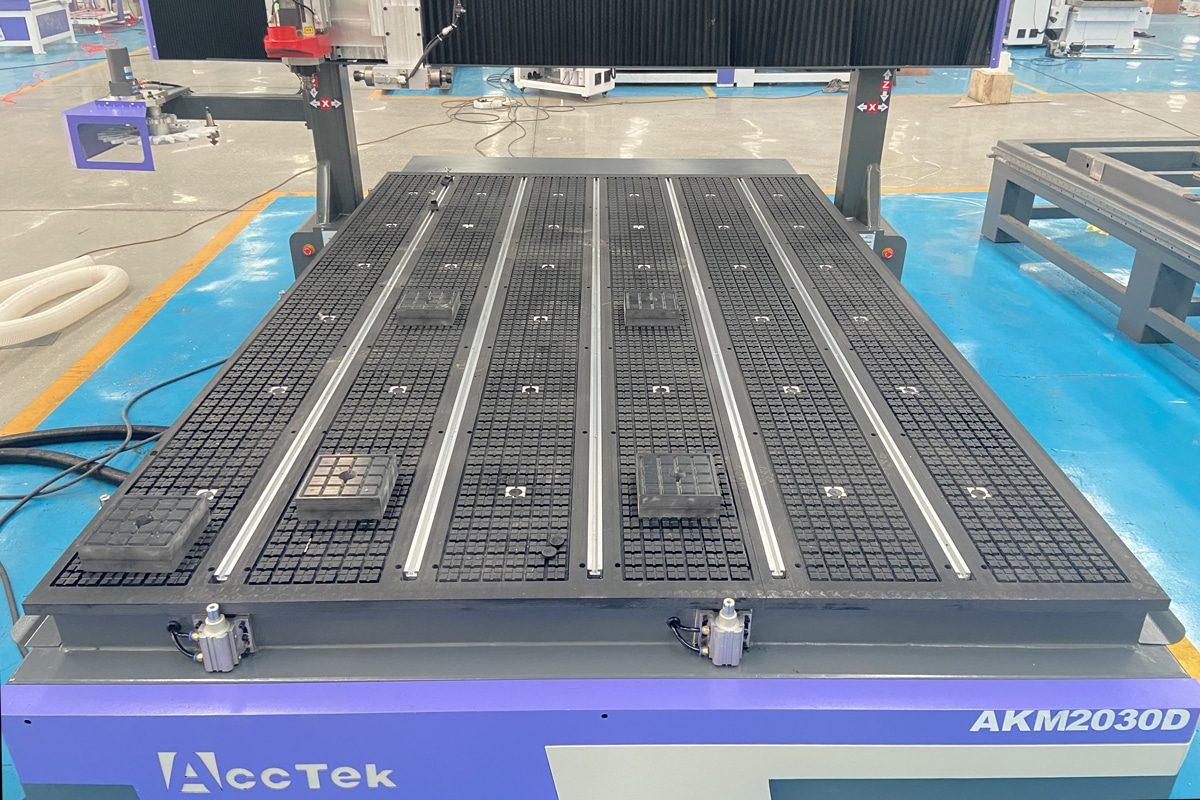
A Cnc yönlendirici vacuum system is an essential part of modern CNC machining operations, especially in applications involving wood, plastics, composites, and other materials that generate large amounts of chips and dust. By creating strong suction to secure workpieces and efficiently remove machining debris, the vacuum system helps improve cutting accuracy, maintain surface quality, and protect both the operator and the machine. However, continuous operation in demanding production environments can gradually reduce vacuum performance if the system is not properly maintained. Blocked filters, dust accumulation, leaking hoses, worn vacuum pumps, and damaged vacuum tables can significantly reduce suction efficiency and affect machining stability. These issues may result in workpiece movement, poor cutting results, increased energy consumption, and unexpected production interruptions.
Maintaining a CNC router vacuum system requires a comprehensive approach that includes understanding its key components, performing regular inspections, cleaning filters and dust collection units, troubleshooting common failures, and optimizing operating conditions. From daily cleaning tasks to long-term component replacement strategies, each maintenance step contributes to improved efficiency and reduced operating costs. This article provides a comprehensive guide to maintaining a CNC router vacuum system, covering essential maintenance procedures, common problems and solutions, performance optimization methods, and best practices for extending system lifespan. Whether you operate a CNC router in a small workshop or manage an industrial manufacturing facility, understanding how to properly maintain the vacuum system can help you achieve more consistent machining results and maximize the value of your equipment.
Understanding the Role of a CNC Router Vacuum System
The CNC router vacuum system is an important part of the overall machining process, directly affecting workpiece stability, cutting accuracy, and production efficiency. During CNC routing operations, large amounts of chips and dust are generated, which can interfere with machining performance and reduce the service life of machine components if not properly managed. By providing strong suction for workpiece holding and efficient debris removal, the vacuum system helps maintain a stable cutting environment and ensures that CNC routers can operate at their full potential. To maintain long-term performance, it is necessary to understand how a CNC router vacuum system works and the role of each component.
What Is a CNC Router Vacuum System?
A CNC router vacuum system is an integrated suction and dust collection system designed to improve CNC machining performance by generating negative pressure to hold workpieces securely and remove chips, dust, and debris produced during cutting operations. It works together with the CNC router to maintain a cleaner working area, improve machining accuracy, reduce material movement, and protect critical machine components from dust contamination. Depending on the machine design and application requirements, vacuum systems can vary in size, suction capacity, and configuration, but their basic operating principles remain the same. A complete CNC router vacuum system typically consists of the following main components:
- Vacuum Pump or Vacuum Blower: It generates the suction force required to create negative pressure between the workpiece and the vacuum table. The performance of the pump directly affects the holding strength and dust removal efficiency of the entire system. Different CNC router applications may require different types of pumps, depending on material type, machining area, and production requirements.
- Vacuum Table: The workholding surface where materials are placed during machining. It contains vacuum grooves, holes, or channels that distribute suction evenly across the working area. When the vacuum system is activated, the table creates a secure connection between the material and the machine bed, preventing movement during cutting.
- Filters: Used to capture dust, chips, and fine particles before they enter the vacuum pump or other sensitive components. They help protect the internal parts of the vacuum system from contamination while maintaining efficient airflow.
- Dust Collection Unit: It collects and stores chips and debris removed from the machining area. Depending on the application, dust collectors may include collection bags, containers, separators, or advanced filtration systems designed to handle different types and volumes of waste materials.
- Vacuum Hoses and Pipes: Connect the pump, filters, dust collector, and vacuum table to form an airflow network. Their size, design, and condition directly influence system efficiency.
- Control Valves and Connectors: They regulate airflow and help distribute vacuum pressure throughout the system. Control valves and connectors allow operators to adjust suction levels, isolate specific sections, and improve energy efficiency.
Why Vacuum System Performance Matters
The performance of a CNC router vacuum system has a direct impact on machining quality, production efficiency, and equipment reliability. As an important auxiliary system, the vacuum unit not only removes chips and dust generated during cutting but also provides stable workpiece holding force. When the vacuum system operates efficiently, CNC routers can achieve higher precision, smoother machining processes, and more consistent production results.
- Improving Workpiece Stability and Machining Accuracy: One of the most important functions of a CNC router vacuum system is securing the workpiece firmly on the vacuum table. Strong and consistent suction prevents materials from shifting or vibrating during cutting, which is especially important when machining large sheets, thin materials, or complex designs.
- Enhancing Cutting Quality and Production Efficiency: A reliable vacuum system helps maintain a clean cutting environment by continuously removing chips and dust from the machining area. Efficient dust removal allows cutting tools to operate more smoothly, improves processing consistency, and helps CNC routers maintain higher productivity during long working cycles.
- Protecting CNC Router Components: Dust and chips generated during CNC machining can accumulate on sensitive machine components, including linear guides, bearings, drive systems, and electrical parts. A properly functioning vacuum system minimizes dust exposure and helps extend the service life of key CNC router components.
- Maintaining a Cleaner and Safer Working Environment: Effective dust extraction contributes to a healthier and safer workplace by reducing airborne particles and preventing excessive dust buildup around the machine. A well-maintained vacuum system supports cleaner production conditions and improves overall operational safety.
Common Signs of Vacuum System Problems
A CNC router vacuum system is designed to provide consistent suction force and efficient dust removal throughout machining operations. However, continuous use, improper maintenance, or component wear can gradually reduce system performance. Identifying early warning signs allows operators to address problems before they affect machining quality, increase operating costs, or cause unexpected equipment downtime. The following are some common indicators that a CNC router vacuum system may require inspection or maintenance.
- Reduced Suction Power: A noticeable decrease in suction strength is one of the most common signs of vacuum system problems. When the vacuum system cannot generate sufficient negative pressure, workpieces may not be held firmly against the vacuum table, increasing the risk of movement during machining. Reduced suction may be caused by clogged filters, blocked hoses, air leaks, worn vacuum pump components, or insufficient system capacity for the machining application.
- Workpiece Movement During Machining: If materials shift, vibrate, or lose contact with the vacuum table during cutting, the vacuum system may not be providing adequate holding force. Workpiece movement can result in inaccurate dimensions, uneven cuts, damaged materials, and poor surface quality. Common causes include insufficient vacuum pressure, improper material placement, damaged vacuum table surfaces, blocked suction channels, or poor sealing between the workpiece and table.
- Excessive Dust and Chip Accumulation: A properly functioning vacuum system should efficiently remove chips and debris from the cutting area. If dust begins to accumulate around the CNC router, on the machine bed, or inside the working area, it may indicate reduced airflow, a clogged filter, an overloaded dust collector, or a problem with the extraction system.
- Unusual Noise or Vibration from the Vacuum Pump: Changes in vacuum pump operation, such as abnormal sounds, excessive vibration, or irregular running patterns, should be treated as warning signs. These issues may result from worn bearings, damaged internal components, loose connections, poor ventilation, or operating conditions beyond the pump’s designed capacity.
- Increased Energy Consumption:A vacuum system that requires more power to achieve the same level of performance may indicate reduced efficiency. Causes can include dirty filters, airflow restrictions, leaks in the vacuum lines, or aging pump components.
- Frequent Overheating or System Shutdowns: Vacuum pumps and dust collection units that frequently overheat or shut down unexpectedly may be experiencing excessive workload, poor ventilation, blocked cooling passages, or mechanical problems. Overheating can reduce component lifespan and interrupt CNC router operations.
A CNC router vacuum system can contributes to machining accuracy, operational efficiency, and equipment protection. By securely holding workpieces, removing dust and chips, and maintaining a cleaner working environment, it helps CNC routers achieve more reliable and consistent results. Understanding the function of each component and recognizing common signs of performance issues allows operators to identify problems early and take appropriate maintenance measures. A well-maintained vacuum system not only improves machining quality but also reduces downtime, lowers operating costs, and extends the lifespan of CNC router equipment. Building a clear understanding of its role is the first step toward developing an effective maintenance routine that ensures stable performance over the long term.
Main Components of a CNC Router Vacuum System and Their Maintenance Requirements
A CNC router vacuum system is made up of multiple components that work together to provide effective workholding and dust removal during machining operations. Each component has a specific function, and the performance of the entire system depends on the proper operation and maintenance of every part. Proper inspection, cleaning, and timely replacement of worn parts not only help maintain strong suction performance but also improve machining accuracy, reduce operating costs, and extend the service life of the CNC router vacuum system.
Vakum Pompası Bakımı
The vacuum pump is the core component of a CNC router vacuum system, responsible for generating the negative pressure required to hold workpieces securely and remove machining debris. Since the pump operates continuously during CNC routing processes, it is exposed to long working cycles, dust contamination, and mechanical stress. Proper care of the vacuum pump can help maintain consistent vacuum pressure, reduce energy consumption, and extend the service life of the entire vacuum system.
- Checking Operating Temperature: Operators should regularly check whether the pump is operating within the recommended temperature range and investigate any abnormal temperature increases promptly. Keeping the pump at a stable operating temperature helps prevent overheating-related damage and ensures reliable long-term performance.
- Inspecting Oil Levels for Oil-Based Pumps: Operators should regularly inspect the oil level and check for signs of contamination, discoloration, or degradation. Following the manufacturer’s recommended oil change intervals and using suitable lubricants can help maintain smooth operation.
- Cleaning Ventilation Openings: Vacuum pumps require proper airflow to dissipate heat generated during operation. Regular cleaning of ventilation areas helps maintain effective cooling and prevents unnecessary stress on the motor and internal components. Keeping the surrounding area clean also improves overall operating safety.
- Checking for Unusual Vibrations or Noises: Changes in vibration levels or operating sounds can be early indicators of vacuum pump problems. Operators should inspect the pump whenever abnormal sounds or movements are detected and address potential issues before they lead to major failures.
- Replacing Worn Seals and Internal Components When Necessary: Over time, components such as seals, bearings, and other internal parts may wear due to continuous operation. Regular inspections and timely replacement of worn parts help restore performance, prevent unexpected breakdowns, and extend the service life of the vacuum pump.
Vacuum Table Maintenance
The vacuum table provides the contact surface that holds workpieces securely during machining. By distributing suction force through grooves, holes, or vacuum channels, the table helps prevent material movement and ensures stable cutting performance. Since chips, dust, and machining debris can easily accumulate on the table surface, regular maintenance is necessary to maintain strong vacuum pressure, improve machining accuracy, and extend the service life of the system.
- Clean Debris from Grooves and Holes Regularly: During CNC routing operations, chips and dust can accumulate in the grooves and suction holes of the vacuum table. Operators should regularly clean the table surface and remove accumulated debris using appropriate cleaning tools to ensure that suction openings remain clear and effective.
- Prevent Blockage of Suction Channels: Blockages caused by dust, chips, or material residue can create uneven suction and reduce workpiece stability. Regular inspection and cleaning of suction channels help maintain consistent airflow and ensure that the entire vacuum table performs effectively during machining operations.
- Check the Sealing Surface for Damage: The sealing condition between the workpiece and the vacuum table directly affects holding performance. Operators should regularly inspect the table surface for signs of wear or damage and address any issues that may affect the seal between the material and the vacuum table.
- Repair Damaged Table Sections Promptly: Any damaged areas on the vacuum table should be repaired as soon as possible to prevent further performance problems. Timely repairs help restore proper sealing performance and prevent small issues from developing into more costly maintenance problems.
Vacuum Filters and Dust Collector Maintenance
Vacuum filters and dust collectors are responsible for capturing chips, dust, and fine particles generated during machining. They help protect the vacuum pump from contamination, maintain efficient airflow, and create a cleaner working environment. Since these components continuously handle machining debris, regular maintenance is necessary to prevent reduced suction performance, system overload, and premature equipment wear.
- Clean Filters Regularly: Over time, collected particles can accumulate on the filter surface and restrict airflow, reducing the efficiency of the entire vacuum system. Regular cleaning helps restore airflow, maintain suction performance, and reduce the workload on the vacuum pump. The cleaning frequency should be adjusted based on machining materials, production volume, and the amount of dust generated during operation.
- Replace Clogged or Damaged Filters: Even with regular cleaning, filters will gradually wear out and lose their ability to maintain effective filtration. Operators should inspect filters regularly and replace them promptly when they show signs of excessive wear, damage, or reduced filtration efficiency.
- Monitor Dust Collector Capacity: If the collection unit becomes too full, airflow resistance can increase and reduce dust extraction efficiency. Regularly checking the dust collector capacity allows operators to identify when maintenance is needed and prevents the system from operating under excessive load.
- Empty Collection Containers Before They Become Overloaded: Collection containers or dust bags should be emptied before they reach their maximum capacity. Establishing a routine schedule for emptying collection units ensures continuous operation and prevents unnecessary interruptions during machining processes.
Vacuum Hoses, Pipes, and Connections Maintenance
Vacuum hoses, pipes, and connections provide the airflow pathways that connect the vacuum pump, dust collection unit, filters, and vacuum table. Their condition directly affects suction efficiency and system stability. Even small leaks, cracks, or loose connections can reduce vacuum pressure, decrease workpiece holding force, and affect dust removal performance. Regular inspection and maintenance of these components are therefore necessary to ensure reliable operation and long-term system performance.
- Inspect Hoses for Cracks and Wear: Vacuum hoses are exposed to continuous airflow, dust particles, vibration, and mechanical movement during CNC router operation. Operators should regularly inspect hoses for visible damage, deformation, or signs of aging. Any damaged sections should be repaired or replaced promptly to maintain stable airflow and prevent further performance issues.
- Tighten Loose Connections: Loose connections between hoses, pipes, valves, and other components can allow air leakage, reducing the overall efficiency of the vacuum system. Regularly checking connection points and tightening loose clamps, fittings, or fasteners helps maintain proper sealing and prevents unnecessary loss of suction power.
- Replace Aging Pipes: Vacuum pipes that have been in service for extended periods may experience material fatigue, internal buildup, or reduced structural strength. Replacing worn or outdated pipes with suitable replacements helps maintain efficient airflow and ensures that the vacuum system continues to operate at its designed capacity.
- Check Valves and Fittings for Proper Sealing: Damaged seals, worn fittings, or improperly installed valves can lead to air leaks and unstable vacuum performance. Operators should regularly inspect these components for signs of leakage and ensure that all seals remain effective.
Every component of a CNC router vacuum system contributes to reliable and efficient machining performance. The vacuum pump provides the necessary suction power, while the vacuum table, filters, dust collector, hoses, and connections work together to maintain stable airflow and effective debris removal. Neglecting the maintenance of any single component can affect the performance of the entire system and lead to reduced machining quality or increased equipment wear. By following proper maintenance practices for each major component, operators can ensure consistent vacuum performance, minimize system failures, and maximize the lifespan of their CNC router equipment. A well-maintained vacuum system provides a strong foundation for achieving accurate, efficient, and reliable machining operations over the long term.
Regular CNC Router Vacuum System Maintenance Schedule
Since the vacuum system continuously handles dust, chips, and airflow during machining operations, neglecting routine care can lead to reduced suction performance, component wear, and unexpected production interruptions. Establishing a structured maintenance schedule allows operators to detect potential problems early, maintain consistent system performance, and extend the service life of key components. A comprehensive maintenance plan should include daily, weekly, monthly, and long-term inspections. Each maintenance interval focuses on different aspects of the vacuum system, from basic cleaning and performance checks to detailed component inspections and replacement of worn parts.
Günlük Bakım Görevleri
Daily maintenance is the foundation of keeping a CNC router vacuum system operating efficiently and reliably. Since the vacuum system continuously collects chips, dust, and debris during machining, small issues can quickly develop into larger performance problems if they are not addressed regularly. Performing simple daily inspections and cleaning tasks helps maintain strong suction performance, prevent blockages, and ensure that the CNC router is ready for stable operation.
- Remove Chips and Dust from the Vacuum Table: After machining operations, chips and dust can accumulate on the vacuum table surface, inside grooves, and around suction holes. Operators should clean the vacuum table regularly using suitable tools to ensure that suction openings remain clear and the workpiece can maintain proper contact with the table surface.
- Check Suction Performance Before Operation: Before starting production, operators should verify that the vacuum system is generating sufficient suction force. Detecting a decrease in vacuum performance early allows operators to inspect possible causes, such as clogged filters, leaks, or pump problems, before machining quality is affected.
- Empty Dust Collection Containers When Needed: Dust collection containers should be checked daily and emptied when they approach their capacity limit. Regular removal of collected waste ensures continuous airflow and helps maintain a cleaner working environment around the CNC router.
- Inspect Hoses and Visible Connections: Operators should perform a quick visual inspection of vacuum hoses, pipes, and connection points before or after operation. Signs of cracks, loose fittings, or damaged sections may indicate potential air leaks that can reduce suction performance. Addressing these issues promptly helps prevent larger problems and keeps the vacuum system operating efficiently.
- Clean the Area Around the Vacuum System: Maintaining a clean area around the vacuum system helps prevent excessive dust buildup and improves overall safety during operation. Regular cleaning of the surrounding workspace supports better airflow and reduces the risk of contamination.
Haftalık Bakım Görevleri
Weekly maintenance provides a more detailed inspection of the CNC router vacuum system and helps identify issues that may not be visible during daily checks. While daily maintenance focuses on basic cleaning and operation checks, weekly inspections allow operators to evaluate the condition of key components, maintain proper airflow, and prevent gradual performance decline. Regular weekly maintenance helps ensure stable suction, reduces component wear, and improves the overall reliability of the vacuum system.
- Clean and Inspect Filters: Operators should inspect filters weekly and clean them according to the manufacturer’s recommendations. If filters show signs of severe clogging, damage, or reduced filtration performance, they should be replaced promptly to maintain proper system operation.
- Inspect Vacuum Pump Operation: Weekly inspections should include checking the pump for abnormal noises, excessive vibration, overheating, or changes in vacuum pressure. For oil-lubricated pumps, operators should also verify oil levels and check for signs of oil contamination.
- Check for Air Leaks: During weekly maintenance, operators should inspect the entire airflow pathway for loose connections, cracks, or damaged seals. Any leaks should be repaired immediately to restore suction performance and prevent the vacuum pump from working harder than necessary.
- Clean Vacuum Table Grooves and Suction Holes: Dust and machining debris can accumulate in vacuum table grooves and suction openings, reducing airflow distribution and workpiece holding strength. Weekly cleaning ensures that vacuum channels remain unobstructed and that suction is evenly distributed across the working surface.
- Verify Valves and Control Components: Weekly inspections should confirm that valves operate smoothly and that connectors remain secure. Any damaged or malfunctioning components should be repaired or replaced to prevent unstable vacuum performance.
Aylık Bakım Görevleri
Monthly maintenance provides a comprehensive evaluation of the CNC router vacuum system and helps identify potential issues that may not be detected during daily or weekly inspections. While routine cleaning and basic checks help maintain normal operation, monthly inspections focus on assessing system performance, checking component condition, and preventing long-term wear. A consistent monthly maintenance routine helps ensure stable suction, improve equipment reliability, and reduce the risk of unexpected downtime.
- Measure Vacuum Pressure and Compare Performance: Regularly monitoring vacuum pressure is an effective way to evaluate whether the system is operating at its expected performance level. Operators should measure the vacuum pressure and compare the results with the normal operating values recommended by the equipment manufacturer. Identifying changes early allows corrective action to be taken before machining performance is affected.
- Inspect the Vacuum Pump and Lubrication System: The vacuum pump should receive a more detailed inspection during monthly maintenance. Operators should check for abnormal temperature changes, unusual operating sounds, excessive vibration, and signs of mechanical wear. For oil-based vacuum pumps, the oil level and condition should be inspected to ensure proper lubrication. If the oil appears contaminated or degraded, it should be replaced according to the manufacturer’s maintenance requirements.
- Check Seals and Connection Points: Monthly inspections should include checking hoses, pipes, valves, and connectors for signs of leakage or damage. Damaged seals or loose fittings should be repaired or replaced promptly to prevent vacuum loss and maintain stable suction performance.
- Examine Electrical Connections and Control Systems: The vacuum system’s electrical components, including switches, wiring, and control interfaces, should be inspected periodically to ensure safe and reliable operation. Regular inspection helps prevent electrical failures and supports stable machine operation.
Uzun Vadeli Bakım Görevleri
While daily, weekly, and monthly maintenance focuses on routine performance checks, long-term maintenance involves more extensive inspections, component replacement, and system optimization. Over time, continuous operation can cause wear on mechanical parts, reduce airflow efficiency, and affect vacuum performance. A proactive long-term maintenance plan helps prevent major failures, minimize downtime, and ensure that the vacuum system continues to meet production requirements.
- Replace Aging Filters and Hoses: Even with regular cleaning, filters may eventually become less efficient, while hoses may develop cracks, hardening, or internal damage. Long-term maintenance should include scheduled inspection and replacement of aging filters and hoses to maintain proper airflow, prevent leaks, and ensure consistent suction performance.
- Service or Rebuild Vacuum Pumps When Necessary: Depending on operating hours and working conditions, the pump may require professional servicing, component replacement, or rebuilding to restore performance. Timely servicing can extend the pump’s lifespan, improve efficiency, and prevent unexpected breakdowns that could interrupt CNC router production.
- Inspect the Complete Airflow System: Over extended periods of operation, dust accumulation, material residue, and component aging can affect airflow throughout the vacuum system. Long-term inspections should include a complete review of the vacuum lines, pipes, valves, filters, and connections to identify restrictions, leaks, or inefficient airflow paths.
- Evaluate System Performance and Maintenance Strategies: Regular evaluation of vacuum system performance helps determine whether current maintenance practices remain effective. Operators should review maintenance records, energy consumption, suction performance, and recurring issues to identify areas for improvement.
A well-planned CNC router vacuum system maintenance schedule is the foundation for achieving consistent performance and long-term reliability. Daily inspections, weekly cleaning, monthly evaluations, and periodic servicing work together to keep critical components such as vacuum pumps, filters, dust collectors, and airflow connections in optimal condition. By following a systematic maintenance routine, operators can prevent common problems, reduce unexpected downtime, improve machining efficiency, and extend the service life of the vacuum system. Regular maintenance not only protects the investment in CNC router equipment but also ensures stable and high-quality machining results throughout long-term operation.
How to Clean and Maintain a CNC Router Vacuum System Properly
During daily CNC routing operations, large amounts of chips, dust, and debris can accumulate in the vacuum table, filters, dust collection unit, and airflow pathways. Without regular cleaning, these contaminants can restrict airflow, reduce workpiece holding force, increase equipment wear, and lead to unexpected system failures. An effective maintenance approach involves more than simply removing visible dust. Operators need to follow proper cleaning procedures for each component, including the vacuum table, filters, dust collector, and ventilation areas. Regular inspections should also be combined with preventive measures to reduce contamination and maintain efficient system operation. The following practices provide a systematic approach to cleaning and maintaining a CNC router vacuum system for long-term performance.
Cleaning the Vacuum Table
The vacuum table provides the workholding surface that keeps materials securely positioned during machining. Over time, chips, dust, and material residues can accumulate on the table surface, inside vacuum grooves, and around suction holes. These contaminants can restrict airflow, weaken suction force, and reduce machining accuracy. Recommended cleaning practices include:
- Remove Chips and Dust: After each machining operation, chips and dust should be removed from the vacuum table surface. Operators should use suitable cleaning tools, such as brushes, industrial vacuum cleaners, or compressed air when appropriate, to remove loose particles without damaging the table surface.
- Clean Vacuum Grooves and Suction Holes: When these channels become blocked by dust, chips, or material fragments, airflow can be restricted, and suction strength may decrease. Regular inspection and cleaning of these areas help maintain even vacuum distribution and ensure that workpieces remain securely fixed during cutting operations.
- Avoid Damage During Cleaning: Operators should avoid using sharp tools or excessive force that may scratch the surface or damage vacuum channels. Cleaning equipment should be selected based on the table material and manufacturer recommendations to ensure effective debris removal without causing unnecessary wear.
Cleaning Vacuum Filters
Vacuum filters protect the pump and other components by capturing dust particles before they enter the vacuum system. However, accumulated dust can gradually block airflow and reduce suction efficiency. Regular filter cleaning helps restore airflow, reduce system strain, and extend the service life of the vacuum system. Depending on the filter type and operating environment, different cleaning methods can be used to maintain effective filtration performance.
- Manual Cleaning: One of the simplest methods for maintaining reusable vacuum filters. It involves removing accumulated dust and debris from the filter surface using appropriate tools, such as soft brushes, cleaning cloths, or industrial vacuum cleaners. Manual cleaning is suitable for light to moderate dust accumulation and routine maintenance. It allows operators to visually inspect the filter condition and identify potential damage early.
- Compressed Air Cleaning: Commonly used for industrial vacuum filters that collect large amounts of dust and fine particles. By directing controlled airflow through the filter material, accumulated debris can be removed more effectively than with simple manual cleaning. For safe and effective compressed air cleaning, use clean, dry compressed air to prevent introducing moisture or contaminants.
- Automatic Filter Cleaning Systems: Some advanced CNC router vacuum systems and dust collectors are equipped with automatic filter cleaning systems. These systems use methods such as air pulses or mechanical shaking to remove dust buildup without requiring frequent manual intervention. However, automatic cleaning systems still require periodic inspection to ensure that cleaning mechanisms are functioning correctly and that filters are not damaged or excessively worn.
Cleaning the Dust Collection System
The dust collection system is responsible for collecting chips, dust, and debris generated during CNC router operations, helping maintain efficient airflow and a cleaner working environment. Poor maintenance can reduce extraction efficiency and cause dust to accumulate around the CNC router. Key maintenance tasks include:
- Remove Accumulated Waste Materials: During machining operations, dust and chips continuously accumulate inside the dust collection unit. Operators should empty collection containers, bags, or bins before they become overloaded and safely dispose of collected waste according to the material being processed.
- Inspect Collection Bags and Containers: Collection bags and containers should be inspected regularly to ensure they remain in good condition and continue to provide effective dust storage. Over time, these components may develop cracks, leaks, or structural damage due to continuous use and contact with abrasive materials. Timely inspection and replacement of worn storage components help maintain reliable dust collection performance.
- Clean and Maintain Dust Collector Filters: As dust accumulates on the filter surface, airflow resistance increases and extraction efficiency may decrease. Regular cleaning or replacement of filters helps restore airflow and maintain proper system performance. Operators should follow the recommended cleaning procedures and replace filters when they become excessively clogged or damaged..
- Prevent Dust Accumulation During Operation: Operators should use appropriate cutting parameters, select suitable dust extraction settings, and avoid processing materials beyond the system’s designed capacity. Maintaining a clean machining area and removing waste regularly can also reduce contamination and help the dust collection system operate more effectively.
Preventing Contamination During Machining
During cutting operations, large amounts of chips, dust, and fine particles can be generated and may accumulate on the machine bed, vacuum table, airflow pathways, and other critical components. By adopting proper operating practices and preventive measures, operators can reduce dust buildup, protect the vacuum system, and maintain stable long-term performance.
- Use Appropriate Cutting Parameters: Improper feed rates, cutting speeds, or tool selections can produce excessive debris, increasing the workload on the vacuum system and dust collector. Operators should optimize machining parameters based on the material type, thickness, and cutting requirements to ensure efficient material removal while minimizing unnecessary contamination.
- Select Proper Dust Extraction Settings: Different materials produce different types and amounts of machining waste, requiring appropriate vacuum and dust extraction settings. Adjusting suction levels and dust collection settings according to the specific application helps improve debris removal efficiency and prevents excessive accumulation within the vacuum system.
- Prevent Excessive Dust from Entering the Vacuum System: Operators should ensure that filters, dust collectors, and suction channels are properly maintained and avoid operating the system beyond its designed capacity. Using appropriate dust collection methods and replacing worn components when necessary helps protect the entire vacuum system.
Regularly cleaning the vacuum table, maintaining filters, servicing the dust collection unit, and inspecting airflow components can prevent performance problems and extend equipment lifespan. By establishing consistent cleaning procedures and following preventive maintenance practices, operators can reduce downtime, improve machining accuracy, and keep their CNC router vacuum system operating efficiently for years. A clean and well-maintained vacuum system is a key factor in achieving stable, productive, and cost-effective CNC machining operations.
Troubleshooting Common CNC Router Vacuum System Problems
A CNC router vacuum system is designed to provide stable workpiece holding and efficient dust removal, but performance issues may occur over time due to component wear, contamination, improper maintenance, or changes in operating conditions. Problems such as low vacuum pressure, weak workpiece holding force, excessive noise or vibration, and overheating can negatively affect machining accuracy, production efficiency, and equipment reliability. A systematic troubleshooting approach allows operators to quickly locate potential faults and take effective corrective actions. By understanding common vacuum system problems and their solutions, users can reduce downtime, improve maintenance efficiency, and ensure that their CNC router continues to operate with stable performance.
Low Vacuum Pressure
Low vacuum pressure is a common CNC router vacuum system problem that can significantly affect workpiece stability and machining performance. When the vacuum system fails to generate sufficient suction, materials may not be held securely on the vacuum table, leading to movement, inaccurate cuts, and reduced production quality. Low vacuum pressure is typically caused by airflow restrictions, damaged system components, or reduced vacuum pump performance. Prompt inspection and corrective action can help restore proper suction and prevent further impact on machining operations.
- Clean or Replace Filters: Clogged or dirty filters can restrict airflow and reduce the vacuum system’s suction capacity. Regularly cleaning reusable filters or replacing damaged and heavily blocked filters helps maintain efficient airflow and stable vacuum pressure.
- Check and Repair Leaks: Air leaks in hoses, pipes, fittings, valves, or sealing areas can cause significant vacuum loss. Inspect the entire airflow system for cracks, loose connections, or damaged seals, and repair any leakage points to restore proper suction performance.
- Inspect Pump Performance: The vacuum pump is the primary source of suction power, and reduced performance can result from wear, overheating, insufficient lubrication, or internal component damage. Check the pump’s operating condition, including noise, vibration, temperature, and output pressure, and perform necessary maintenance or repairs to restore normal operation.
Weak Workpiece Holding Force
Weak workpiece holding force is a common issue that can affect the accuracy and reliability of CNC router operations. When the vacuum system cannot provide sufficient clamping force, the workpiece may shift, vibrate, or lose stability during machining, resulting in inaccurate cuts, poor surface finishes, and increased material waste. This problem is often related to poor sealing between the workpiece and vacuum table, damage to the table surface, or improper vacuum system settings. Identifying and correcting these issues promptly helps restore stable workholding performance and ensures more consistent machining results.
- Improve Sealing Conditions: A poor seal between the workpiece and vacuum table can allow air leakage and reduce holding force. Ensure that the material is positioned correctly, the contact surface is clean, and any sealing materials or fixtures are properly applied to maximize vacuum efficiency.
- Repair Table Damage: Cracks, scratches, uneven surfaces, or damaged vacuum grooves can prevent effective sealing and reduce suction performance. Inspect the vacuum table regularly and repair damaged areas to restore proper contact and maintain consistent holding force.
- Adjust Vacuum Settings: Incorrect vacuum settings may result in insufficient suction for specific materials or machining conditions. Check and adjust vacuum levels according to the workpiece size, material type, and machining requirements to achieve optimal holding performance.
Aşırı Gürültü veya Titreşim
Excessive noise or vibration from a CNC router vacuum system often indicates that one or more components are not operating under normal conditions. While some operational sound is expected during vacuum pump operation, unusual noises, increased vibration, or irregular running patterns may signal problems such as loose connections, worn mechanical parts, airflow issues, or internal pump damage. Ignoring these warning signs can accelerate component wear, reduce vacuum efficiency, and eventually lead to unexpected system failures. Prompt inspection and maintenance can help restore stable operation and extend the service life of the vacuum system.
- Inspect Mechanical Parts: Check the vacuum pump and related mechanical components for signs of wear, such as damaged bearings, worn seals, loose internal parts, or imbalance in rotating components. Replacing worn parts in a timely manner can reduce vibration and prevent further damage.
- Tighten Connections: Loose mounting bolts, hose fittings, pipe connections, or other fasteners can create additional vibration and abnormal operating noise. Inspect all connection points and tighten them securely to improve system stability and reduce unnecessary movement.
- Service the Vacuum Pump: If excessive noise or vibration continues after basic inspections, the vacuum pump may require professional servicing. Maintenance tasks such as lubrication checks, internal component inspection, and replacement of damaged parts can help restore normal performance and ensure reliable operation.
Aşırı Isınma Sorunları
Overheating is a common issue that can reduce the efficiency and service life of a CNC router vacuum system, particularly the vacuum pump and related electrical components. Excessive operating temperatures may result from poor ventilation, dust accumulation, blocked cooling areas, or continuous operation beyond the system’s recommended capacity. If overheating is not addressed promptly, it can lead to reduced suction performance, premature component wear, and unexpected system shutdowns. Here are the solutions:
- Improve Airflow: Ensure that the vacuum pump and surrounding components have sufficient space for heat dissipation. Keep ventilation openings clear and avoid placing the equipment in enclosed areas where heat can accumulate.
- Clean Cooling Systems: Dust and debris can block ventilation openings, cooling fans, or heat dissipation surfaces, reducing cooling efficiency. Regularly clean these areas to maintain proper airflow and prevent excessive temperature increases.
- Reduce Unnecessary Operating Stress: Avoid operating the vacuum system beyond its designed capacity or under conditions that create excessive workload. Maintain filters, prevent airflow restrictions, and ensure the system configuration matches machining requirements to reduce strain on the vacuum pump and other components.
Effective troubleshooting is an important part of maintaining a reliable CNC router vacuum system. By addressing issues such as reduced vacuum pressure, insufficient workpiece holding force, abnormal noise, vibration, and overheating in a timely manner, operators can prevent minor problems from developing into major failures. Combining regular maintenance with proper troubleshooting practices helps extend the service life of vacuum system components, reduce unexpected downtime, and maintain consistent machining quality. A well-managed vacuum system ensures stable suction performance, improved production efficiency, and long-term reliability for CNC router operations.
Best Practices to Extend CNC Router Vacuum System Service Life
A CNC router vacuum system is a critical component that directly affects machining stability, workpiece holding performance, and dust removal efficiency. Like other industrial equipment, the vacuum system experiences gradual wear due to continuous operation, dust exposure, and mechanical stress. Without proper care, issues such as reduced suction power, component failures, and increased maintenance costs may occur. Implementing effective maintenance strategies and operating practices can significantly extend the service life of the vacuum system while ensuring consistent performance. This section introduces key practices that help maintain long-term CNC router vacuum system performance.
Operate the System Within Its Designed Capacity
Properly matching the vacuum system with machining requirements and adjusting operating settings according to different materials helps maintain stable suction performance and prevents unnecessary equipment damage.
- Avoid Overloading the Vacuum System: Processing large amounts of dust and debris beyond the system’s handling capability can cause filters to clog quickly, restrict airflow, and increase the workload on the vacuum pump. Operators should avoid continuous operation under excessive loads and ensure that dust collection and vacuum capacity are sufficient for the machining tasks being performed.
- Match Vacuum Capacity with Machining Requirements: Factors such as workpiece size, material type, cutting process, and production volume should be considered when evaluating vacuum requirements. A properly sized vacuum system provides sufficient holding force and dust extraction efficiency without unnecessary energy consumption or excessive mechanical stress.
- Select Appropriate Settings for Different Materials: Different materials generate different types and amounts of chips and dust, requiring adjustments to vacuum and dust collection settings. Materials such as wood, plastics, composites, and other engineered materials may require different airflow levels and extraction strategies. Optimizing system settings based on the material being machined helps improve debris removal, maintain stable workpiece holding, and reduce the workload placed on the vacuum system.
Prevent Dust and Chip Accumulation
During machining operations, large amounts of chips and fine particles can enter the vacuum system and accumulate on the vacuum table, filters, dust collector, and surrounding machine areas. Establishing proper cleaning routines and using effective dust management practices can help protect the vacuum system and extend its service life.
- Maintain Regular Cleaning Habits: Operators should remove debris from the vacuum table, suction grooves, working area, and accessible system components after machining operations. Filters, dust collection containers, and other parts should also be cleaned according to their maintenance requirements. Consistent cleaning prevents blockages, maintains airflow efficiency, and reduces the risk of dust-related performance problems.
- Use Proper Dust Collection Methods: Operators should ensure that the dust collector, filters, hoses, and extraction settings are appropriate for the materials being processed. Properly configured dust collection improves chip removal efficiency, protects the vacuum pump from excessive contamination, and helps maintain stable suction performance during long machining cycles.
- Keep Surrounding Areas Clean: Maintaining a clean area around the CNC router and vacuum system helps prevent external dust and debris from affecting equipment operation. Accumulated dust around ventilation openings, electrical components, and moving parts can interfere with cooling and contribute to premature wear. Regularly cleaning the workspace and removing scattered chips not only improves operating conditions but also supports safer and more efficient machine performance.
Yüksek Kaliteli Yedek Parçalar Kullanın
Using high-quality replacement parts is an important practice for maintaining the performance and extending the service life of a CNC router vacuum system. Low-quality or incompatible replacement parts may reduce performance, increase the risk of failures, and cause additional damage to other system components. Selecting reliable parts that meet the equipment manufacturer’s specifications helps ensure proper operation and long-term durability.
- Choose Compatible Replacement Parts: Replacement components should always match the specifications and requirements of the CNC router vacuum system. Using parts with incorrect dimensions, materials, or performance ratings may lead to poor sealing, reduced airflow, or accelerated wear. Operators should verify compatibility before installation and select components designed for the specific vacuum pump, dust collector, or filtration system.
- Avoid Low-Cost, Low-Quality Alternatives: Although inexpensive replacement parts may reduce short-term maintenance costs, they can negatively affect system reliability and increase long-term expenses. Poor-quality filters may restrict airflow or allow dust to enter sensitive components, while inferior seals or hoses may cause leaks and reduce suction performance. Investing in durable, reliable parts helps maintain stable operation and reduces the frequency of repairs.
- Follow Manufacturer Recommendations: Manufacturers typically provide recommended specifications for replacement parts to ensure optimal system performance. Following these guidelines helps maintain proper compatibility, safety, and efficiency. When replacing critical components such as vacuum pump parts or filtration elements, using approved or recommended parts can significantly reduce the risk of system problems.
Monitor System Performance Regularly
Regularly monitoring the performance of a CNC router vacuum system is an effective way to maintain reliability and identify potential problems before they lead to equipment downtime. By keeping accurate performance records and observing system changes over time, operators can take preventive actions, optimize maintenance schedules, and extend the service life of the vacuum system.
- Record Vacuum Pressure Readings: Regular pressure checks can reveal gradual declines in suction caused by issues such as filter blockage, leakage, or reduced vacuum pump efficiency. Maintaining consistent records allows operators to compare current performance with previous readings and quickly identify abnormal changes that require inspection or maintenance.
- Track Maintenance History: Keeping detailed maintenance records provides valuable information about the condition and service needs of the vacuum system. Records should include cleaning activities, filter replacements, repairs, component inspections, and any performance issues observed during operation. A well-maintained history helps operators identify recurring problems, plan preventive maintenance, and make informed decisions about component replacement or system improvements.
- Identify Performance Changes Early: Operators should pay attention to warning signs such as reduced suction, unusual noise, increased vibration, overheating, or higher energy consumption. Addressing these changes promptly can minimize downtime, reduce repair costs, and help maintain stable CNC router performance.
Tren Operatörleri Uygun Şekilde
Well-trained operators are better able to use the system correctly, perform routine checks, and identify early warning signs before minor issues develop into major failures. Effective training helps improve equipment reliability, reduce downtime, and ensure safer CNC machining operations.
- Teach Correct Vacuum System Operation: Operators should understand the basic functions of the vacuum system and how to operate it according to manufacturer recommendations. Training should cover proper startup and shutdown procedures, appropriate vacuum settings, workpiece positioning methods, and the correct use of dust collection equipment.
- Encourage Routine Inspections: Operators should be encouraged to perform regular inspections as part of their daily workflow. Basic checks, such as monitoring suction performance, inspecting hoses and connections, checking filter conditions, and cleaning the vacuum table, can help identify potential problems early.
- Ensure Operators Understand Warning Signs: Operators should be familiar with common indicators of vacuum system problems, including reduced suction pressure, weak workpiece holding force, unusual noises, excessive vibration, overheating, and increased dust accumulation. Recognizing these warning signs allows them to report issues promptly and take appropriate corrective actions before further damage occurs.
Extending the service life of a CNC router vacuum system requires consistent maintenance, proper operation, and proactive problem prevention. Preventing dust accumulation, avoiding system overload, using high-quality replacement components, monitoring performance, and ensuring operators are properly trained all contribute to maintaining stable and efficient operation. A well-maintained vacuum system not only reduces the risk of failures and costly downtime but also improves machining accuracy, energy efficiency, and overall productivity. By adopting a proactive approach to system care, operators can protect their CNC router investment and ensure reliable vacuum performance for long-term machining operations.
Safety Considerations When Maintaining a CNC Router Vacuum System
Safety should always be a priority when cleaning, inspecting, or repairing a CNC router vacuum system. Although the vacuum system is designed to improve machining efficiency and maintain a cleaner working environment, maintenance activities may involve potential hazards. Without proper safety procedures, operators may face increased risks of injury, while improper maintenance practices may also lead to equipment damage or reduced system performance. Following proper safety procedures during maintenance helps protect operators, prevent equipment damage, and ensure reliable system operation.
Uygun Kapatma Prosedürlerini İzleyin
Incorrect shutdown methods can place unnecessary stress on the vacuum pump, dust collection components, and electrical systems, potentially leading to premature wear or unexpected failures. A controlled shutdown process helps protect equipment, maintain system reliability, and ensure that maintenance activities can be performed safely.
- Turn Off the Vacuum System Correctly: Operators should follow the recommended shutdown sequence provided by the equipment manufacturer. In general, the vacuum system should be stopped after machining operations are complete and the cutting process has fully ended. Allowing the system to complete normal operation before shutdown helps prevent sudden pressure changes and reduces unnecessary stress on internal components.
- Allow Components to Cool Down: Vacuum pumps and related equipment may generate heat during extended operation. Before performing cleaning, inspection, or maintenance tasks, operators should allow the system to cool down sufficiently. Working on hot components can increase the risk of burns and may affect the accuracy of maintenance procedures.
- Disconnect Power Before Maintenance: If maintenance or cleaning is required after shutdown, the power supply should be disconnected before accessing internal components or removing system parts. This prevents accidental startup of the vacuum pump or dust collection equipment and provides a safer working environment for operators.
Uygun Kişisel Koruyucu Ekipman (PPE) Giyin
Maintenance activities may expose operators to fine dust particles, sharp chips, hot components, and other potential hazards generated during machining operations. Using the correct protective equipment helps reduce the risk of injury, protects operator health, and ensures that maintenance tasks can be completed safely and efficiently.
- Wear Eye Protection: Safety glasses or protective goggles should be worn during vacuum system maintenance to prevent dust, chips, and debris from entering the eyes. When cleaning filters, emptying dust collection containers, or removing accumulated material from the vacuum table, particles may become airborne and create a risk of eye irritation or injury.
- Use Respiratory Protection When Necessary: Fine dust generated during CNC machining can remain suspended in the air and may be harmful if inhaled, especially when cleaning filters or handling collected waste materials. Operators should use appropriate dust masks or respirators when performing maintenance tasks that may release airborne particles. The type of respiratory protection should be selected based on the material being machined and the level of dust exposure.
- Wear Protective Gloves: Protective gloves can help prevent injuries when handling sharp chips, replacing filters, inspecting hoses, or cleaning internal components. Gloves should provide adequate protection while still allowing operators to handle tools and components safely. Operators should avoid wearing loose gloves near moving machinery when the equipment is running.
Handle Dust Collection Materials Safely
During machining operations, the dust collector accumulates chips and fine particles from different materials, and improper handling of these residues may create health, environmental, or fire risks. Some materials can generate combustible dust that may become hazardous when allowed to accumulate in the collection system or surrounding workspace. Following appropriate disposal procedures and preventing excessive dust buildup helps maintain a safer operating environment and ensures reliable vacuum system performance.
- Avoid Creating Airborne Dust: When removing collected dust or cleaning filters, operators should avoid actions that create unnecessary dust clouds. Materials should be handled carefully, and appropriate cleaning methods should be used to minimize airborne particles. Using suitable collection tools or cleaning equipment can help reduce operator exposure and maintain workplace cleanliness.
- Prevent Accumulation of Combustible Dust: Fine dust particles can create potential fire hazards when they accumulate in dust collectors, filters, pipes, or surrounding areas. Operators should empty collection containers regularly, clean dust buildup from critical components, and ensure that the vacuum system and dust collection equipment are properly maintained. Keeping the system clean and free from excessive combustible dust helps reduce fire risks and supports safer long-term operation.
- Dispose of Collected Materials Properly: Collected dust and chips should be disposed of according to the characteristics of the processed materials and local safety requirements. Some materials may require special handling due to flammability or chemical properties. Proper waste management helps reduce environmental risks and prevents potential safety hazards caused by improper disposal.
Maintaining a CNC router vacuum system safely requires a combination of proper procedures, protective measures, and operator awareness. By following correct shutdown practices, wearing suitable PPE, handling dust and debris responsibly, and preventing unsafe operating conditions, users can reduce maintenance risks and protect system components from unnecessary damage. A strong focus on safety not only creates a healthier working environment but also contributes to more reliable vacuum system performance and longer equipment service life. Integrating safety practices into regular maintenance routines ensures that CNC router vacuum systems remain efficient, dependable, and safe throughout their operational lifespan.
Özetlemek
Maintaining a CNC router vacuum system for long-term performance requires consistent care, proper operation, and proactive maintenance practices. By regularly cleaning components, inspecting system conditions, troubleshooting issues promptly, and following preventive maintenance practices, operators can maintain stable suction, improve machining efficiency, and extend equipment lifespan. Operating the system correctly, replacing worn parts when needed, monitoring performance, and following safety procedures help reduce downtime and repair costs while ensuring the vacuum system continues to provide reliable support for high-quality CNC machining operations.
AccTek Grubu is a professional CNC router manufacturer dedicated to providing reliable and efficient machining solutions for a wide range of applications. The company offers various CNC router models designed to meet different processing requirements, including options for woodworking, advertising, furniture production, and industrial manufacturing. In addition to providing advanced CNC router equipment, we offer comprehensive services, including pre-sales consultation, technical guidance, and after-sales support, helping customers achieve stable performance and long-term value from their CNC investments. AccTek Group is a trusted choice for businesses looking for dependable CNC router solutions.