
Sign Making with CNC Routers: A Guide for Advertising Professionals - AccTek CNC

From setup and software to cutting techniques and finishing touches, this article covers the practical essentials you need to confidently integrate CNC routing into your signage workflow.
ホーム » Blog » Sign Making with CNC Routers: A Guide for Advertising Professionals
目次
Sign Making with CNC Routers: A Guide for Advertising Professionals
Sign-Making-with-CNC-Routers

In the fast-paced world of advertising, signage remains one of the most effective tools for capturing attention and communicating brand identity. From storefront signs and billboards to trade show displays and directional graphics, signage helps reinforce brand recognition through consistent use of logos, colors, typography, and messaging. In advertising, it is a persuasive medium that can influence customer behavior and differentiate a business from its competitors. As demand grows for more customized, precise, and visually striking signage, advertising professionals are turning to CNC routers to elevate their production capabilities.

CNCルーター have revolutionized the sign-making process by offering unmatched precision, speed, and design flexibility. With the right setup and know-how, these machines can cut, engrave, and shape a wide range of materials into high-impact visual displays. This guide is designed specifically for advertising professionals who want to understand not just what CNC routers can do, but how to operate them effectively for sign production. From setup and software to cutting techniques and finishing touches, this article covers the practical essentials you need to confidently integrate CNC routing into your signage workflow.

Understanding CNC Routers in Sign Making

CNC routers have transformed the way modern signage is designed and produced. For advertising professionals, understanding the fundamentals and what makes them so effective is key to unlocking their full potential.

CNCルーターとは何ですか?

A CNC router is a computer-controlled cutting machine designed to carve, cut, and shape materials with high precision. The term “CNC” stands for Computer Numerical Control, meaning the machine follows digital instructions to perform its operations automatically, with high accuracy and repeatability.

Unlike manual tools, a CNC router moves along multiple axes (typically X, Y, and Z) to create complex shapes and patterns based on a digital design file. Users create or import these designs into specialized software, which then generates the necessary toolpaths for the machine to follow. Depending on the machine’s capabilities, it can perform various operations like contour cutting, pocketing, engraving, and 3D carving.

Key Components Relevant to Sign Making

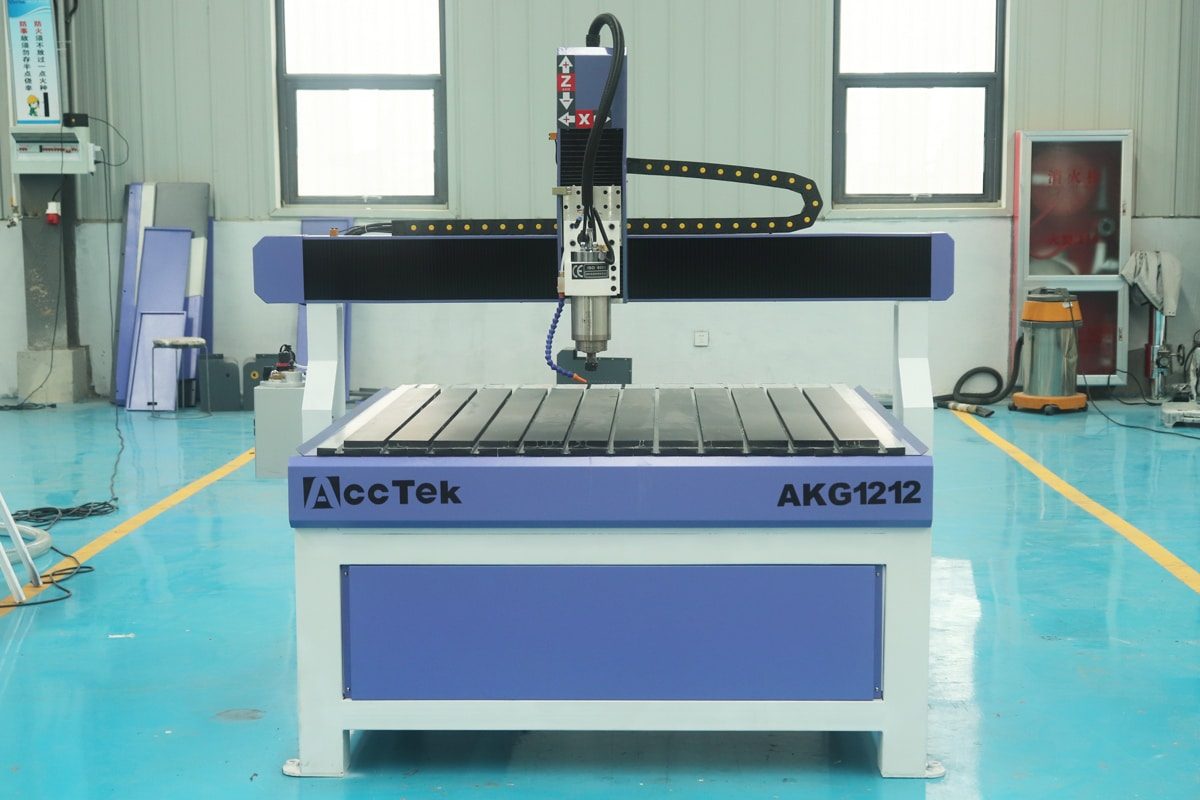
Key components and features of a CNC router that directly impact quality, efficiency, and versatility in sign making:

  • Spindle: It is the cutting head of the CNC router and determines how fast and powerfully the tool can cut through different materials. For sign making, a high-speed spindle is ideal for clean cuts on materials like acrylic, wood, and aluminum composites.
  • Worktable: The size of the machine’s bed determines the maximum dimensions of the signs you can produce. Common features include vacuum tables for secure material hold-down, or T-slot tables for clamping.
  • Controller: The controller interprets the G-code and directs machine movement. A user-friendly interface helps streamline setup, operation, and job execution.
  • Drive System: Stepper motors are cost-effective and accurate enough for most signage work. Servo motors, while more expensive, offer higher precision and smoother motion, ideal for large-scale or intricate signage.
  • Dust Collection System: Routing materials like MDF, PVC, or acrylic generate fine dust and chips. An integrated dust collection system keeps the work area clean and protects both the machine and operator, while maintaining visibility of the workpiece.

Advantages Over Traditional Sign-Making Methods

CNC routers are an increasingly popular choice for advertising professionals seeking precision, efficiency, and creative flexibility. Here are the key benefits:

  • Precision and Consistency: CNC routers follow exact digital instructions, producing highly accurate cuts, engravings, and shapes. Once a design is programmed, the machine can repeat it perfectly across multiple pieces, ensuring brand consistency in large sign orders.
  • Efficiency and Flexibility: CNC routers significantly reduce the time needed to create signs compared to manual cutting, routing, or engraving. Complex shapes, intricate lettering, layered textures, and 3D effects are easily achievable with CNC routing.
  • Compatibility with a Wide Range of Materials: CNC routers can handle diverse materials such as wood, PVC, acrylic, aluminum composite panels, and foam board. This versatility allows sign makers to meet varied customer needs without investing in multiple specialized tools.
  • Lower Risk of Human Error: Manual sign-making often depends on the skill and steadiness of the operator. CNC machines reduce mistakes by automating the process, minimizing waste, and rework.

With precise digital control, compatibility with a wide range of materials, and clear advantages over manual techniques, CNC routers are not just tools—they are powerful assets in modern advertising. Understanding their components, features, and benefits lays the foundation for producing standout signs that leave a lasting impression.

Types of Signs You Can Create with CNC Routers

CNC routers open up a wide range of creative possibilities for sign makers, enabling the production of high-quality, custom signage that captures attention and reinforces brand identity. With their precision and versatility, CNC routers can handle everything from simple directional signs to intricate 3D displays. Here are some of the most common types of signs you can create with a CNC router:

  • Dimensional Lettering and Logos: These signs feature raised or recessed letters, logos, and shapes that add depth and a professional, high-end appearance. CNC routers can cut precise profiles from materials such as acrylic, PVC, wood, or HDU foam, making them ideal for storefront signage, corporate offices, and building exteriors. The layered look enhances visibility and gives brands a stronger, more premium presence.
  • Engraved and Etched Signs: These are created by carving text or graphics directly into the surface of a material. CNC routers excel at this process, delivering clean, detailed engravings on materials like wood, plastic, and metal composites. These signs are commonly used for interior nameplates, room identifiers, control panels, and informational signage in professional environments. Engraving adds a level of durability and sophistication that printed signs often lack.
  • Backlit and LED-Ready Signs: CNC routers can be used to produce signs designed for internal lighting, such as backlit or LED-embedded signs. By cutting precise cavities and channels, routers allow seamless integration of LED strips or bulbs behind letters and logos. These signs are ideal for retail stores, entertainment venues, and hospitality businesses looking to enhance nighttime visibility and add visual impact.
  • Wayfinding and Directional Signs: Wayfinding signs help guide people through buildings, campuses, malls, or event spaces. CNC routers ensure that each directional sign is consistent in style and legibility, which is beneficial for user experience and brand cohesion. These signs are often made from durable, weather-resistant materials like aluminum composite panels or acrylic and are designed to withstand high traffic and frequent use while maintaining a polished look.
  • Decorative and Custom Artistic Signs: CNC routers are perfect for creating artistic and decorative signage with unique shapes, layered textures, or intricate carvings. These signs are often used in boutique shops, restaurants, art galleries, and themed environments where a handcrafted, creative touch is desired. Whether cutting ornamental borders, vintage-style typography, or stylized graphics, CNC routers enable advertising professionals to bring imaginative concepts to life with precision and repeatability.
  • Trade Show and Promotional Displays: In the world of temporary installations and brand promotions, CNC routers are indispensable for crafting eye-catching trade show signs and display elements. Lightweight and portable materials like foam board, PVC, or MDF can be shaped into custom backdrops, cutout logos, product stands, and promotional props. The ability to produce intricate designs quickly and at scale makes CNC routers ideal for short-run, high-impact marketing displays.

With the ability to produce a wide variety of signage styles, CNC routers empower advertising professionals to meet diverse client needs, offer creative solutions, and deliver consistent, high-quality results across different industries.

Preparing and Setting Up the CNC Router

Careful preparation and setup of the CNC router not only ensure clean, accurate cuts but also reduce the risk of errors, material waste, and equipment damage. For advertising professionals who rely on consistency and visual impact, taking the time to correctly prepare the material, install the right tools, and verify machine settings is a critical part of the production process.

Preparing for CNC Sign Production

Before starting any CNC sign-making job, proper preparation is necessary to ensure quality results, efficient workflow, and machine safety. Here are the key steps to effectively prepare for CNC sign production:

  • Choose the Right Material: Common materials include wood, acrylic, PVC, foam board, and aluminum composite panels. Consider the environment where the sign will be displayed to choose a material that balances appearance, durability, and cost.
  • Ensure Material Flatness and Cleanliness: Before loading the material onto the machine, make sure the surface is clean, flat, and free of warping.
  • Secure the Material Properly: Depending on the machine’s bed type, you can use vacuum tables, clamps, or T-slot fixtures to hold the material firmly in place. For smaller pieces or irregular shapes, using tabs may be necessary to prevent movement during cutting.
  • Inspect the Machine and Tools: Before starting a job, inspect the CNC router for any loose components, wear, or dust buildup. Make sure the cutting tools are sharp, undamaged, and appropriate for the chosen material and cut type.

Setting Up the Sign CNC Router

Following a structured setup process, advertising professionals can maximize the performance and reliability of their CNC routers. Here are the key steps to effectively set up a CNC router for sign production:

  • Power On and Initialize the Machine: Begin by powering on the CNC router and initializing the system. This tells the machine its starting point and ensures accurate positioning throughout the job.
  • Install and Secure the Cutting Tool: Select the appropriate router bit based on the material and type of cut. Insert the bit into the collet and tighten it securely. Make sure the tool is clean and undamaged to avoid poor cuts or tool breakage during operation.
  • Set the Workpiece Zero: Manually move the router to the designated origin point on your material, usually the bottom-left corner or the center, depending on your design. Use the controller to zero the X, Y, and Z axes.
  • Checking Machine Calibration: Confirm that the CNC router’s X, Y, and Z axes are moving the correct distances. Use a precision ruler or calibration block to verify that each axis moves exactly as commanded.
  • Testing Security Features: Press the emergency stop (E-stop) button to ensure it halts all machine motion immediately. Test the machine’s limit switches to make sure they trigger properly and stop the machine when it reaches the edge of travel.

Effective CNC sign production begins with a solid foundation—proper setup. From choosing and securing the right material to calibrating machine axes and testing security features, every detail contributes to the quality and efficiency of the final product. A well-prepared machine not only produces cleaner, more professional signs but also reduces downtime and enhances overall shop safety.

Designing Signs and Running for CNC Production

Turning a creative concept into a finished sign demands a well-structured process that connects design with machine execution. For advertising professionals, understanding how to prepare digital designs for CNC routing and operate the machine correctly is beneficial to achieving precision, efficiency, and visual impact.

Software Workflow for Sign Makin

The software workflow is a critical part of CNC sign production, bridging the gap between creative design and precise machine execution. Proper preparation and processing of design files can accurately transform visual concepts into reality.

  • Design Creation: The first step is to create the sign design using CAD software. Programs like Adobe Illustrator, CorelDRAW, or dedicated CNC design tools like VCarve and Aspire are commonly used. These tools allow you to create vector graphics, text, logos, and custom shapes that form the basis of the sign.
  • Importing and Preparing the File: Once the design is complete, it is either imported into CAM software or designed directly within it. Formats such as DXF, SVG, or AI are often used. At this stage, you will assign material dimensions, thickness, and orientation, and check for any overlapping paths or broken vectors that could disrupt toolpath generation.
  • Toolpath Generation: Using CAM software, you’ll generate toolpaths. Different operations can be set depending on the sign’s requirements, such as profile cutting, pocketing, V-carving, or 3D engraving. You’ll also select the appropriate router bit for each toolpath, define cut depths, and assign feed rates and spindle speeds according to the material being used.
  • Toolpath Simulation and Error Checking: Before exporting the toolpaths, run a simulation within the software to visualize how the machine will move. This step helps catch issues like incorrect tool selection, overlapping cuts, or toolpaths that extend beyond the material area.

CNCルーターの実行

Once your CNC router is set up and the design file is ready, the next step is executing the job—running the machine. This phase transforms your digital design into a physical sign, so it’s crucial to proceed with care, focus, and attention to safety.

  • Load the G-code into the Controller: Start by uploading the G-code file generated from your CAM software to the machine’s control system. Ensure the correct file is selected and verify job settings like origin point, tool number, and material thickness.
  • Perform a Dry Run or Air Cut: A dry run is a test pass where the machine runs the toolpaths above the material without actually cutting. This helps confirm that the tool will move correctly across the workspace, avoid collisions, and verify that the material fits within the machine’s cutting area.
  • Start the Cut Job: Once everything checks out, start the actual job. Monitor the initial movements closely to ensure the bit enters the material at the right location and depth.
  • Monitor the Cutting Process: Throughout the job, stay alert and watch for unusual machine behavior, tool chatter, burning, or material movement. If you detect an issue, use the pause or emergency stop function to avoid damaging the material or machine.
  • Be Ready for Mid-Job Adjustments: On some machines, feed rates and spindle speeds can be adjusted in real time. If you notice the cut is too aggressive or not deep enough, small tweaks can improve the result without stopping the job. Be cautious and make gradual adjustments based on material response.
  • Complete the Job and Shut Down Safely: Once the cutting is finished, allow the spindle to stop completely before removing the material or touching the CNC router. Turn off the dust collector, clear any chips, and inspect the sign while it’s still secured to the table.

Bridging the gap between design and production is where the true power of CNC routing shines. A consistent approach to digital preparation, toolpath planning, and machine execution leads to faster turnaround times, fewer mistakes, and higher-quality results. With these skills in place, your CNC production process becomes a reliable and flexible tool for delivering standout signage that meets both aesthetic and commercial goals.

Enhancing Sign Quality and Visual Impact

For advertising professionals, the final steps of the CNC sign-making process are where craftsmanship and creativity come together. Enhancing visual impact requires thoughtful finishing, attention to detail, and techniques that elevate a simple sign into a compelling display. Here are key ways to improve the quality and appearance of CNC-routed signage:

  • Smoothing and Surface Preparation: After cutting, inspect the sign for burrs, tool marks, or rough edges. Sanding the surface ensures a clean, professional look. For signs made from wood or HDU foam, smoothing helps the paint or coating adhere better. Use finer grit sandpaper for delicate features and rotary tools for tight corners.
  • Painting and Finishing Techniques: A well-applied finish adds color, contrast, and protection to a sign. Use high-quality primers and paints that suit the sign’s material and intended use. Masking techniques can help achieve sharp color separations, and airbrushing or hand-painting details can add depth and character. For a premium look, consider metallic, matte, or gloss finishes.
  • Integrating Lighting Effects: Backlighting or edge lighting with LEDs can dramatically enhance a sign’s visibility and modern appeal. CNC routers can carve channels or pockets into the sign material to house LED strips or modules. Translucent materials like acrylic are ideal for illuminated signs, especially in retail, hospitality, and entertainment settings.
  • Applying Protective Coatings: To preserve the sign’s appearance over time, apply a protective finish such as clear lacquer, polyurethane, or UV-resistant topcoats. These coatings guard against fading, moisture, scratches, and environmental wear, especially beneficial for outdoor signage or high-traffic areas.
  • Clean Assembly and Mounting: Precise, well-aligned assembly enhances both appearance and durability. Use hidden fasteners or clean adhesives for a seamless look. For wall-mounted or freestanding signs, ensure brackets, frames, or posts are professionally installed and complement the sign’s style.
  • Final Inspection and Touch-Ups: Before installation or delivery, conduct a thorough inspection. Check for any missed spots, uneven edges, or imperfections. Make any necessary touch-ups with fine brushes or spot sanding. A quality control checklist can help ensure consistency and professionalism.

A well-crafted sign reflects more than technical skill—it showcases creativity, attention to detail, and a commitment to quality. By paying close attention to these finishing techniques, advertising professionals can significantly improve the quality and visual impact of their CNC-routed signs. A clean, well-finished sign not only grabs attention but also reflects positively on the brand it represents, making it an invaluable asset in any advertising strategy.

信頼性の高い運用のためのメンテナンスのヒント

To ensure your CNC router delivers consistent, high-quality results and operates smoothly over the long term, regular maintenance is required. For advertising professionals relying on CNC machines for sign production, proper upkeep minimizes downtime, extends equipment life, and preserves accuracy. Below are key maintenance tips to help keep your CNC router in top working condition:

  • Cleaning the Machine: At the end of each workday, clean the work surface, gantry, and moving parts to remove dust, chips, and debris. Pay special attention to rails, leadscrews, and spindle housings. Accumulated material can cause premature wear and misalignment. Use a soft brush, vacuum, or compressed air to clear out sensitive areas.
  • Lubricate Moving Parts: Proper lubrication of linear guides, bearings, ball screws, and rack systems ensures smooth motion and reduces mechanical wear. Refer to your machine’s manual for recommended lubrication points and intervals. Use only the manufacturer-specified lubricant to avoid damaging seals or surfaces.
  • Tighten Fasteners: Vibration from regular use can loosen bolts, screws, and clamps. Periodically inspect and tighten fasteners across the machine, especially around the spindle mount, gantry supports, and bed frame. This helps maintain structural rigidity and cutting precision.
  • Inspect Belts, Chains, and Cables: Belts and chains should be checked for tension and signs of wear, such as fraying or cracking. Loose belts can affect motion accuracy, while worn cables may cause intermittent electrical faults. Replace any damaged components promptly to avoid production delays.
  • Monitor Spindle and Cooling System: The spindle is a critical part of your CNC router. Listen for unusual noises, check for excessive heat, and ensure the cooling system (air or water) is functioning correctly. Clean filters, coolant lines, or air passages regularly to prevent overheating and premature spindle failure.
  • Calibrate the Machine Periodically: Over time, even small alignment shifts can impact cut quality. Perform periodic calibration checks on axes, tool height sensors, and homing positions. Use test cuts or dial indicators to verify accuracy and adjust settings as needed.
  • Update Software and Firmware: Keep the machine’s software, drivers, and firmware up to date to benefit from performance improvements, bug fixes, and new features. Back up your configurations and settings before applying updates to avoid data loss.
  • Schedule Professional Servicing: In addition to in-house maintenance, schedule periodic professional checkups, especially for high-use machines. Certified technicians can perform deeper diagnostics, replace worn components, and ensure optimal performance.

Consistent and thorough maintenance is key to sustaining the performance and longevity of your CNC router. By following these practical tips, advertising professionals can avoid costly downtime and maintain the high standards their clients expect. A well-maintained machine not only reduces costly downtime but also ensures that every sign you produce meets the quality standards your clients expect.

まとめる

Incorporating CNC routers into the sign-making process offers advertising professionals a powerful combination of precision, efficiency, and creative flexibility. Mastering the entire CNC workflow, from material preparation and machine setup to design execution and finishing, allows users to produce high-quality, impactful signage that truly reflects their brand image. As advertising continues to evolve, embracing CNC technology equips professionals with the tools to innovate and meet growing demands, making CNC routers an indispensable asset in any modern sign-making business. Continue reading “Best Budget CNC Router for Making Outdoor Signs?” to help you choose an affordable machine.

アクセテック CNC is a trusted professional manufacturer specializing in a wide range of CNC router machines tailored to meet the needs of various industries, including sign making, woodworking, metal fabrication, and more. With a strong commitment to quality, innovation, and customer support, AccTek offers reliable, high-performance CNC routers that deliver precision, durability, and efficiency. Our diverse product lineup ensures that businesses of all sizes can find a machine that fits their specific production requirements and budget. For advertising professionals seeking to elevate their sign-making capabilities, AccTek CNC provides dependable equipment backed by comprehensive technical service and training, making it a smart choice for long-term success.

良いマシンを手に入れたいですか?
ボタンをクリックしてください。当社の CNC 専門家がご連絡し、解決策をお送りします。
AccTek CNC ソリューションで精度を解放しましょう!
CNC ルーティングの経験を次のレベルに引き上げる準備はできていますか? AccTek CNC は単なるメーカーではなく、精度と効率を再定義する最先端のソリューションへのゲートウェイです。以下にあなたの詳細を残してください。当社の専門チームが個別のソリューションと競争力のある見積もりを提供します。プロトタイピングでも量産でも、当社が対応します。
オーダーメイドのソリューションのために詳細を残してください
*AccTek CNC では、お客様のプライバシーを尊重します。ご提供いただいた情報は機密として厳重に保管され、パーソナライズされたソリューションと見積もりを提供するためにのみ使用されますので、ご安心ください。
アクテックのアイコン
プライバシーの概要

このウェブサイトはクッキーを使用しており、可能な限り最高のユーザーエクスペリエンスを提供しています。 クッキー情報はブラウザに保存され、ウェブサイトに戻ったときにあなたを認識し、最も興味深く有用なウェブサイトのセクションをチームが理解できるようにするなどの機能を果たします。